Benchmark: We Tested Parsio’s Prompt Parser on 5 Hard Documents
We ran five hard documents (a bad scan, a phone photo, a Japanese era date, an invoice with no subtotal and a 14-page manifest) through Parsio's Prompt parser: over 99 % accuracy, and import-ready dates and amounts once three rules were added to the prompt.

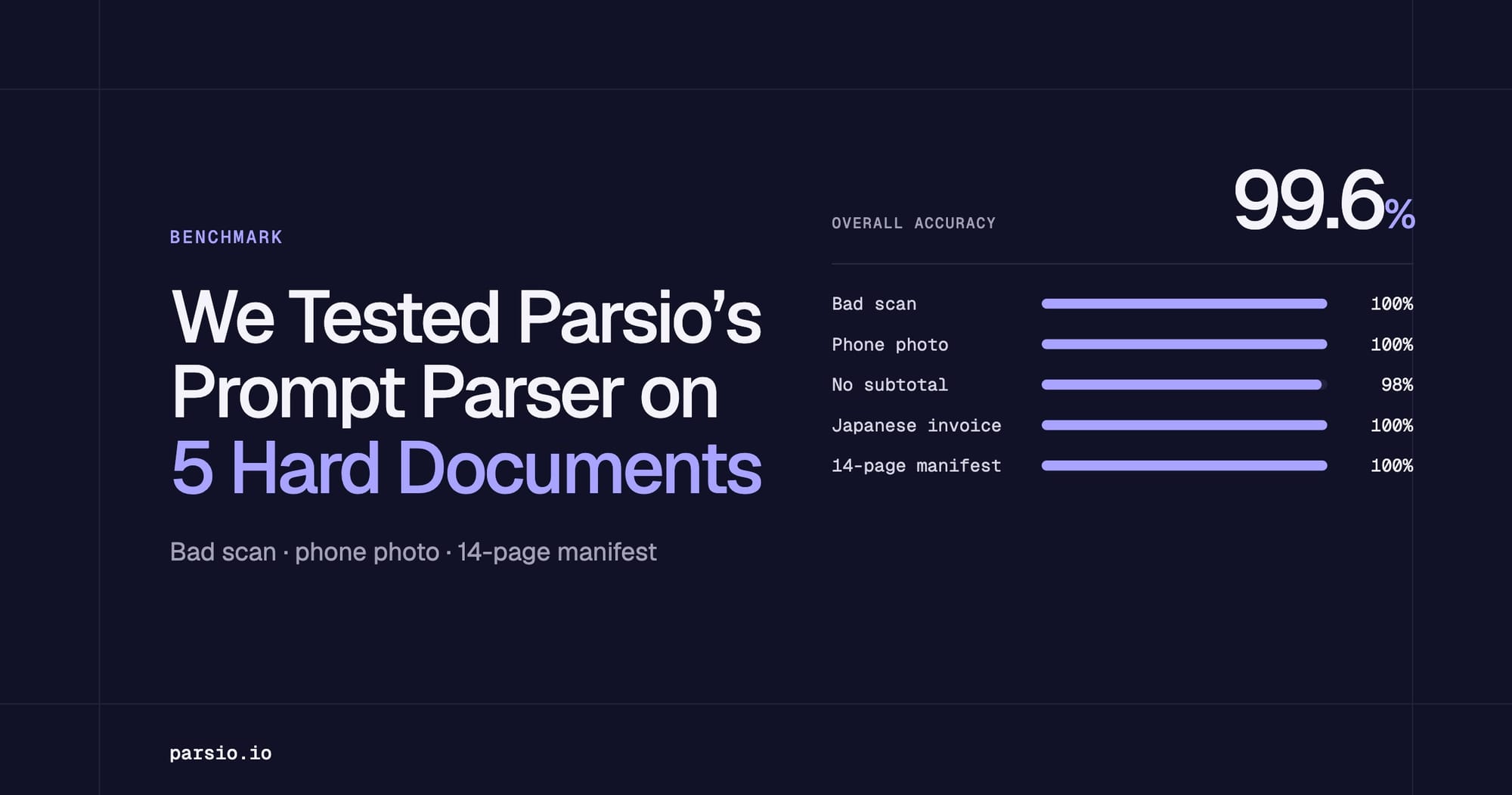
TL;DR: We ran five hard documents (a bad scan, a phone photo, a Japanese era date, an invoice with no subtotal and a 14-page manifest) through Parsio's Prompt parser. It read all five with over 99 % accuracy: 99.6 % with a plain field-list prompt and 99.4 % after we added three rules. With the plain prompt, dates and amounts came back as printed (58 % import-ready) and one subtotal was invented; the three rules took import-ready output to 100 % and invented values to 0. The only slip was one character on the noisiest scan, a good reason to re-test your hardest document after editing a prompt. Parsio and Airparser are made by the same company, so we publish the documents and the scoring rules so you can check the result yourself.
If you are deciding whether Parsio's Prompt parser can handle the documents your suppliers actually send, a clean PDF will not tell you much. We tested it on the opposite: five documents chosen because they are hard. The short answer is that it reads them very well, and that the difference between "text as printed" and "data you can import" comes down to a few lines in the prompt.
The Prompt parser works from a text prompt that describes the data you want. You can write the prompt yourself, or let Parsio generate it from a sample document you upload. For this test we wrote the prompt ourselves, as a plain list of fields with a one-line description each, so that every tool in our wider benchmark got exactly the same instructions. Then we added three general rules and ran the same documents again.
The full set of documents and the results for five parsers are on the open benchmark page. This article focuses on what the numbers mean for people who use Parsio.
Key takeaways
- It reads hard documents well. The bad scan, the phone photo, the Japanese era-calendar invoice and the 112-row manifest were read almost completely right: 99.6 % accuracy with the plain prompt and 99.4 % with the rules.
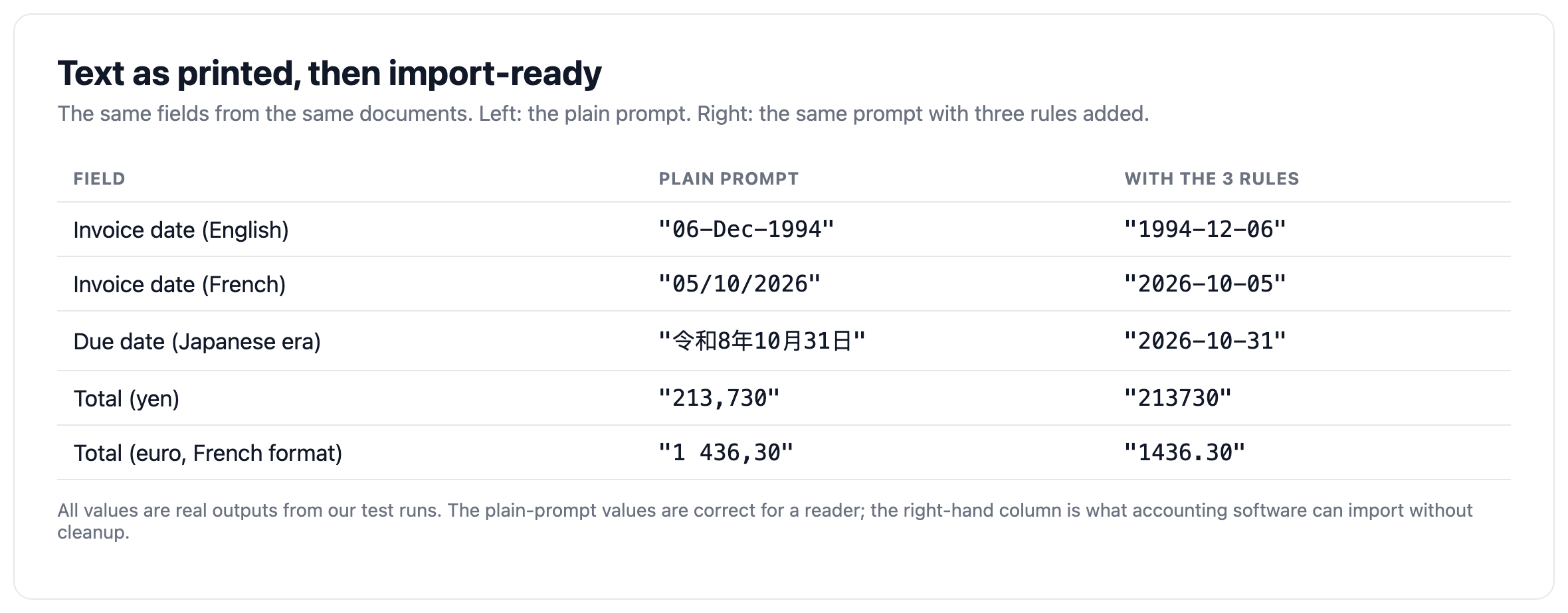
- Format is a prompt decision. With the plain field list, dates and amounts came back as printed ("05/10/2026", "令和8年10月31日", "1 436,30"), 58 % import-ready. With three rules in the prompt, 100 % of the correct dates and amounts came back as ISO dates and plain numbers.
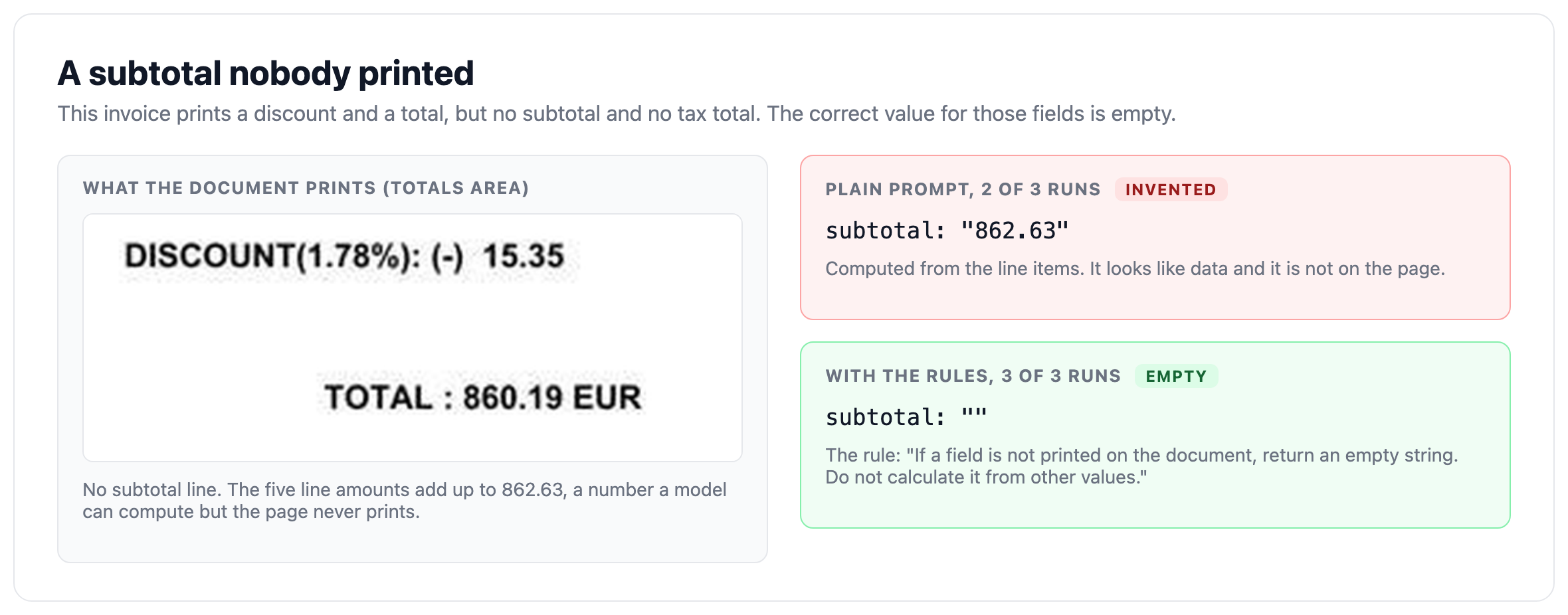
- "Leave it empty" has to be said. On an invoice that prints no subtotal, the plain prompt returned a subtotal computed from the line items in two of three runs. With the rule, it stayed empty in all three.
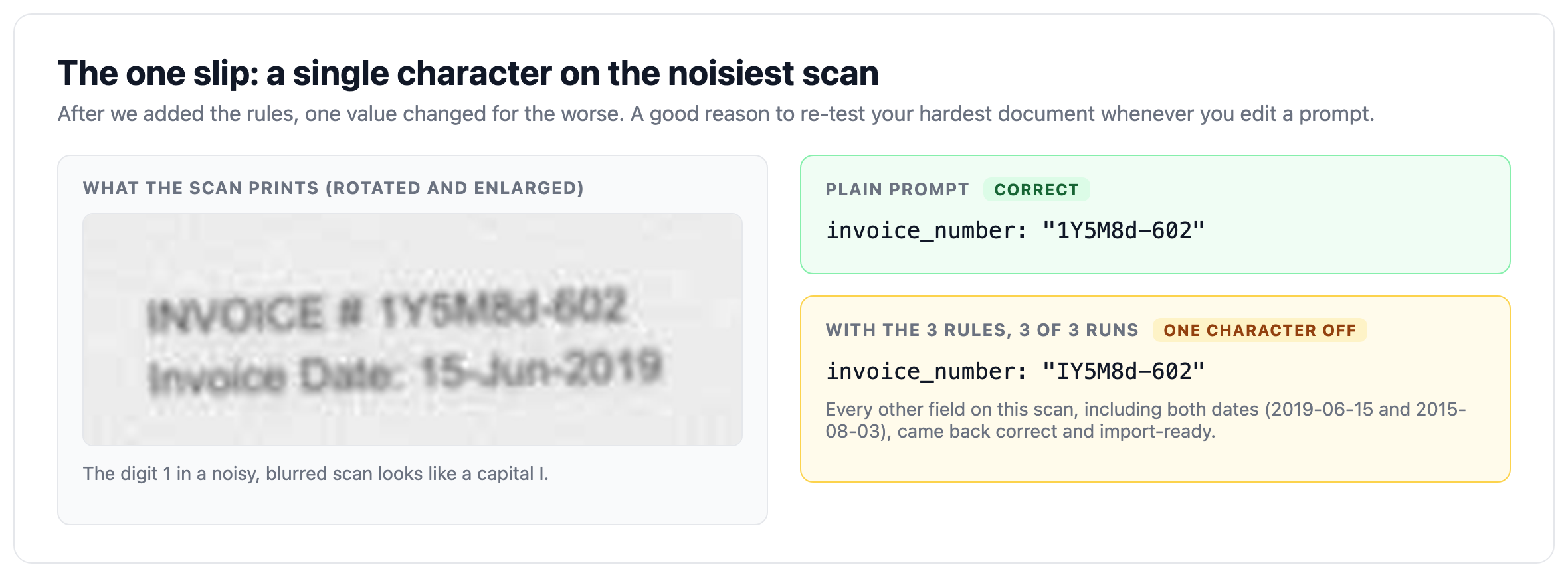
- Re-test after every prompt change. After the rules, one character on the noisiest scan changed ("1Y5M8d-602" became "IY5M8d-602" in every run). Everything else on that scan was correct.
The five documents and how we tested the Prompt parser
We picked five documents that stress different parts of extraction. They are a mix of an open dataset and documents we generated from invented data (no customer or competitor documents).
| Document | Format | What makes it hard |
|---|---|---|
| Bad scan | JPEG, English | Turned 90 degrees, tilted, grey, blurred and noisy |
| Phone photo | JPEG, French | Invoice photographed on a desk: angle, shadow, glare, day/month dates |
| Invoice with no subtotal or tax | JPEG, English | Fields that are not printed must stay empty |
| Japanese invoice | PDF, Japanese | Due date in the Reiwa era calendar, yen amounts |
| 14-page manifest | PDF, English | 112 container lines, a page-total row on every page that is not a container |
Each document was checked field by field against an answer key written before we looked at any output: 12 header fields and a line-items table for the invoices, and manifest fields plus 112 container rows for the manifest. We created a Parsio inbox with the Prompt parser, used our own field list as the prompt (with no formatting rules), uploaded each document three times and scored every answer. Then we added the three rules to the prompt and repeated the whole test.
Results: over 99 % accuracy on all five hard documents
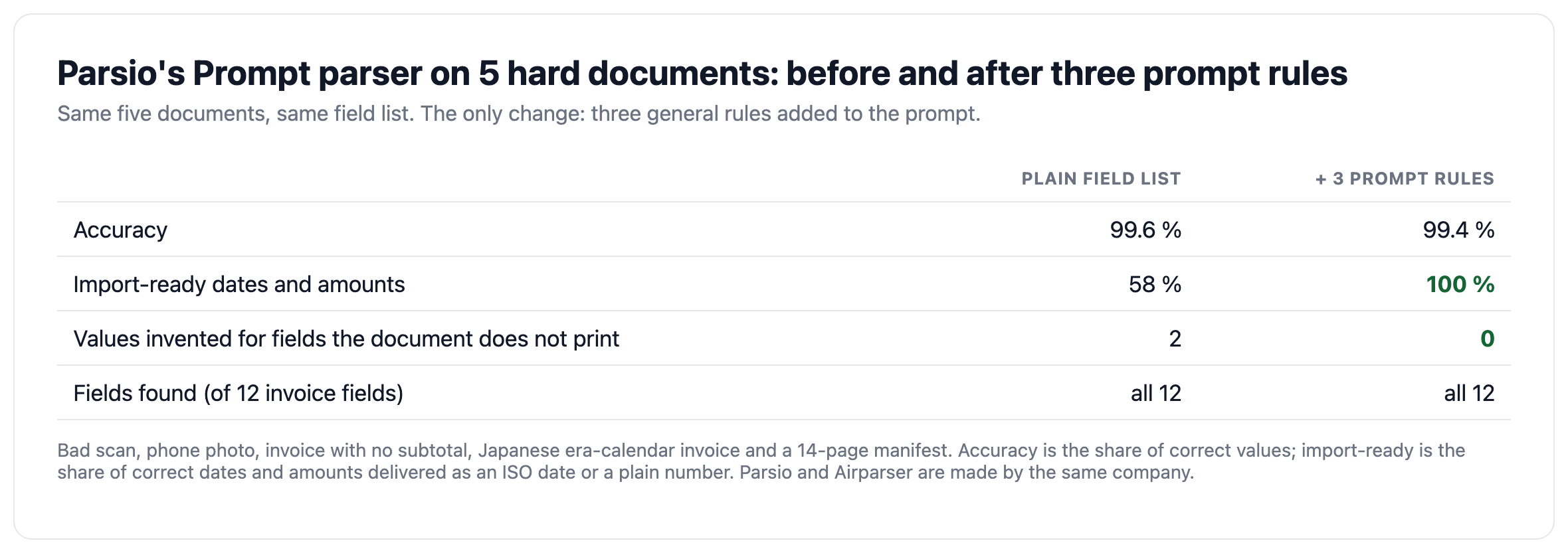
We measured three things. Accuracy is the share of correct values, judged by meaning (a French "05/10/2026" is 5 October). Import-ready is the share of correct dates and amounts delivered as an ISO date or a plain number that accounting software can import without cleanup. Invented values counts values returned for fields the document does not print.
| Document | Plain field list | With 3 prompt rules |
|---|---|---|
| Bad scan | 100 % | 97 % |
| Phone photo | 100 % | 100 % |
| Invoice with no subtotal or tax | 98 % | 100 % |
| Japanese invoice | 100 % | 100 % |
| 14-page manifest | 100 % | 100 % |
| Overall | 99.6 % | 99.4 % |
Differences of a point or two are noise in a test this small. In our runs the Prompt parser took around 25 seconds per document with the plain prompt and around 19 with the rules (wall-clock, including upload and queueing, so this is not a speed benchmark).
What the Prompt parser read correctly
A sideways, noisy scan
The scan is turned 90 degrees, tilted, grey and blurred. With the plain prompt, every value on it was correct, including both dates and all five line items. Parsio straightens images before extraction, which matters for scans and photos. For a step-by-step guide to scanned documents, see How to Convert Scanned Documents into Structured Data Using AI.
A phone photo with day/month dates
The French invoice prints its dates as 05/10/2026 and 04/11/2026, meaning 5 October and 4 November. Day/month confusion is the classic silent failure of invoice extraction, because a swapped date is still a valid date. The Prompt parser read both correctly in every run, and with the rules it returned them as 2026-10-05 and 2026-11-04.
A Japanese invoice with an era-calendar date
The due date is written as 令和8年10月31日, a Reiwa-era date. The plain prompt returned it exactly as printed; with the rule asking for ISO dates and Gregorian conversion, it returned 2026-10-31. The yen amounts, the company names and the line items were correct in both versions.
A 14-page manifest with 112 rows
The manifest has eight container lines per page and a page-total row on every page. The Prompt parser returned all 112 rows in order and did not count a page total as a container, in all six runs (three with each prompt). One note on scope: Parsio's own guidance is that very long documents, especially beyond about 10 pages, are not the ideal fit for prompt-based parsing. This manifest worked, but test your own long documents before you rely on the result. For freight documents, see How to Extract Data from Freight Invoices Automatically.
Where the plain prompt needed help: format and a made-up subtotal
The plain prompt did exactly what we asked: it listed the fields and nothing else. Two things follow from that.
Dates and amounts came back as printed
A date returned as "06-Dec-1994" or "令和8年10月31日", or an amount as "1 436,30" or "213,730", is correct to a reader. It is not what an accounting system wants, which is 1994-12-06, 2026-10-31, 1436.30 and 213730. A prompt only gives you what it asks for, so if you want clean data, say what clean means.
A subtotal nobody printed
One invoice prints a discount and a total but no subtotal and no tax total, so the correct answer for those fields is empty. With the plain prompt, the Prompt parser returned a subtotal of 862.63 in two of three runs: the sum of the line items, computed rather than read. A made-up subtotal is more dangerous than an empty one, because it looks like data.
Three prompt rules that fixed it
The three rules are general. We wrote them after seeing the plain-prompt results, in general terms, and we did not tune them for any single document or re-run them to optimise the score: this was the only run with rules. This is what we added after the field list:
Rules:
- Read each date using the convention of the document's language and country,
and return it as an ISO date (YYYY-MM-DD). Convert era calendars (for example
the Japanese one) to the Gregorian calendar.
- Return every amount, price and quantity as a plain number: no thousands
separator, '.' as the decimal separator, no currency symbol.
- If a field is not printed on the document, return an empty string.
Do not calculate it from other values.
With these rules, 100 % of the correct dates and amounts came back as ISO dates and plain numbers, up from 58 %, and no value was invented, down from two. You do not have to write a prompt like this from scratch: Parsio can generate the extraction prompt from a sample document you upload, and you can then add rules like these to it. In Parsio, create an inbox, choose the Prompt parser, upload a sample, review the generated prompt and add the rules you need.
The one slip: re-test your hardest document after editing a prompt
With the rules added, one value got worse. On the noisiest scan, the invoice number "1Y5M8d-602" came back as "IY5M8d-602" (a capital I instead of the digit 1) in all three runs. With the plain prompt it was read correctly. Every other field on that scan, including both dates, was correct and import-ready.
The lesson is practical: model-based parsers are flexible but less deterministic than rule-based ones, and any prompt change can shift results on your hardest documents. After you edit a prompt, run your worst scan and your most unusual layout again and compare the output with what you expect, rather than only the document you were fixing.
How Parsio's result compares in our benchmark
We ran the same five documents through four other document parsers. The setups were not identical, because the products work differently: Airparser and Parsio were given our field list, Parseur created its fields from the first invoice it saw, and Nanonets and Docparser used pre-built templates. Airparser and Parsio are made by the same company. The table is not a ranking; read the setup notes on the benchmark page before drawing conclusions.
| Product | Accuracy | Import-ready | Invented values | Fields found |
|---|---|---|---|---|
| Parsio Prompt parser, with 3 rules | 99.4 % | 100 % | 0 | all 12 |
| Parsio Prompt parser, plain field list | 99.6 % | 58 % | 2 | all 12 |
| Airparser (core-1.5 model) | 100.0 % | 100 % | 0 | all 12 |
| Parseur | 98.5 % | 100 % | 0 | 6 to 7 of 12 |
| Nanonets (pre-built Invoices extractor) | 91.9 % | 66 % | 0 | 7 to 9 of 12 |
| Docparser (free pre-built templates) | 20.0 % | 100 % (17 values) | 0 | 0 to 3 of 12 |
Accuracy counts the values a product returned, so a product that created fewer fields is not penalised for the ones it did not create. Nanonets' and Docparser's rows show what their free pre-built templates do out of the box, not what their other extractors or AI options can do. The full results, the five documents and the scoring rules are on the open benchmark page.
Which Parsio parser to use for which document
- AI-powered PDF parser. For document types that have a dedicated pre-trained model: invoices, receipts, bank statements, contracts, business cards, ID documents and others. We tested the Prompt parser on invoices because it works on any document type and lets you control the output format; we did not test the dedicated invoice model.
- Prompt parser. For everything without a dedicated model, such as manifests, packing lists, credit notes, customs documents, utility bills and purchase orders, and for email bodies. This is where our test applies most directly.
- OCR converter. For turning PDFs or images into text or Excel. It is a conversion tool, not a structured field extractor.
For a comparison of invoice parsing options, see Best Invoice Parsing Software in 2026.
What this test does and does not show
- Five documents is a small test. Differences of a point or two are noise.
- Most documents are synthetic. Real mail and real scans are messier.
- We tested the Prompt parser on invoices and a manifest; we did not test Parsio's dedicated AI-powered PDF parser.
- The test was run by the company that makes Parsio and Airparser. That is why the documents and the scoring rules are public.
- Not measured: handwriting, documents over 14 pages, confidence scores, human review, speed under load and price. Products change, and results are valid only for the versions we ran.
How to test the Prompt parser on your own documents
- Pick documents that hurt. One bad scan or phone photo, one date convention you actually receive, one document with a field that is often missing, and your longest table.
- Write down the expected values first. Mark the fields that must stay empty.
- Start from the generated prompt or a plain field list and see what comes back before you add rules.
- Add formatting rules for dates and amounts, and a rule for fields that are not printed.
- Compare four things: correct values, import-ready format, invented values and the table rows (count them and check the order).
- Re-test your hardest document after every prompt change, and run each document more than once.
FAQ
Is Parsio's Prompt parser accurate on scanned invoices and phone photos?
In our test it read a sideways, noisy scan and a French phone photo almost completely right: 99.6 % accuracy across five hard documents with a plain prompt and 99.4 % with three added rules. The one slip was a single character in an invoice number on the noisiest scan. Test your own worst documents before you rely on any parser.
Do I have to write the prompt myself?
No. Parsio can generate the extraction prompt from a sample document you upload, and you can edit it. We wrote our own prompt only so that every tool in our benchmark received identical instructions.
How do I get ISO dates and plain numbers from the Prompt parser?
Say so in the prompt. In our test, a rule asking for ISO dates in the document's own convention and for amounts as plain numbers raised the import-ready share from 58 % to 100 %. A plain field list returns values as printed.
How do I stop the Prompt parser from inventing values?
Add an explicit rule: return an empty value for any field the document does not print, and do not calculate it from other values. On an invoice with no subtotal, the plain prompt computed one in two of three runs; with the rule, it stayed empty in all three. Then test it on a document that really lacks the field.
Does the Prompt parser work for long documents?
It read our 14-page manifest with 112 rows completely and in order in every run, but Parsio's own guidance is that very long documents, especially beyond about 10 pages, are not the ideal fit for prompt-based parsing. Test your own long documents first.
Is Parsio the same company as Airparser?
Yes. Parsio and Airparser are separate products made by the same company. We included Airparser in the benchmark and say so openly, and we publish the documents and the scoring rules so you can verify the results.
Try it on your own hard documents
If you want to see how the Prompt parser handles your worst scans and photos, create an inbox in Parsio, choose the Prompt parser, upload a sample and review the generated prompt. Try Parsio for free and compare the output with the values you expect.