Parsio vs Klippa DocHorizon: Which Document Parser Is Right for You?
Parsio and Klippa DocHorizon both automate document parsing, but they target different users. Here is how they compare on setup, features, integrations, and pricing.

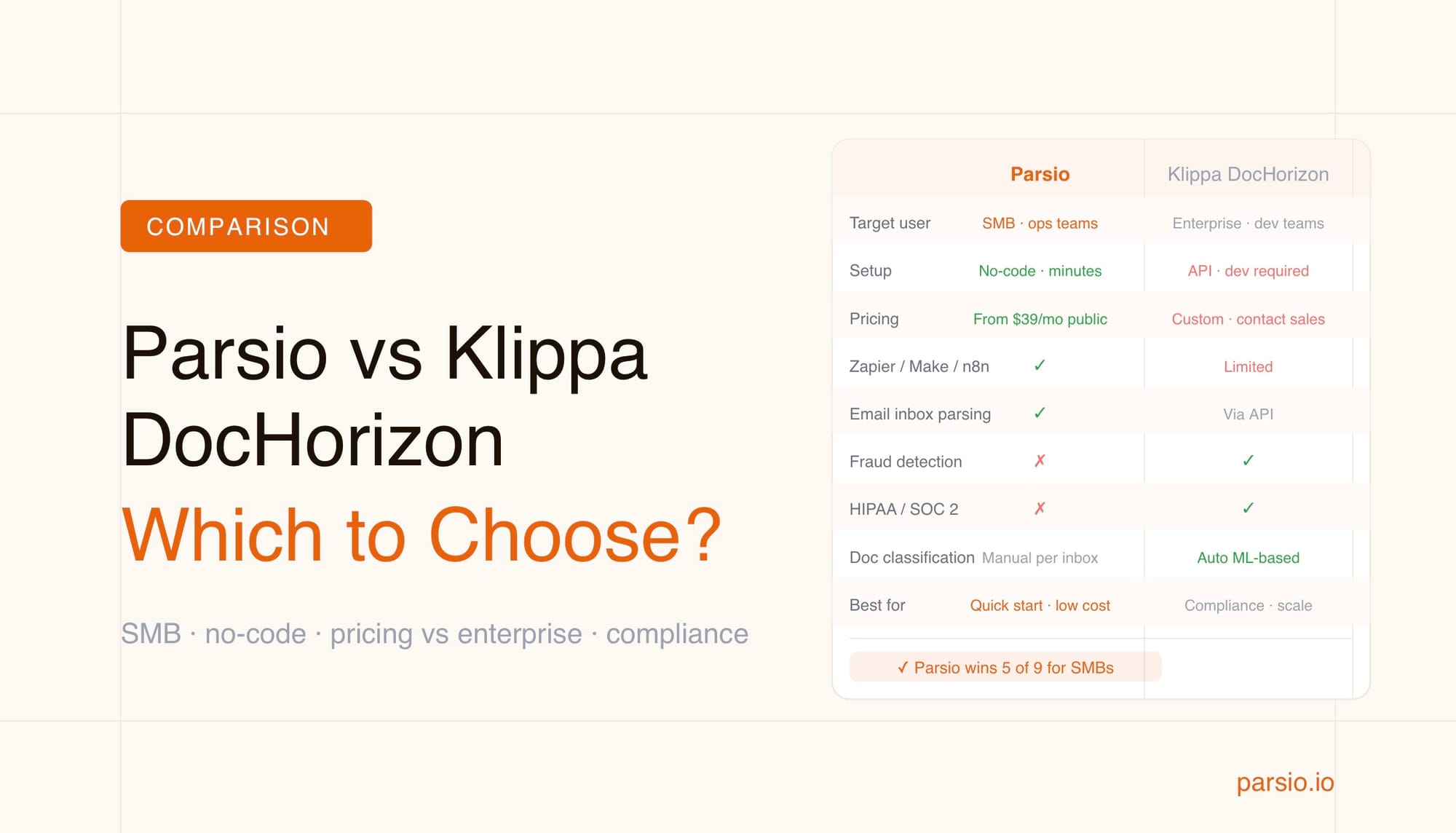
If your team is choosing between Parsio and Klippa DocHorizon, the short answer is this: Parsio fits small and mid-sized businesses that need fast no-code document parsing with transparent pricing, while Klippa DocHorizon is built for enterprises that require compliance certifications, fraud detection, and custom integration at scale. Both tools extract structured data from PDFs and documents — but they target different teams, budgets, and use cases.
This comparison covers parser types, supported documents, integrations, pricing, and compliance so you can make a confident choice based on your actual workflow.
TL;DR
- Parsio — best for SMBs and ops teams that need quick setup, no-code extraction from invoices, emails, and PDFs, with native integrations to Zapier, Make, and Google Sheets. Transparent pricing from $39/month.
- Klippa DocHorizon — best for enterprises needing GDPR/HIPAA/SOC 2 compliance, fraud detection, and high-volume document processing across 100+ document types. Custom pricing via sales.
- Both handle invoices, receipts, and identity documents — the difference is complexity, compliance, and cost.
- If setup friction and cost matter, Parsio wins. If regulatory compliance and fraud detection are non-negotiable, Klippa wins.
What Is Parsio?
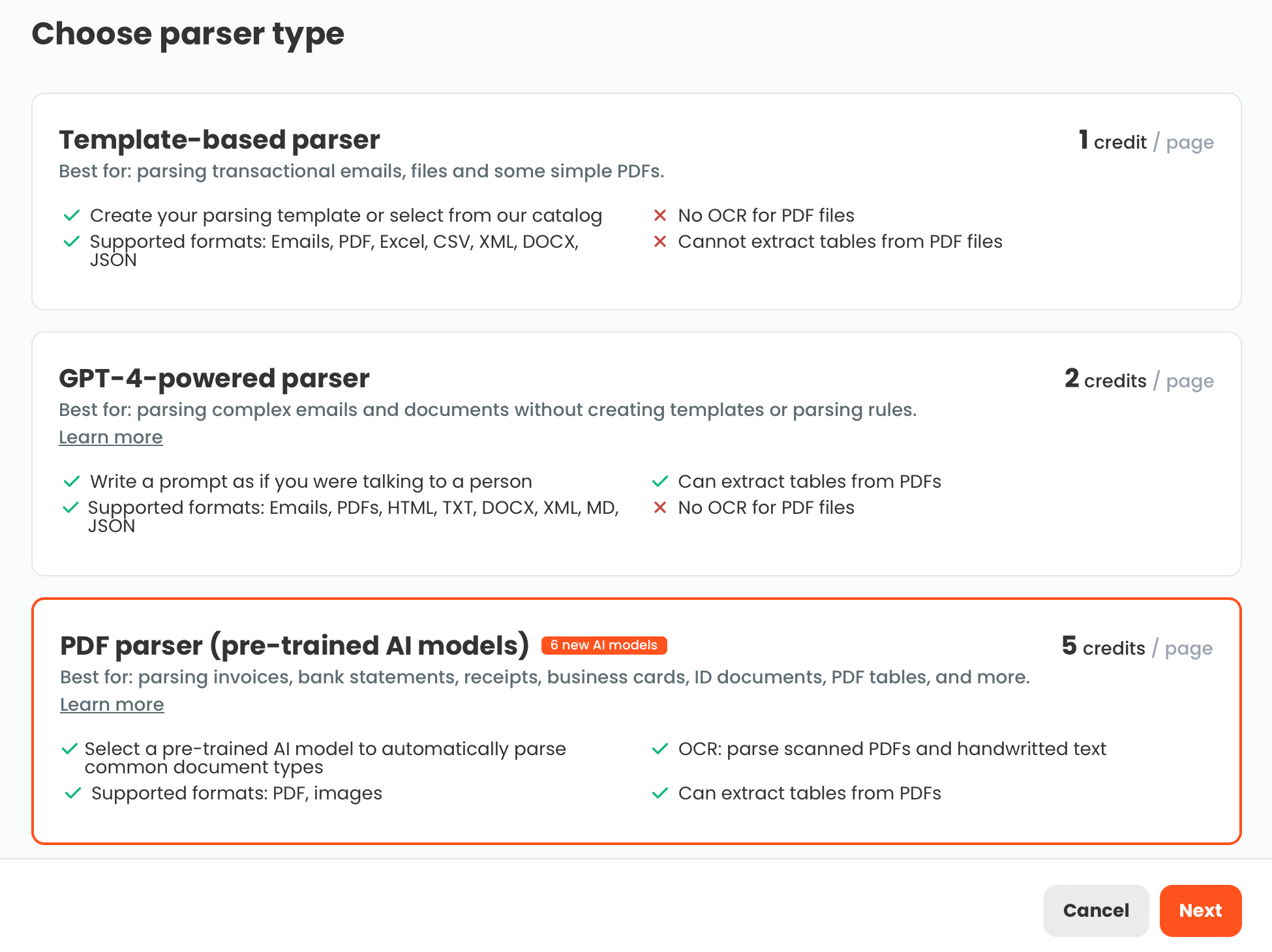
Parsio is a document parsing platform that automates data extraction from emails, PDFs, and images using four distinct parser types: a template-based parser, an AI-powered PDF parser, a GPT-powered parser, and an OCR converter. The platform is designed for operations teams, finance departments, and SMBs that want to eliminate manual data entry without writing code.
Parsio's core workflow is straightforward: create an inbox, send or upload documents, choose the right parser, and export structured data to Google Sheets, webhooks, Zapier, Make, n8n, or CSV. The platform works especially well for standard business documents — invoices, receipts, bank statements, and transactional emails — where its pre-trained AI models require no configuration to start extracting fields.
The four-parser approach is a key differentiator. Rather than forcing every document through a single model, Parsio lets you select the right extraction engine for each document type. Stable machine-generated emails get the template parser. Invoices and receipts get the AI PDF parser. Unusual or variable layouts get the GPT parser. Documents that just need text conversion get OCR. This means you can handle a mixed document stack without compromise.
What Is Klippa DocHorizon?
Klippa DocHorizon (now also marketed as Doxis AI.dp) is an enterprise-grade Intelligent Document Processing (IDP) platform built by the Dutch company Klippa. It combines OCR, machine learning classification, data extraction, fraud detection, and document verification into a single API-driven platform.
Klippa targets regulated industries, large enterprises, and organizations with strict compliance requirements. The platform supports more than 100 document types in more than 150 languages and holds certifications including ISO 27001, GDPR, SOC 2, and HIPAA. It is positioned primarily as an API service and enterprise integration layer rather than a self-serve extraction tool.
Where Parsio is built around a visual no-code interface, Klippa DocHorizon leans toward developers and IT teams who need to embed document processing into internal systems. The platform offers advanced capabilities including duplicate invoice detection, document anonymization, and third-party source validation — features that matter in finance, insurance, and identity verification workflows at volume.
Parser Types and Document Support
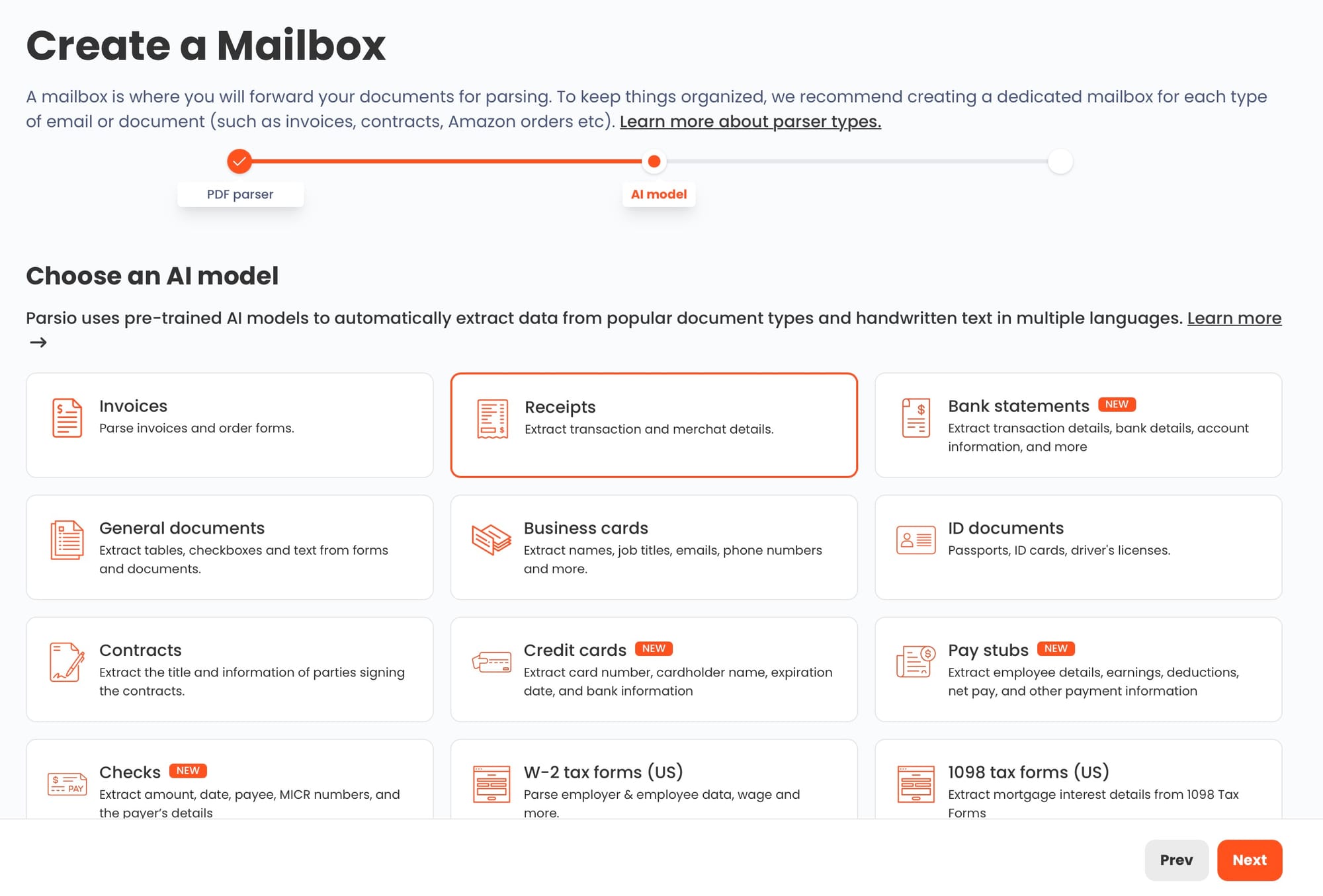
Parsio uses four parser types that you choose per inbox or document type. The template-based parser works best for machine-generated emails with stable layouts such as order confirmations and shipping notifications. The AI-powered PDF parser handles common business documents — invoices, receipts, bank statements, business cards, and ID documents — without any configuration. The GPT-powered parser handles messy or variable documents where templates are too brittle. The OCR converter turns scanned files into editable text but does not extract fields into a schema.
Klippa DocHorizon processes over 100 document types using pre-trained machine learning models combined with zonal OCR. It classifies documents automatically before extracting data, which makes it useful when documents arrive as a mixed batch. Klippa also applies fraud detection during extraction — flagging duplicate invoices, identifying tampered documents, and validating data against external sources.
For the most common business documents (invoices, receipts, bank statements), both tools perform extraction without manual template work. Parsio's AI PDF parser is purpose-built for these document types and handles scanned files and handwriting. Klippa adds fraud detection and classification on top, which matters at enterprise scale but adds complexity that SMBs rarely need. See our comparison of PDF parsing methods for more on how different extraction approaches work.
Setup and Ease of Use
Parsio is designed to be operational in minutes. Creating an inbox, uploading a document, and getting structured output does not require any developer involvement for supported document types. The visual interface makes it accessible for operations managers and finance teams who do not have engineering support. For documents with stable layouts, the template builder lets non-technical users define extraction rules by clicking on fields inside an email preview.
Klippa DocHorizon is primarily an API product. Integrating it typically requires a developer to set up API calls, configure document workflows, and connect outputs to internal systems. The platform does offer a web interface for testing and configuration, but production deployments usually involve custom development work. Klippa provides a €25 free credit to test the API before committing.
The setup difference is significant for teams without in-house developers. Parsio's self-serve model means a finance manager can configure invoice extraction in an afternoon. Klippa DocHorizon requires an integration project, which is reasonable for an enterprise IT team but is overkill for a small business processing a few hundred documents per month.
Integrations and Export Options
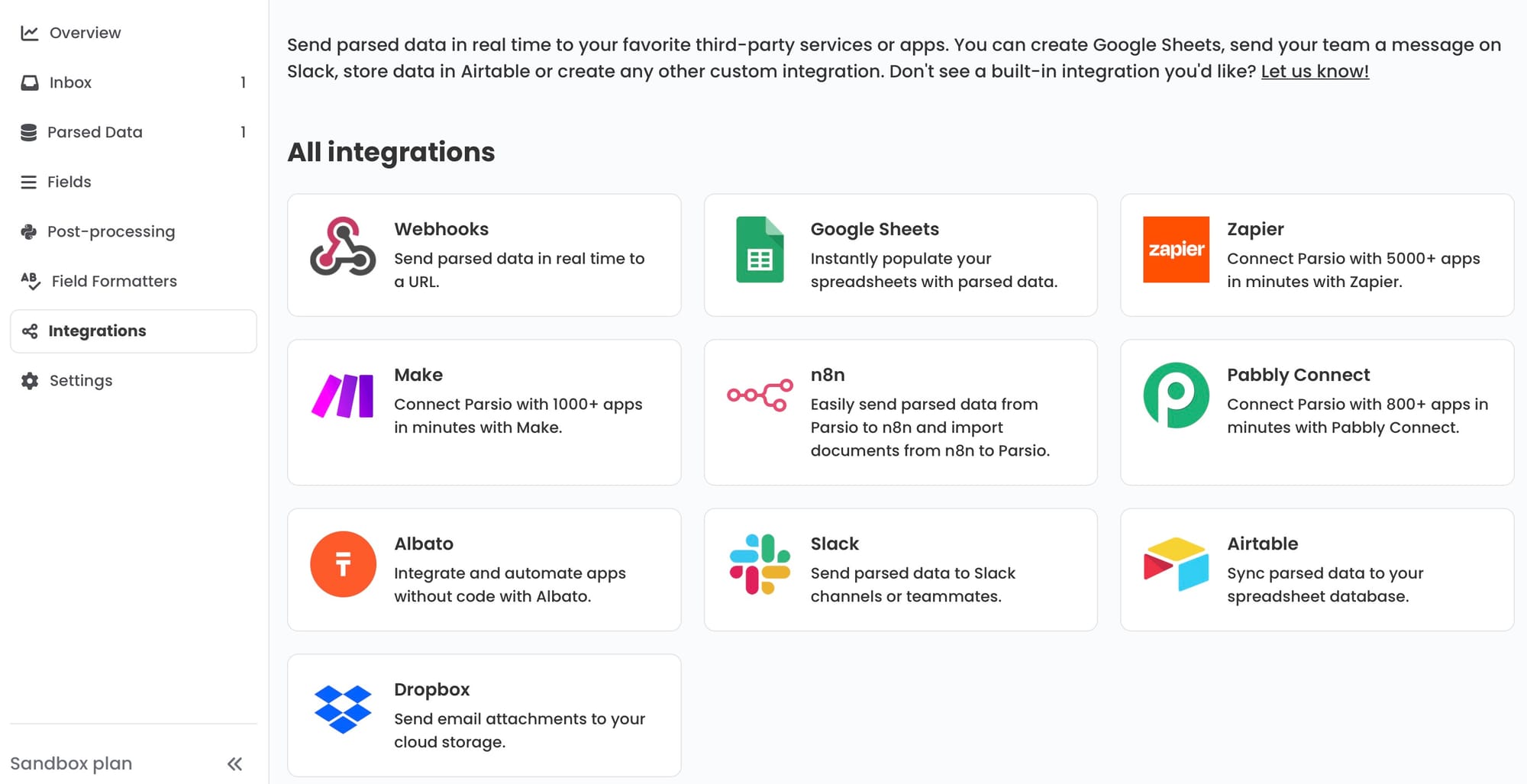
Parsio has native integrations built into the product for the tools most SMBs already use. You can export parsed data directly to Google Sheets, send it via webhooks, push it through Zapier, Make, or n8n, or download it as CSV, Excel, or JSON. The integrations page inside Parsio shows all available destinations and lets you connect them without writing code.
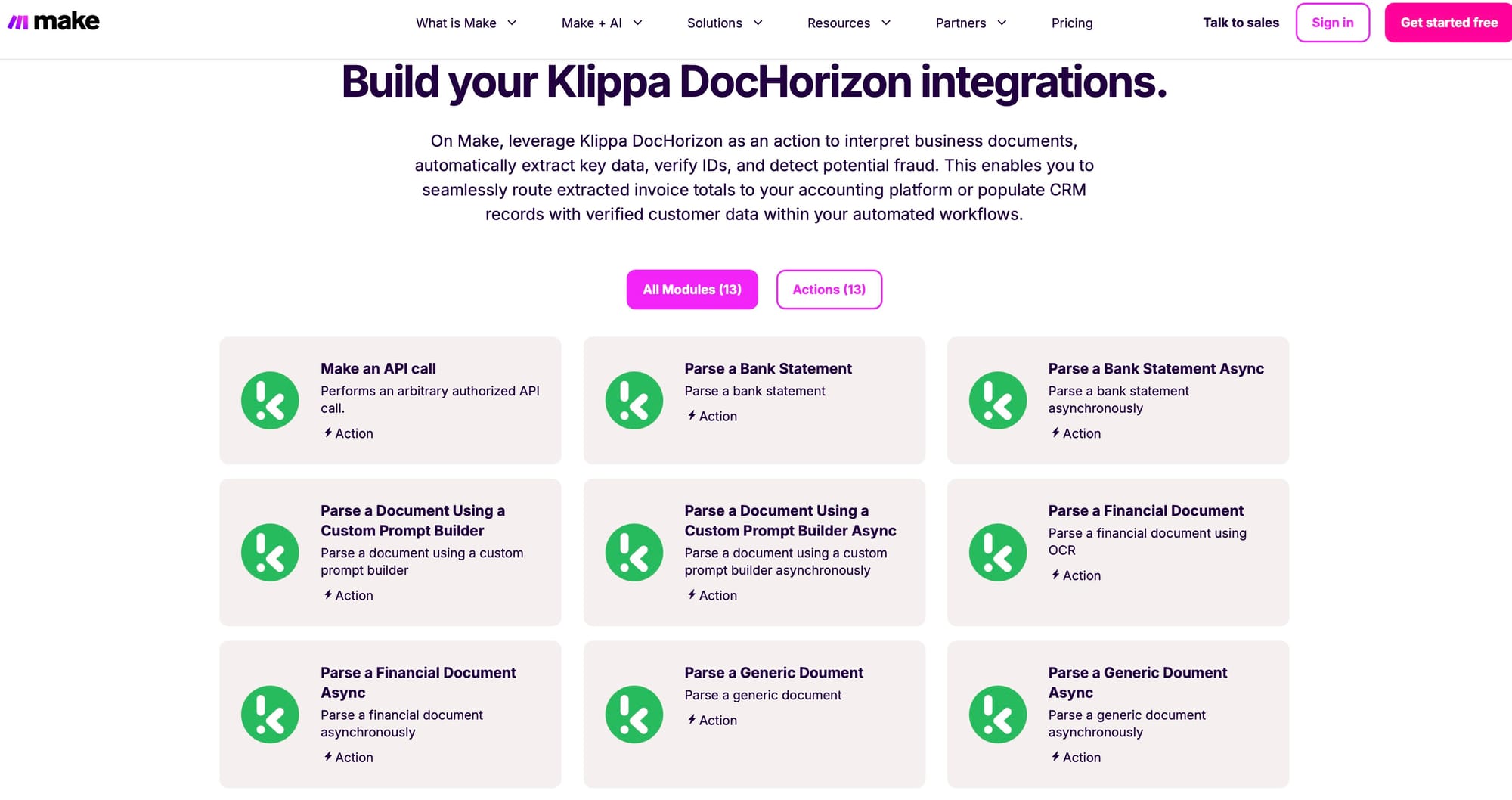
Klippa DocHorizon integrates with over 75 business applications including Google Drive, OneDrive, Xero, and Salesforce. Because it is API-first, the integration model is more flexible in theory — but it requires more setup. Klippa does not offer the same out-of-the-box connectivity to no-code automation platforms that Parsio provides through its native Zapier and Make apps.
For teams already using Zapier or Make to orchestrate workflows, Parsio's native app support is a meaningful time saving. For enterprises running custom ERP or workflow software, Klippa's API model gives full control. See the guide to automating document parsing with Zapier, Make, and n8n for workflow templates using Parsio.
Compliance and Security
Klippa DocHorizon holds ISO 27001, GDPR, SOC 2, and HIPAA certifications. It offers data residency options for European organizations, document anonymization to mask sensitive fields before processing, and fraud detection that flags duplicate or manipulated documents. These features make Klippa a strong fit for regulated industries — finance, insurance, healthcare, and legal — where compliance is a procurement requirement, not just a preference.
Parsio is designed for SMB workflows and does not publish equivalent enterprise compliance certifications. For teams where HIPAA or SOC 2 certification is a hard requirement from their security or legal team, Klippa DocHorizon is the more defensible choice.
For most small and mid-sized businesses processing invoices, receipts, and transactional emails, compliance certifications are not a blocking requirement. The relevant question is whether data is handled securely and whether the product is reliable — and Parsio meets the practical needs of most SMB operations teams without the overhead of enterprise compliance audits.
Pricing
Parsio offers public pricing plans starting at $39 per month, with costs scaling based on the number of documents processed. The transparent pricing makes it easy to estimate monthly costs and compare against the time saved on manual data entry. There are no required sales conversations to get started.
Klippa DocHorizon does not publish standard pricing tiers. The model is pay-as-you-go based on document volume, with high-volume discounts and custom rates negotiated directly with Klippa's sales team. The platform offers €25 in free credit for testing via API. For enterprise deployments this pricing model is standard, but for a small business it creates uncertainty and requires a sales process before you can evaluate total cost.
For growing teams with a predictable monthly document volume, Parsio's transparent pricing is easier to budget. Klippa's model suits organizations with dedicated procurement teams who can negotiate volume contracts and expect per-document costs to drop significantly at scale.
Who Should Choose Parsio
Parsio is the right choice for:
- SMBs and operations teams that process invoices, receipts, purchase orders, or transactional emails and want to eliminate manual data entry without involving a developer
- Finance and back-office teams that need to extract fields from PDFs and send results to Google Sheets, a CRM, or an accounting tool via Zapier or Make
- No-code automation builders who want extraction to plug into an existing workflow without an API integration project
- Teams with mixed document types that benefit from having four extraction engines in one platform — template for stable emails, AI for standard business documents, GPT for variable layouts, OCR for text conversion
If you are extracting from invoices, receipts, bank statements, or common transactional emails and want to get started today at a predictable cost, Parsio is the practical choice. Learn more about how to extract data from invoices automatically with Parsio.
Who Should Choose Klippa DocHorizon
Klippa DocHorizon is the right choice for:
- Large enterprises and regulated industries that require ISO 27001, GDPR, SOC 2, or HIPAA certification as part of their vendor security review
- Finance and insurance teams at scale that need fraud detection and duplicate invoice identification built into the processing pipeline
- Organizations processing 100+ document types in multiple languages where automated classification is a core requirement
- Development teams building a custom IDP pipeline that needs an API with full control over classification, extraction, verification, and output format
If your workflow involves HIPAA-regulated health records, cross-border financial compliance, or high-volume processing where fraud detection is a core safeguard, Klippa DocHorizon addresses those requirements more completely than Parsio.
Feature Comparison at a Glance
| Feature | Parsio | Klippa DocHorizon |
|---|---|---|
| Target user | SMBs, ops teams, no-code builders | Enterprises, regulated industries, dev teams |
| Setup | No-code, self-serve in minutes | API-first, requires developer integration |
| Parser types | Template, AI PDF, GPT, OCR | ML-based extraction + zonal OCR |
| Fraud detection | No | Yes (duplicate detection, tamper flags) |
| Compliance | Standard data handling | ISO 27001, GDPR, SOC 2, HIPAA |
| Native no-code integrations | Zapier, Make, n8n, Google Sheets, webhooks | 75+ apps via API, limited no-code options |
| Pricing | Public plans from $39/month | Custom, contact sales (€25 free credit) |
| Email inbox parsing | Yes — core feature with template parser | Yes — via API email ingestion |
| Document classification | Manual (choose parser per inbox) | Automatic ML-based classification |
| Languages supported | Multiple (parser-dependent) | 150+ |
Frequently Asked Questions
Is Parsio or Klippa DocHorizon better for invoice processing?
Both tools handle invoice extraction well, but the right choice depends on your team's scale and requirements. Parsio's AI-powered PDF parser is pre-trained on invoices and works without any configuration — you upload or forward an invoice, and Parsio extracts vendor name, invoice number, date, line items, totals, and tax fields automatically. It integrates directly with Google Sheets, accounting tools via Zapier, and QuickBooks through automation platforms. This makes it a strong choice for finance teams and SMBs processing hundreds to a few thousand invoices per month without a developer on the team. Klippa DocHorizon also offers strong invoice extraction with the addition of fraud detection — it can identify duplicate invoices and flag potentially manipulated documents before they reach your AP workflow. For enterprises processing high volumes of invoices from many vendors where fraud is a real concern, this adds meaningful safeguards. If you are an SMB focused on speed and simplicity, Parsio is the faster path to working invoice automation. If you are processing invoices at enterprise scale with compliance and fraud requirements, Klippa adds capabilities that justify its complexity.
Does Klippa DocHorizon work without a developer?
Klippa DocHorizon is primarily an API product, and production deployments typically require developer involvement to integrate into your systems. The platform provides a web interface for testing and API exploration, and you can use the €25 free credit to evaluate extraction quality before committing. However, setting up automated workflows — such as processing invoices received by email, classifying documents, and routing output to your ERP or spreadsheet — generally requires building and maintaining API integrations. This is standard for enterprise software and acceptable if you have an IT or development team. It is a meaningful barrier for operations or finance teams that want to start extracting data without technical support. Parsio's no-code setup was specifically designed for this scenario: a finance manager can create an inbox, connect it to a Gmail or Outlook forwarding address, and start receiving extracted invoice data in Google Sheets on the same day, without involving a developer at any point.
How does Parsio's multi-parser approach compare to Klippa's single extraction pipeline?
Parsio's four-parser model gives you direct control over which extraction method is used for each document type. Stable machine-generated emails use the template parser, which is fast and precise when layouts are consistent. Standard business documents like invoices and receipts use the AI PDF parser with pre-trained models. Variable or messy documents — supplier emails that change formatting frequently, or human-written content — use the GPT parser. Documents that just need text conversion use OCR. This means you deliberately choose the right tool for each use case rather than relying on the platform to make that choice. Klippa DocHorizon applies automated ML-based classification before extraction, which works well for large mixed-document batches where manual classification per inbox would be impractical. At high volume and document diversity, automated classification saves configuration time. At moderate volume with mostly consistent document types, Parsio's manual selection is easier to understand, debug, and maintain. See the guide to rule-based parsing for more on when template extraction outperforms AI-only approaches.
Which tool is better for GDPR-compliant document processing?
Klippa DocHorizon has explicit GDPR compliance certification and data residency options for European organizations, making it the stronger choice for teams where GDPR compliance is a formal vendor requirement. This matters for companies in the EU processing personal data in documents — identity records, employee data, or customer information — where your legal team or DPO needs to confirm the processing chain is covered. Klippa's data anonymization feature can mask sensitive fields before they leave the document, which is relevant for workflows where only specific extracted fields need to be retained downstream. Parsio processes documents securely but does not publish equivalent GDPR certification credentials. For most SMBs processing business documents like invoices and purchase orders — which contain company and transaction data rather than personal health or identity data — this distinction is rarely a blocking concern. But if your documents contain personal data subject to strict GDPR processing rules and you need formal certification for your compliance records, Klippa DocHorizon has the documentation to support that requirement.
Can Parsio handle the same document types as Klippa DocHorizon?
For common business documents — invoices, receipts, bank statements, ID documents, business cards, and standard transactional emails — Parsio's AI-powered PDF parser covers the same ground as Klippa's pre-trained models. Parsio also handles purchase orders, delivery notes, freight invoices, packing lists, W-2 forms, and 1099 forms, among others. The GPT-powered parser extends this to less structured or unusual documents where no pre-trained model exists. Klippa DocHorizon supports over 100 document types including highly specialized categories across finance, insurance, logistics, and identity verification in more than 150 languages. For teams dealing with a very wide range of document types across multiple languages — particularly in global enterprise workflows — Klippa's breadth is broader. For teams whose document stack is primarily standard business documents in common languages, Parsio covers the full range needed. The practical difference emerges at the edges: highly specialized document categories, low-resource languages, or document types outside standard business workflows are where Klippa's catalog has more coverage.
What is the main pricing difference between Parsio and Klippa DocHorizon?
Parsio publishes transparent pricing plans starting at $39 per month, with costs scaling based on document volume. You can evaluate plans, calculate expected monthly cost based on your document count, and sign up without speaking to a salesperson. This predictability is valuable for small businesses managing tight budgets. Klippa DocHorizon uses custom pricing based on volume, workflow complexity, and contract terms, with discounts for higher document volumes. There are no published standard plans — you need to request a quote from Klippa's sales team to understand your cost. Klippa offers €25 of free API credit to test before committing. For enterprise procurement teams used to custom contracts, Klippa's model is normal. For an SMB finance manager comparing options in an afternoon, Parsio's transparent pricing removes friction and makes budget approval straightforward. Total cost of ownership also includes setup and integration effort: Parsio's no-code model means zero engineering cost for common document types, while Klippa's API-first approach adds developer hours to the initial investment.
Try Parsio for Free
Parsio lets you extract structured data from invoices, receipts, emails, and PDFs in minutes — no code, no setup calls, no commitment. Create a free inbox and see parsed output from your own documents today.