How to Automate Supplier Invoice Processing When Every Vendor Uses a Different Format
Most invoice automation fails because one parser can't handle every supplier format. Learn how to match each vendor's documents to the right extraction engine in Parsio.

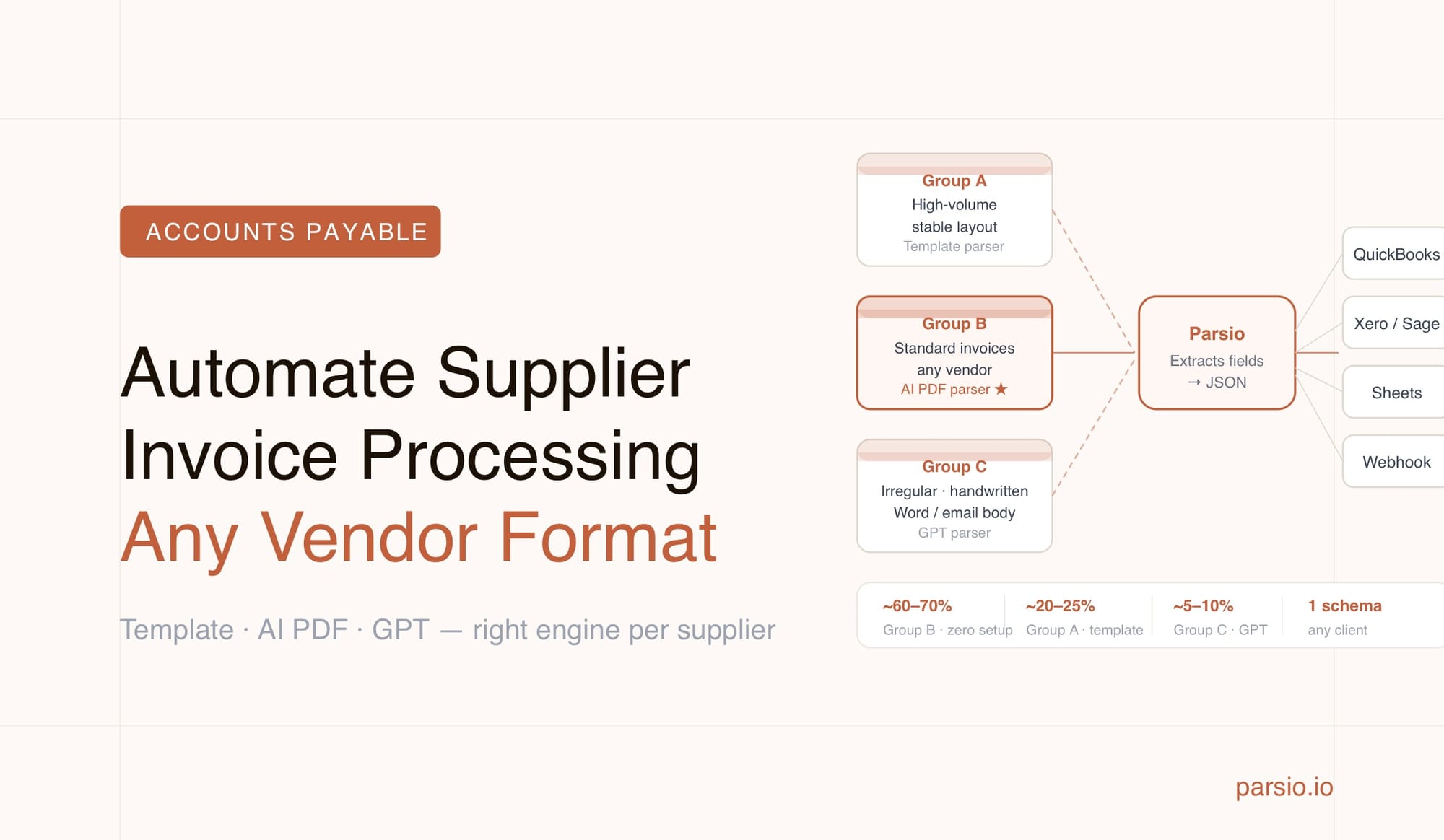
The reliable way to automate supplier invoice processing across dozens of vendors is to stop using a single parsing approach for everything and instead match each supplier's document type to the right extraction engine. For high-volume suppliers with consistent formats, a template parser gives near-perfect accuracy. For standard invoices from any vendor, a pre-trained AI model works with zero setup. For irregular or human-generated invoices, a GPT-powered parser handles the variation. Forcing one method onto all your suppliers is the root cause of most invoice automation failures.
Most accounts payable teams work with 20, 50, or even hundreds of suppliers — and nearly every one sends invoices differently. Some use clean PDF exports from accounting software. Others send scanned paper invoices. A few embed the amount and payment instructions directly in the email body with no attachment at all. No two look exactly alike, and treating them as if they do is where automation breaks down.
This guide explains how to build a multi-supplier invoice processing workflow using Parsio's four parser types, so each vendor's documents get routed to the engine that handles them best — without building a separate automation for every single supplier.
TL;DR
- Multi-supplier invoice automation fails when one parser type is forced on every document format
- Template parsers are best for suppliers who always use the same layout — maximum accuracy, no AI cost
- Parsio's AI-powered PDF parser handles standard invoices from any sender with zero setup
- The GPT-powered parser covers messy, inconsistent, or human-written invoices that don't fit any model
- Separate inboxes per supplier group (or per high-volume sender) let you assign the right parser to each
- Extracted data routes to Google Sheets, QuickBooks, Xero, webhooks, Zapier, Make, or n8n
Why Multi-Supplier Invoice Processing Is Harder Than It Looks
A single-supplier invoice automation is a solved problem. You get a sample invoice, build a template or configure an AI parser, test it, and deploy it. When one supplier always sends the same format, it works reliably.
The problem starts when you have ten suppliers. Then fifty. Each has a different accounting system, a different layout preference, and a different level of consistency. The supplier you set up a template for last year just switched accounting software — now their invoice number is in a different position and your template extracts nothing. The freelancer who invoices you quarterly writes their own invoices in Word, and the layout changes every time. The freight carrier sends scanned PDFs that OCR struggles to read cleanly.
The traditional answer was to build one parsing template per supplier and maintain those templates indefinitely. That approach has a hard ceiling: for a finance team managing more than a handful of vendors, template maintenance becomes a full-time job, and every supplier format change creates a processing gap until someone fixes it.
The modern answer is to stop treating every invoice as if it needs the same extraction approach, and to route each document to the engine that fits it best. That's what Parsio's multi-engine architecture enables.
The Four Parser Types and When Each One Fits
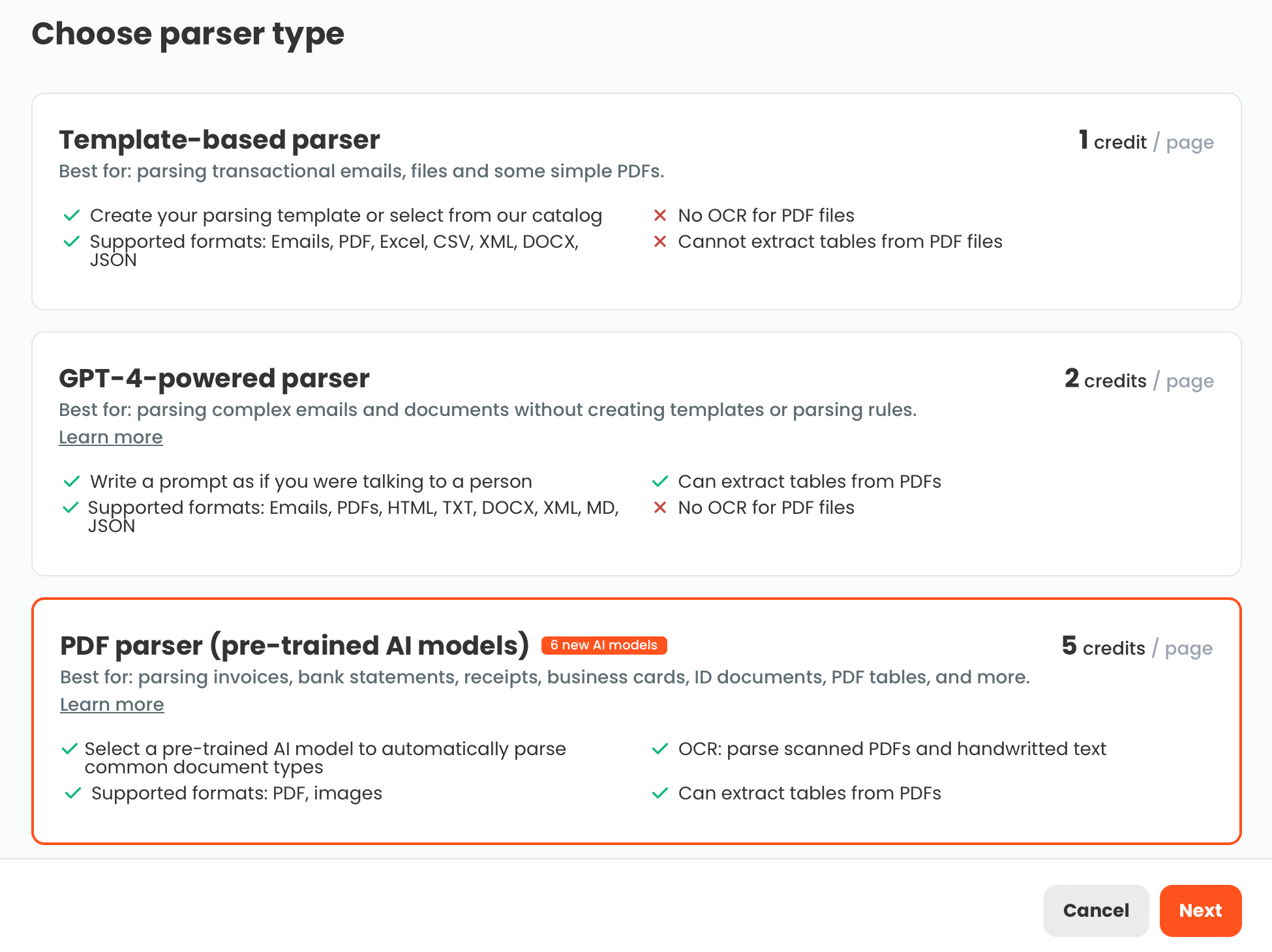
Parsio exposes four distinct extraction engines. Understanding what each one does — and doesn't do well — is what makes a multi-supplier workflow reliable.
Template-based parser
You define field positions once using a sample document, and Parsio applies that template every time a matching document arrives. Accuracy is very high when the format never changes. The limitation is maintenance: if a supplier's invoice layout shifts, the template needs updating. This is the right choice for high-volume suppliers where format stability is guaranteed — for example, a vendor who exports from the same ERP every month.
AI-powered PDF parser
This engine uses pre-trained models that already understand standard business document structures. For invoices, it knows where vendor names, invoice numbers, dates, line items, and totals typically appear — regardless of the specific layout. No template setup required. It handles any invoice that fits recognizable business document patterns, including different languages and currencies. This is Parsio's workhorse for the majority of vendor invoices.
GPT-powered parser
This is the most flexible option. You define what fields you need in a short prompt, and the GPT parser handles documents that are too irregular for templates and outside the scope of the pre-trained AI model. Use cases include invoices from consultants who write their own documents, suppliers with highly non-standard layouts, and invoices where key data is embedded in prose or unusual positions. GPT parsing requires a short prompt but handles variation that the other engines cannot.
OCR converter
This engine converts scanned images or non-selectable PDFs into readable text. It is useful as a conversion step, not a field extractor. If you need to turn a scanned invoice into a searchable document, the OCR converter handles that. For structured AP data extraction, use one of the three parsing engines above.
For a detailed comparison of how these extraction methods differ technically, see PDF Parsing Methods Compared: Rule-Based, Zonal OCR, AI, and LLM Approaches.
Grouping Your Suppliers Before You Build the Workflow
Before creating inboxes in Parsio, spend twenty minutes categorizing your supplier base. This categorization determines which parser you assign to each inbox, and it is the decision that drives accuracy at scale.
Group A — High-volume, format-stable suppliers
These are your biggest vendors who generate invoices from a fixed accounting system and whose format never changes. Typically large suppliers with sophisticated billing processes. Use case: set up one dedicated inbox per major supplier, assign the template-based parser, and build the template once. You get deterministic, near-perfect extraction with no ongoing AI cost.
Group B — Standard invoice senders (the majority)
Most suppliers send invoices that look like invoices: vendor name, address, invoice number, date, line items, total. The layout varies from sender to sender, but the document type is standard. The AI-powered PDF parser handles this group without any template setup. You create one inbox for this group, set the parser to "AI PDF — Invoice," and all standard invoices from any sender extract correctly.
Group C — Irregular, inconsistent, or human-generated invoices
Consultants who write their own invoices in Word or Google Docs. Small suppliers who format things unconventionally. Invoices that embed amounts in narrative text. These fall outside what templates and pre-trained models handle reliably. Assign these to a GPT-parser inbox, write a prompt describing the fields you need, and the GPT engine handles layout variation automatically.
In practice, most AP teams find that roughly 60–70% of their invoices fall into Group B and can be handled by a single AI PDF parser inbox with zero maintenance. Group A covers the high-volume suppliers where template accuracy is worth the one-time setup. Group C is a small subset of edge cases that previously required manual entry.
Setting Up the Multi-Supplier Workflow in Parsio Step by Step
Here is the practical setup sequence. You will create between two and four inboxes to cover your full supplier base.
Step 1: Create your Group B inbox first
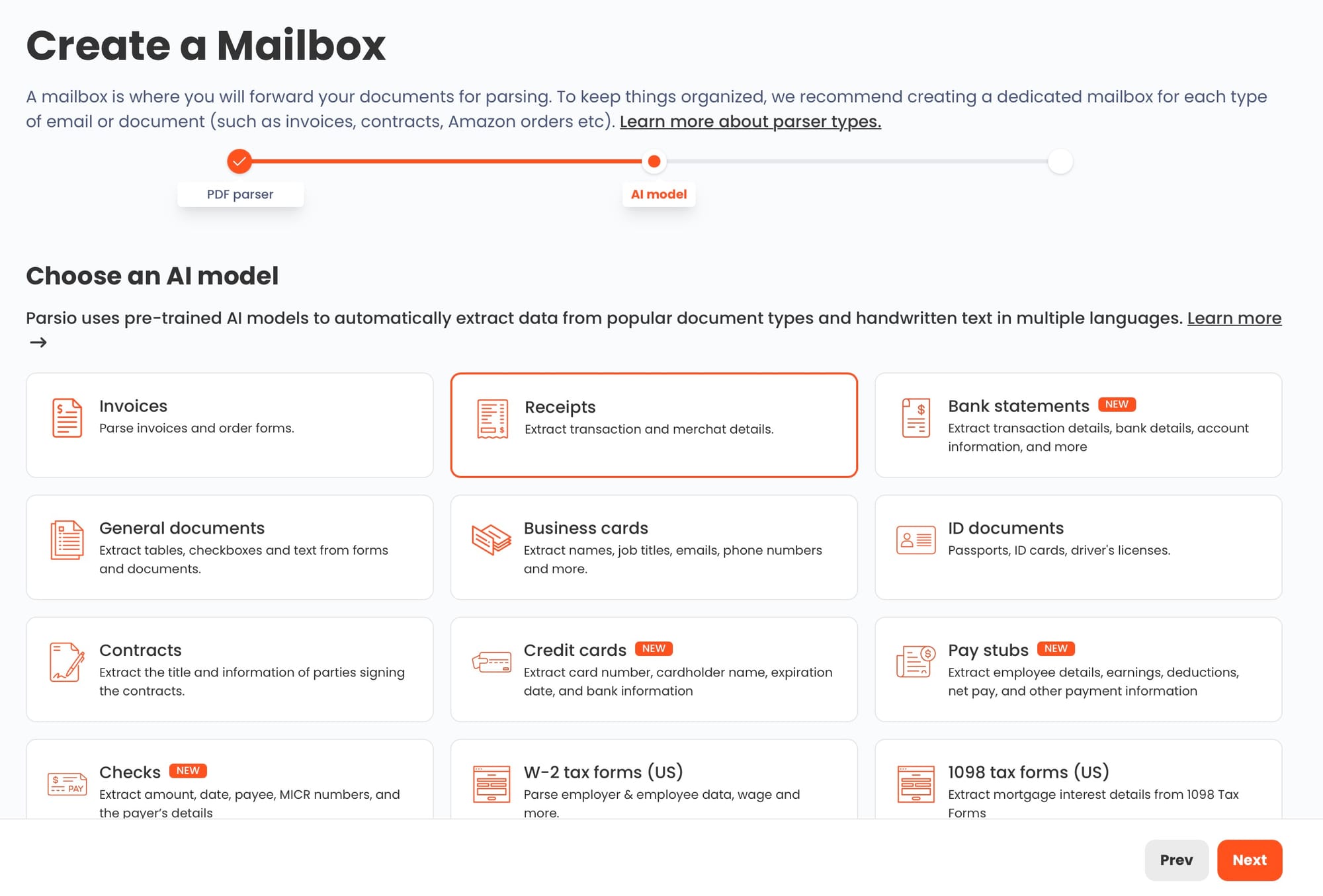
Log in to Parsio and create a new inbox. Name it something like "Supplier Invoices — Standard." Select "PDF / Image" as the document type and choose the AI-powered parser. Under model selection, pick "Invoice." This inbox will serve as the primary destination for forwarded invoice attachments from most of your vendors.
Step 2: Create dedicated inboxes for Group A suppliers
For each high-volume supplier where you want template-level accuracy, create a separate inbox, select the template-based parser, and upload a sample invoice. Map the fields you need: vendor name, invoice number, invoice date, due date, line items, subtotal, tax, and total. Save the template. Future invoices forwarded to this inbox will extract with the same template.
Step 3: Create a Group C inbox for irregular documents
Create one more inbox, name it "Supplier Invoices — Irregular," and select the GPT-powered parser. Write a prompt in plain language: "Extract the following fields: vendor name, invoice number, invoice date, due date, line items (description, quantity, unit price, line total), subtotal, tax amount, and total amount due." Test it with two or three irregular invoices from your problem suppliers to confirm accuracy.
Step 4: Set up email forwarding rules
Each Parsio inbox has a dedicated email address. In your email client or email server, create forwarding rules so that invoices from each supplier automatically reach the right inbox:
- Invoices from your Group A suppliers forward to their dedicated template inbox addresses
- All other invoice attachments forward to the Group B standard inbox
- Invoices from known problem senders (Group C) forward to the GPT inbox
If you use Gmail or Outlook with rules, this setup takes about fifteen minutes.
Step 5: Configure exports
In each inbox's settings, configure where extracted data goes. Options include Google Sheets (built-in direct integration), webhooks, Zapier, Make, n8n, or CSV download. For most AP teams, Google Sheets is the simplest starting point: each invoice creates a new row with all extracted fields in columns.
For a broader walkthrough of the extraction process, see How to Extract Data from Invoices Automatically.
What Gets Extracted: Standard Invoice Fields
When using the AI-powered PDF parser with the Invoice model, Parsio extracts the standard AP fields automatically:
- Vendor name and address
- Invoice number
- Invoice date and due date
- Purchase order reference (when present on the invoice)
- Line item descriptions, quantities, unit prices, and line totals
- Subtotal, tax amount, and total amount due
- Currency
- Payment terms (when printed on the invoice)
The template-based parser extracts the same standard fields plus any custom fields specific to that supplier's invoice format — cost center codes, project references, delivery reference numbers, or internal identifiers your supplier prints on their documents.
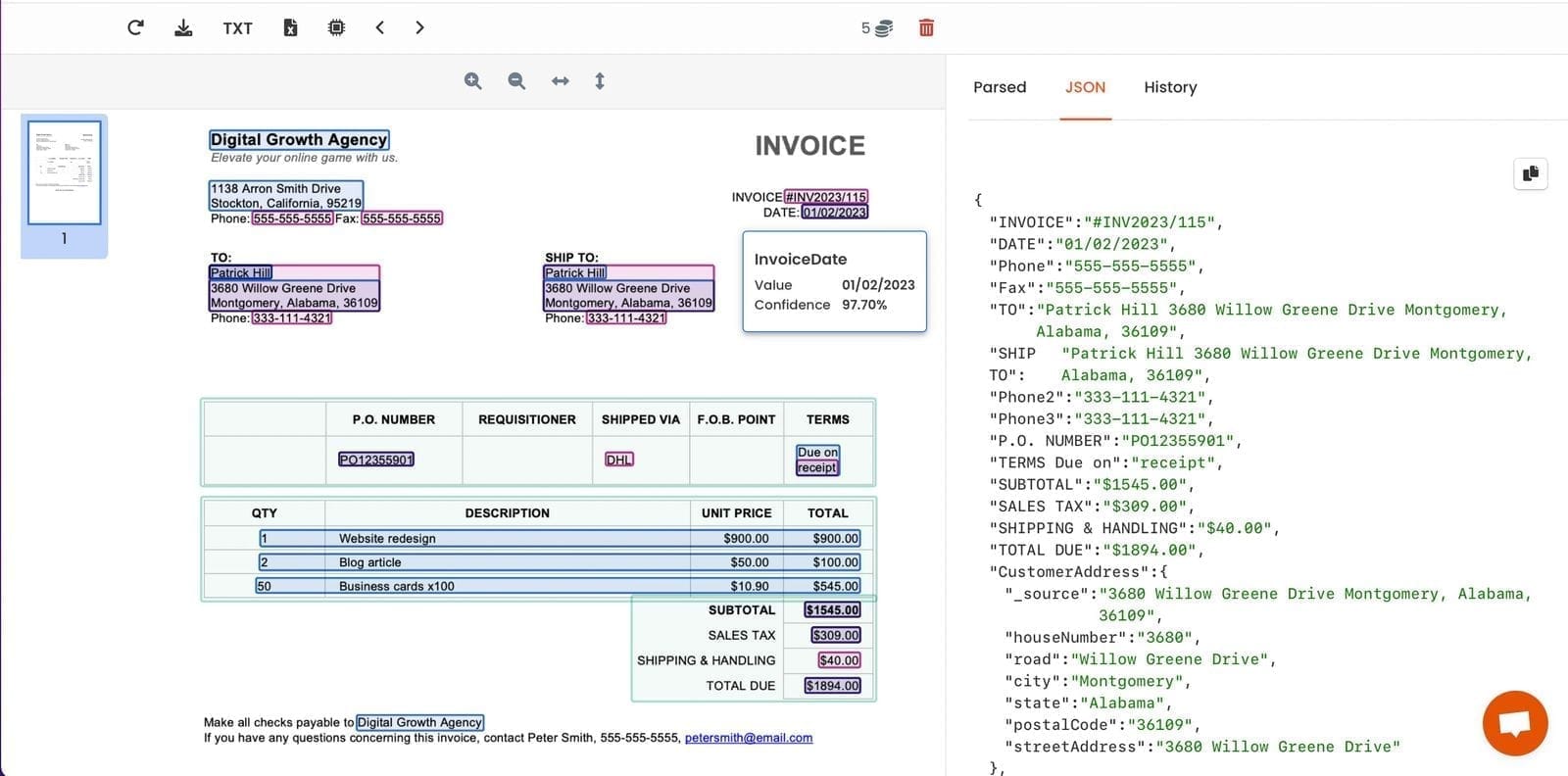
Line items are returned as a structured array — each row in the invoice table becomes one entry with description, quantity, unit price, and line total as separate fields. This maps directly to AP systems that need individual line items, not just the invoice total.
Routing Extracted Invoice Data to Your AP Stack
Once extraction is running, the second half of the workflow is getting data into the tools your AP team actually uses.
Google Sheets is the lowest-friction starting point. Parsio has a built-in Google Sheets integration that appends each extracted invoice as a new row. For teams without an ERP, the spreadsheet becomes the AP queue: reviewers open it daily, check the extracted fields, mark invoices as approved, and trigger payment.
Webhooks work for teams that have an ERP or custom AP system. Parsio posts the extracted JSON to any endpoint immediately after processing. Your system receives the structured invoice data and creates a payable record automatically.
Zapier and Make let you connect Parsio to downstream business tools without code. Common patterns include: creating a bill in QuickBooks or Xero from each extracted invoice, posting a Slack notification to an AP channel when a large invoice arrives, or adding a record to an Airtable AP tracker. See Best Ways to Automate Document Parsing in Zapier, Make & n8n for worked examples.
API is available for teams building custom integrations. The Parsio API lets you poll for new processed documents and retrieve structured results programmatically.
A practical pattern for multi-supplier workflows: route Group A and Group B invoices directly to a Google Sheet as the daily AP queue. Route Group C invoices to a separate sheet for human review before approval. Use a Zapier step to push invoices from the approved sheet into QuickBooks only after the review flag is set. This keeps the high-confidence automated flow fast while ensuring edge cases get a human checkpoint.
Common Mistakes When Automating Invoices Across Multiple Suppliers
Using one inbox for all suppliers. A single inbox makes it impossible to assign different parser types per sender. The result is that the parser you pick needs to handle every invoice format, which means it will perform poorly on the ones that don't fit its strengths. Separate inboxes are the right structure, even if it takes an extra hour of setup.
Defaulting to the GPT parser for everything. The GPT parser is flexible, but it is slower and more expensive to run than the template-based and AI PDF parsers. Use it only for documents that genuinely require that flexibility. For standard invoices, the pre-trained AI PDF parser is faster, more consistent, and does not require prompt setup or tuning.
Not testing before going live. Run at least fifteen to twenty sample invoices through each inbox before routing real AP documents. Check that line items are extracted correctly, that date formats are parsed as expected, and that currency values are captured with the right symbol or code. Problems that surface in testing are trivial to fix; problems that surface after six months of processing are not.
Assuming every field will always be present. Some invoices omit tax details. Others leave out PO references. A few don't print payment terms. Build your downstream workflow to handle missing fields gracefully — null values should not crash your Zapier step or break your sheet formula.
Skipping template maintenance on Group A inboxes. Template parsers are highly accurate but need updating when a supplier changes their layout. Build a lightweight process for monitoring: if the daily AP sheet starts showing blank fields for a usually reliable supplier, check whether their template still matches their current invoice format.
For more guidance on choosing between rule-based and AI parsing, see When to Use Rule-Based Parsing: 5 Real-World Examples (and When Not To).
Frequently Asked Questions
Can Parsio handle invoices from suppliers in different countries and currencies?
Yes. The AI-powered PDF parser and GPT parser both handle invoices in multiple languages and currencies without any additional configuration. The parser reads the currency symbol or ISO code printed on the invoice and returns it as a field alongside the monetary amount, so your downstream tools receive both values — for example, "EUR" and "4,250.00" as separate fields. For multi-currency AP teams managing suppliers in different regions, this means you can standardize all extracted invoice data into a single Google Sheet or ERP without any manual currency translation. Date formats are also handled flexibly: the AI PDF parser normalizes date strings regardless of whether the supplier uses MM/DD/YYYY, DD.MM.YYYY, or a spelled-out month. The template parser handles multi-currency and multi-locale invoices as long as the template was built from a sample document in the same locale as the supplier's output.
What happens when a supplier changes their invoice format?
For Group B suppliers using the AI-powered PDF parser, format changes typically require no action at all. The pre-trained model understands invoice structure conceptually, not based on pixel positions, so it continues to extract correctly even when a supplier switches accounting software or redesigns their invoice template. For Group C suppliers on the GPT parser, the same applies — the prompt-based approach is layout-agnostic. The only parser that requires action on format change is the template-based parser used for Group A. When a template stops matching the supplier's current layout, Parsio's document view will show extraction errors or empty fields for recent documents. The fix is to open the template editor and update the field mappings using a sample of the new format. This usually takes five to ten minutes per template.
How do I handle invoices that arrive as scanned images or faxed PDFs?
Parsio's AI-powered PDF parser includes OCR for scanned documents. Most scanned invoices — even multi-page ones — are handled correctly by the same pre-trained invoice model used for digital PDFs. You do not need to create a separate inbox or use the OCR converter tool just because an invoice is scanned rather than digital. For very low-quality scans, heavily degraded images, or handwritten invoices, the GPT-powered parser often performs better because you can describe the fields you need in a prompt, and the model applies broader reasoning to recover partial data. Reserve the standalone OCR converter for cases where you need plain extracted text rather than structured AP fields — for example, converting a scanned multi-page contract into a searchable text file.
Can Parsio extract invoice line items, or only header fields like totals and dates?
Line item extraction is fully supported across all three parsing engines. For the AI-powered PDF parser, table rows are extracted as a structured array — each line item becomes an object with description, quantity, unit price, discount (when present), and line total as separate fields. For the template-based parser, you define the repeating table structure once and Parsio captures all rows on every processed invoice. For the GPT parser, you include line item fields in your prompt (for example: "extract line items as an array with description, quantity, unit price, and total per row"). Line items are returned in JSON, which maps naturally to multiple rows in a spreadsheet, separate records in a database, or individual line entries in QuickBooks or Xero. This is especially important for AP teams that need to match invoice lines against purchase orders, because total-only extraction is not sufficient for three-way matching workflows.
Can Parsio process invoices that come embedded in email bodies rather than as PDF attachments?
Yes. Parsio inboxes accept both attachments and inline email content. For invoices where a supplier writes the invoice directly into the email body — amounts, line descriptions, and payment instructions in the message itself rather than a separate file — the template-based parser is usually the right choice. You define the fields based on the email's HTML structure, and Parsio extracts them from every message with that structure. The GPT parser also handles email-body invoices effectively when the layout varies between messages or when the supplier writes in a narrative style. This is useful for freelancers and sole traders who send informal payment requests rather than formal PDF invoices. Email-body invoice parsing can be combined with attachment parsing in the same inbox, so a supplier who occasionally switches between an attached PDF and an inline message is handled automatically.
Is there a limit on the number of suppliers or inboxes I can set up in Parsio?
The number of inboxes you can create depends on your Parsio subscription plan. For most AP teams, the practical structure is two to four inboxes: one for standard AI-extracted invoices (Group B), one or two for high-volume template suppliers (Group A), and one for irregular GPT-parsed documents (Group C). If your vendor base is very large — for example, a procurement team with hundreds of suppliers — you can create additional dedicated inboxes for the highest-volume senders while routing the majority through the shared AI PDF parser inbox. Parsio does not charge per supplier or per inbox sender address. The relevant limit for high-volume teams is document processing volume per month, which varies by plan. For teams processing thousands of invoices monthly, it is worth reviewing the plan tiers to confirm the volume fits.
How accurate is the AI PDF parser compared to building custom templates for each supplier?
For standard business invoices, the AI-powered PDF parser typically achieves accuracy comparable to a well-built template — extracting the correct value in the correct field for 95–98% of documents when tested across a diverse supplier set. The critical difference is maintenance: a template requires ongoing updates when supplier formats change, while the AI parser adapts automatically to layout variation. Where the template parser still has an advantage is in edge-case fields that are specific to one supplier's format — cost center codes, internal project numbers, or custom reference fields that the pre-trained invoice model does not know to look for. For those fields, a template on a per-supplier inbox is the more reliable approach. For standard AP fields (vendor, dates, totals, line items), the AI PDF parser handles the majority of supplier invoices without per-supplier configuration.
Ready to stop manually entering supplier invoices?
Parsio's multi-engine approach handles standard invoices, scanned documents, and irregular vendor formats — all in one platform, with no template maintenance for most of your supplier base.