How to Extract Data from Utility Bills Automatically
Utility bills arrive from multiple providers in completely different formats — and someone has to key the data in manually. Here is how to automate that extraction and put the data to work.

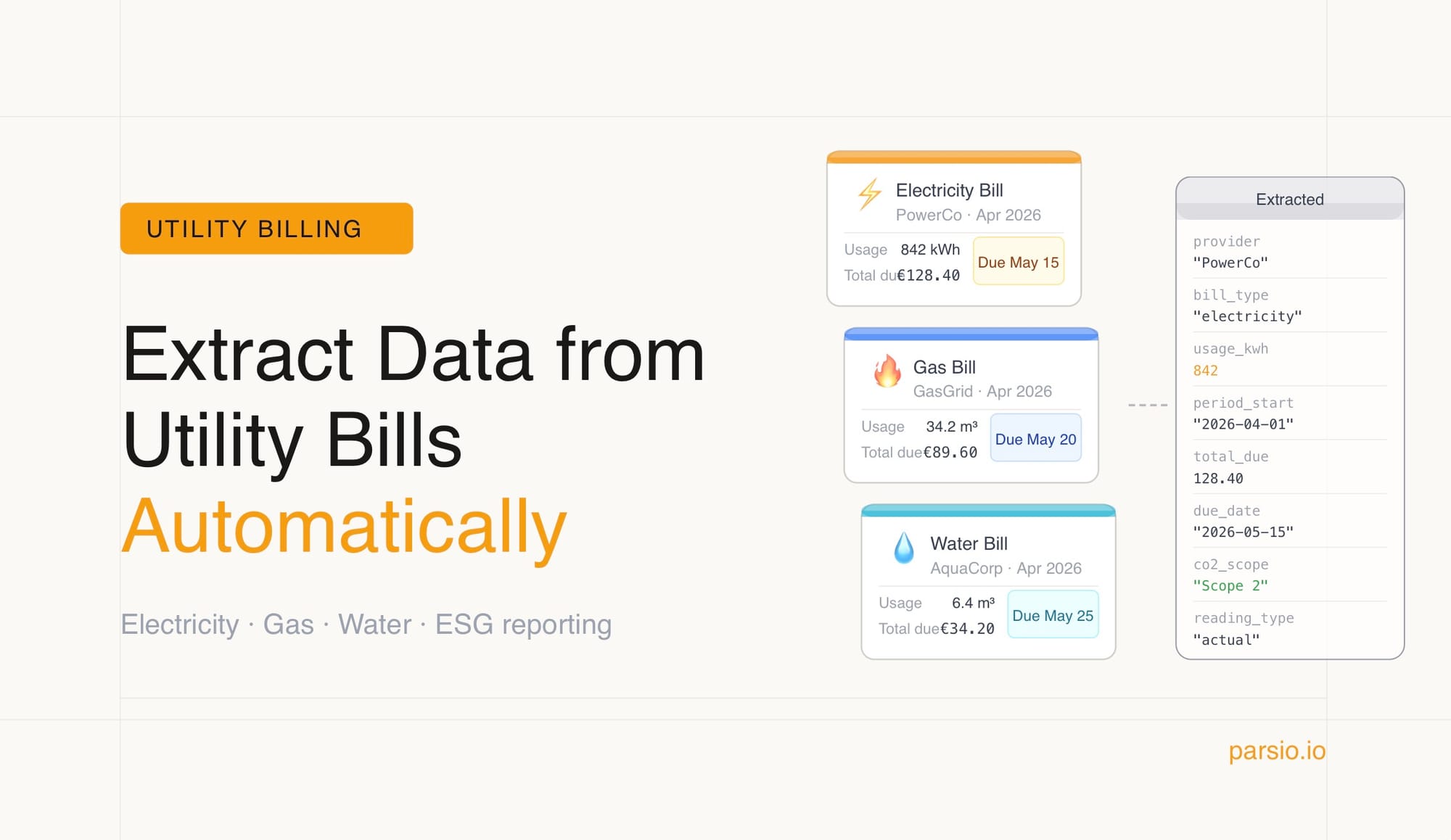
Most businesses deal with utility bills every month — electricity, gas, water, internet, sometimes waste collection or district heating on top. Each provider formats their bill differently. Some send a clean digital PDF. Some send a scanned image. Some cram consumption data, rate tiers, taxes, surcharges, and meter readings into a layout that seems designed to resist any attempt to extract it efficiently.
The result, in most organisations, is that someone manually reads each bill and types the key figures into a spreadsheet or accounting system. It is repetitive, it is error-prone, and when you multiply it across several providers and twelve billing cycles a year, it adds up to a meaningful amount of time spent on something a machine should handle.
This guide covers what data is worth extracting from utility bills, why they are harder to process than standard invoices, and how to automate the whole workflow.
What Data Lives in a Utility Bill
Despite the layout chaos, the information inside utility bills is fairly consistent. The fields most teams care about are:
- Provider and account details: provider name, account number, meter number, service address
- Billing period: start date, end date, invoice date
- Consumption data: meter readings (opening and closing), total consumption in the relevant unit — kWh for electricity, therms or cubic metres for gas, gallons or litres for water
- Charges breakdown: supply charges, delivery or network charges, standing charges, demand charges (for commercial electricity), taxes and levies, any surcharges
- Totals and payment: total amount due, due date, previous balance, any payments already received
For teams doing cost allocation or carbon tracking, consumption figures and the breakdown between supply and delivery charges are often more important than the total amount. For accounts payable, the total, due date, and account number are what matter most. Getting all of these into structured form unlocks different downstream uses.
Why Utility Bills Are Harder Than Invoices
Standard invoices follow recognisable conventions. Utility bills do not.
A few things make them particularly awkward to process automatically:
No standard format. Every energy supplier, water company, or telecoms provider has their own bill layout — and those layouts change when providers rebrand, merge, or update their billing systems. A template built for one provider will break the moment they issue a redesigned bill.
Multiple charge types. A typical electricity bill might include a standing charge, a tiered consumption rate (different rates for different bands of usage), a capacity or demand charge, a renewable energy levy, VAT, and sometimes a credit from a previous period. Pulling these apart correctly requires understanding the structure of the bill, not just reading text.
Mixed units and terminology. Gas bills use therms, cubic metres, or CCF depending on region and provider. Electricity bills may show consumption in kWh alongside demand in kW. Water bills use litres, gallons, or cubic metres. The same underlying concept appears under different labels.
Scanned and low-quality formats. Many utility bills, especially from smaller local providers or older paper-based processes, arrive as scans rather than digital PDFs. Image quality varies, and OCR needs to work reliably before extraction can happen.
Multi-page layouts. Commercial bills in particular can run to several pages, with usage data on one page and charge breakdowns on another. Extraction needs to piece together fields from across the whole document.
Who Needs Utility Bill Data Extraction
Four types of teams run into this problem regularly:
Finance and accounts payable teams who need to code utility invoices to the right cost centres, match them against budgets, and get them paid on time. Manual data entry across a dozen or more providers each month is where errors accumulate.
Facilities and property managers overseeing multiple sites or buildings, each with its own set of utility accounts. Tracking consumption and spend across a portfolio without automation means running a lot of spreadsheets by hand.
Sustainability and ESG teams who need consumption figures — particularly electricity and gas usage — to calculate Scope 1 and Scope 2 carbon emissions for ESG reporting. With ISSB sustainability disclosure standards now binding in many markets, getting clean consumption data out of bills reliably has become a compliance requirement, not just a nice-to-have.
Operations teams at multi-tenant businesses — commercial landlords, managed office operators, co-working spaces — who need to allocate utility costs to tenants based on usage, and generate chargeback invoices from the raw data.
How to Automate Utility Bill Data Extraction with Parsio
Step 1: Choose the right parser
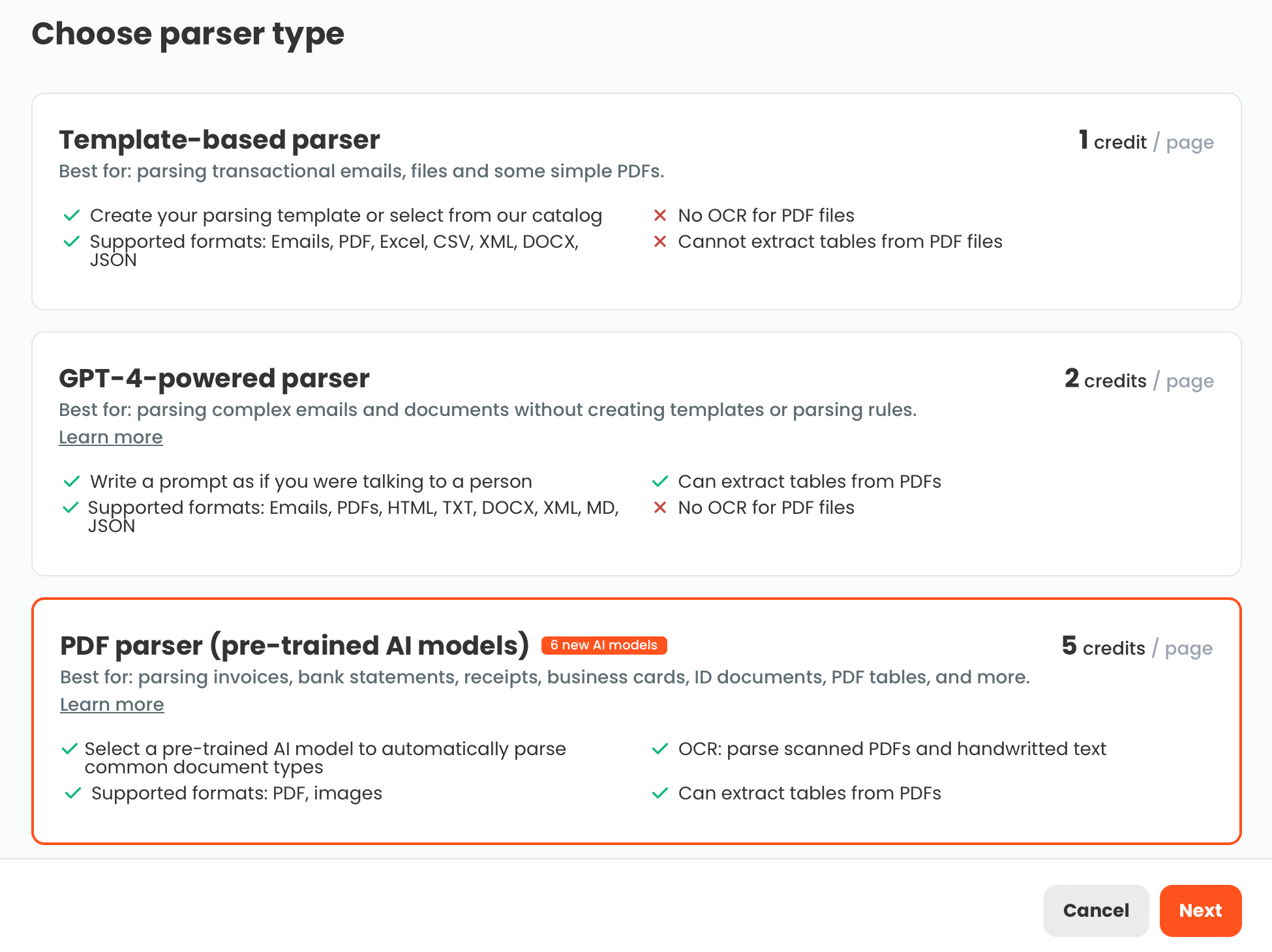
Because utility bills vary so significantly between providers, the GPT-powered parser is the right starting point for most teams. Instead of building a template per provider — which breaks every time a bill layout changes — you define the fields you want to extract in plain language, and the parser reads each bill and finds them regardless of where they appear on the page.
If you only process bills from a single provider with a stable layout, the template-based parser is also an option — faster and more predictable once the template is built, but requires a new template if the layout ever changes.
For scanned bills or photo-quality PDFs, make sure OCR processing is enabled. This converts the image to readable text before extraction runs.
Step 2: Create a utility bills inbox
Set up a dedicated inbox in Parsio for utility documents. You can create separate inboxes by utility type (electricity, gas, water) if you want separate export destinations or different field definitions per category — or keep them in one inbox if your extraction fields are consistent across bill types.
Step 3: Define your extraction fields
For the GPT-powered parser, write out the fields you need clearly. A typical set for a finance team might be:
- Provider name
- Account number
- Service address
- Billing period start date
- Billing period end date
- Total consumption (include the unit)
- Total charges before tax
- Tax amount
- Total amount due
- Payment due date
For an ESG or facilities team, add:
- Meter number
- Opening meter reading
- Closing meter reading
- Supply charge
- Delivery or network charge
- Any renewable or carbon levy line items
The more specific your field descriptions, the more consistently the parser will return the right values — especially for charges that appear under different labels across providers.
Step 4: Send bills to the inbox
Bills can reach the inbox several ways:
- Forward utility bill emails with PDF attachments directly to the Parsio inbox email address
- Upload PDFs manually in batches
- Set up a Zapier or Make automation to pull bills from a shared email folder, Google Drive, or Dropbox as they arrive
- Use the Parsio API for programmatic submission if bills are collected from a billing portal
Once a bill is in the inbox, Parsio extracts the defined fields and makes the structured data available immediately.
Step 5: Connect to your downstream tools
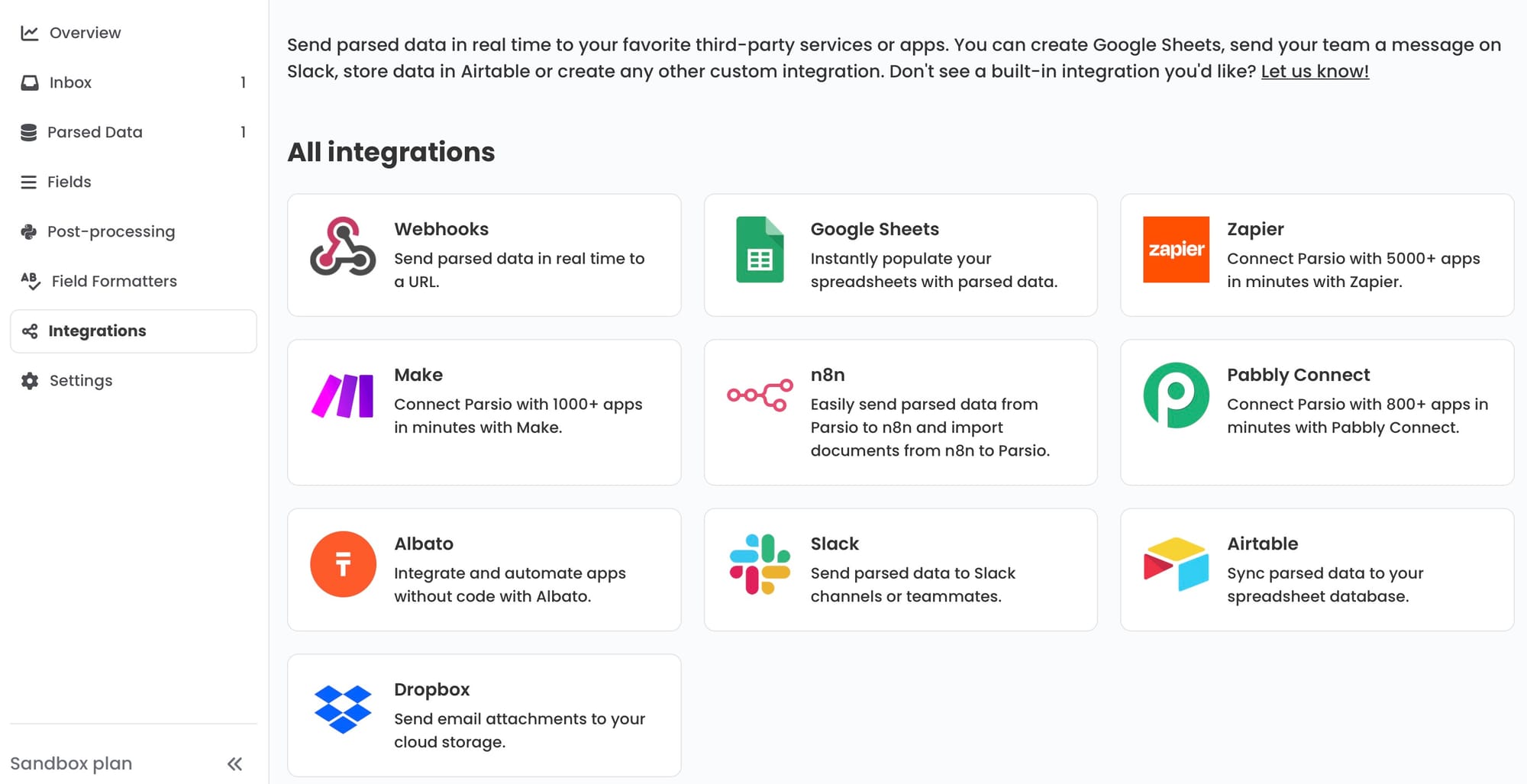
Where the data goes depends on what you are doing with it:
- Google Sheets — the fastest setup for most teams. Each new bill appends a row with all extracted fields. From there, formulas can handle cost allocation, trend analysis, provider comparisons, or consumption summaries. You can share a live view with finance, facilities, and sustainability teams simultaneously.
- Webhook to an accounting or ERP system — if bills need to be coded and approved in accounting software before payment, send the extracted data via webhook to create a draft payable directly in your system.
- Zapier or Make — connect extracted bill data to any business tool without code. Route electricity consumption figures to a carbon tracking spreadsheet, total amounts to a payment queue, and service addresses to a facilities management platform in the same automated flow.
- CSV or Excel export — for batch processing at the end of a billing cycle, export all extracted bills at once and import into whichever system needs them.
Common Failure Modes
Inconsistent charge labels. What one provider calls a "supply charge" another calls an "energy charge" or "commodity charge." If your field descriptions are too narrow, the parser may miss the right line. Use broader descriptions — "the charge for energy supplied, which may be labelled supply charge, energy charge, or commodity charge" — to catch the variations.
Estimated versus actual meter readings. Many utility bills flag whether a reading is actual or estimated. If this distinction matters for your workflow (it usually does for ESG reporting), add it as an explicit extraction field: "indicate whether the meter reading is actual or estimated."
Bills with multiple meters or accounts. A commercial property with several meters on one bill needs each meter's data extracted separately. Structure your field definitions as repeating items — one set of consumption and charge fields per meter — rather than a single flat list.
Credit notes and adjustments. Providers occasionally issue credits, corrections, or refund bills that look very different from a standard charge bill. Flag these as a separate field — "bill type: charge or credit" — so your downstream system can handle them correctly rather than treating a negative amount as a payment owed.
Very long commercial bills. Large commercial energy bills can run to many pages, particularly when they include half-hourly demand data or detailed rate schedules. The GPT-powered parser works best on shorter, summary-level documents. For bills that consistently run long, work with the summary pages rather than the full document, or extract only the summary section.
Putting Extracted Utility Data to Work
Once extraction is running reliably, the structured data opens up workflows that are impossible with PDFs alone:
- Provider benchmarking: compare cost per kWh or cost per cubic metre across providers over time to identify renegotiation opportunities
- Consumption trend tracking: chart monthly usage against the same period in previous years to identify anomalies — a spike that suggests a fault, or a drop that follows an efficiency measure
- Automated cost allocation: divide costs by site, department, or tenant based on consumption figures without manual calculations each month
- Carbon emission calculations: use electricity and gas consumption data as direct inputs to Scope 1 and 2 emissions calculations for sustainability reporting
- Payment scheduling: feed due dates and amounts into an AP workflow so bills are never paid late or missed in a stack of PDFs
👉 For a broader overview of AI-based document extraction, see the Guide to Document Data Extraction Using AI in 2026.
👉 If you also process supplier invoices, see How to Extract Data from Invoices Automatically for a parallel workflow.
👉 To connect Parsio with Zapier, Make, or n8n for multi-step utility bill workflows, see Best Ways to Automate Document Parsing in Zapier, Make and n8n.
FAQ
Can Parsio extract data from any utility provider?
The GPT-powered parser handles varied layouts without templates, so it works across different providers without requiring per-provider configuration. It reads the bill, locates the fields you defined, and returns the values — regardless of how a specific provider formats their document. Very unusual layouts or low-quality scans may need some field description adjustment after initial testing.
What is the best way to handle bills from many different providers?
Use a single GPT-powered inbox with field definitions broad enough to cover the labelling variations across providers. Test the extraction on a sample from each provider before running at full volume. Where a provider consistently uses unusual labels, adjust the relevant field description to cover those terms specifically.
Can I extract consumption data as well as charges?
Yes. Consumption fields — kWh, therms, cubic metres, meter readings — can be included in your field definitions just like any monetary value. Add the relevant unit to the field description so the parser returns the value in context rather than just a number.
How do I handle utility bills that arrive as scanned images?
Enable OCR processing in Parsio before extraction runs. OCR converts the scanned image to readable text, which the parser can then work with normally. Extraction accuracy on scanned bills depends on scan quality — clean, high-resolution scans extract well, while low-resolution or skewed scans may produce errors on specific fields.
Is this useful for ESG and carbon reporting?
Directly, yes. Electricity and gas consumption figures from utility bills are the primary inputs for Scope 1 and Scope 2 carbon emission calculations. Automating their extraction means your emissions data is always current and drawn from the source document rather than re-entered by hand, which improves accuracy and creates an audit trail back to the original bill.