How to Automate Insurance Document Processing for Operations Teams
Insurance operations teams process claim forms, COIs, health insurance cards, EOBs, and medical invoices daily. Here is how to automate extraction from all of them using no-code tools in 2026.

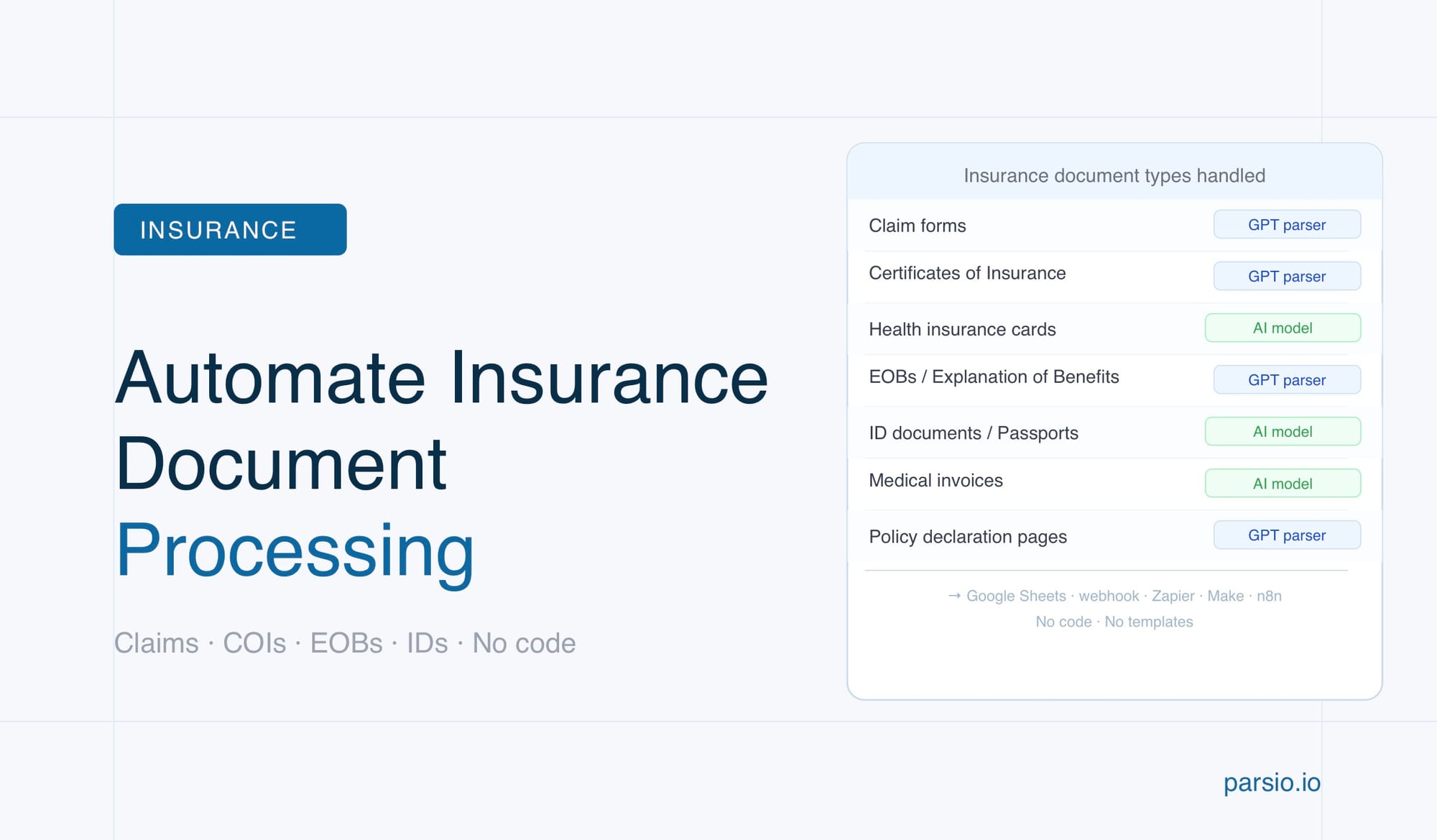
Insurance operations teams can automate document intake and data extraction by routing each document type to the right parser — AI-powered models for health insurance cards and ID documents, and a GPT-powered parser for claim forms, certificates of insurance, explanation-of-benefits statements, and other variable-format materials. No code is required, and extracted data flows automatically into your claims system, spreadsheet, or CRM.
What Insurance Document Processing Actually Involves
Insurance operations is not a single document workflow — it is a constant stream of different document types arriving from different sources. A claims team at a mid-sized insurer might process hundreds of documents per week: paper and digital claim forms, explanation-of-benefits statements from health plans, certificates of insurance from commercial policyholders, scanned ID documents from claimants, medical invoices and hospital bills, and policy-related correspondence from brokers and agents.
Each of these document types has its own layout, terminology, and extraction requirements. A COI from one insurer looks completely different from a COI issued by another. A claim form from a hospital system uses different field labels than a claim form submitted by a contractor. This variability is what makes manual data entry both slow and error-prone — staff must interpret each document, locate the right fields, and key data into a case management or accounting system by hand.
The downstream impact is real. Research from insurance automation providers consistently shows that a high proportion of claims delays trace back to missing or low-quality documentation — not to adjudication complexity. Automating the data extraction layer does not replace the human judgment in claims decisions, but it eliminates the mechanical intake work that slows everything else down. When structured data is available within seconds of a document arriving, adjusters and ops staff can spend their time on resolution rather than data entry.
The Document Types Insurance Operations Teams Handle Every Day
Understanding which document types appear in your workflow is the first step to choosing the right extraction approach. Insurance document workflows typically include some combination of the following:
- Claim forms — Submitted by policyholders or third parties. Layouts vary significantly by line of business (health, property, liability, auto) and by the submitting party.
- Certificates of Insurance (COIs) — Provided by commercial policyholders as proof of coverage. Typically ACORD 25 or ACORD 28 format, but many carriers issue their own variants. Parsio has a dedicated guide on extracting data from certificates of insurance automatically.
- Health insurance cards — Submitted by claimants as proof of coverage. Usually scanned images or PDFs with a fixed card-style layout. Parsio's AI parser has a dedicated pre-trained model for these. See the full guide on extracting data from health insurance cards automatically.
- Explanation of Benefits (EOBs) — Issued by health insurers to explain claim payment decisions. Variable layouts across carriers.
- Medical invoices and hospital bills — Structured similarly to standard invoices but often with ICD/CPT codes, provider NPI numbers, and itemized service lines.
- ID documents — Passports, driver's licenses, and national ID cards submitted to verify claimant identity. Parsio's AI parser includes a dedicated model for these.
- Police reports — Submitted with auto and liability claims. Unstructured narrative text that may need selective field extraction.
- Inspection reports and damage assessments — Variable format documents from adjusters, contractors, or third-party assessors.
- Policy declaration pages — Issued by the insurer at policy inception. Contain coverage limits, named insureds, effective dates, and premium amounts.
- Receipts and repair invoices — Supporting documentation for property and auto claims.
Most insurance operations teams deal with at least five or six of these on a weekly basis. The key insight is that no single parser type works well for all of them — which is why a multi-engine approach produces much better results than trying to apply one parsing model to every document type in your stack.
Why Manual Document Processing Creates Claims Delays
Manual document processing in insurance operations fails for several structural reasons that automation directly addresses.
Format variability creates rework. When staff manually extract data from a COI, they must mentally locate the right fields across a document where the layout changes depending on the issuing insurer. A mistake means a callback to the submitting party, a re-review, and a delay in coverage verification. Automated extraction solves this with a model trained to find the relevant fields regardless of where they appear on the page.
Volume spikes overwhelm manual capacity. After a severe weather event or a regulatory change, document volumes can double overnight. Manual processing capacity does not scale with volume. An automated pipeline processes the 50th document in the same time it processes the first.
Manual entry introduces systematic errors. Data keyed by hand produces transposition errors, missed fields, and inconsistent formatting. When extracted data feeds downstream systems — claims management software, accounting, regulatory reporting — a 2% error rate compounds across thousands of documents and produces audit findings, payment disputes, and compliance exposure.
Unstructured handoffs lose context. When a claim arrives as an email attachment and a staff member manually keys the relevant fields into a system, the original document and the extracted data become disconnected. An automated pipeline preserves both the source document and the structured output, creating a clean audit trail.
Choosing the Right Parser for Each Insurance Document Type
The most important decision in setting up insurance document automation is matching each document type to the right extraction approach. Parsio offers four parser types, and the right choice depends on the stability and structure of the document:
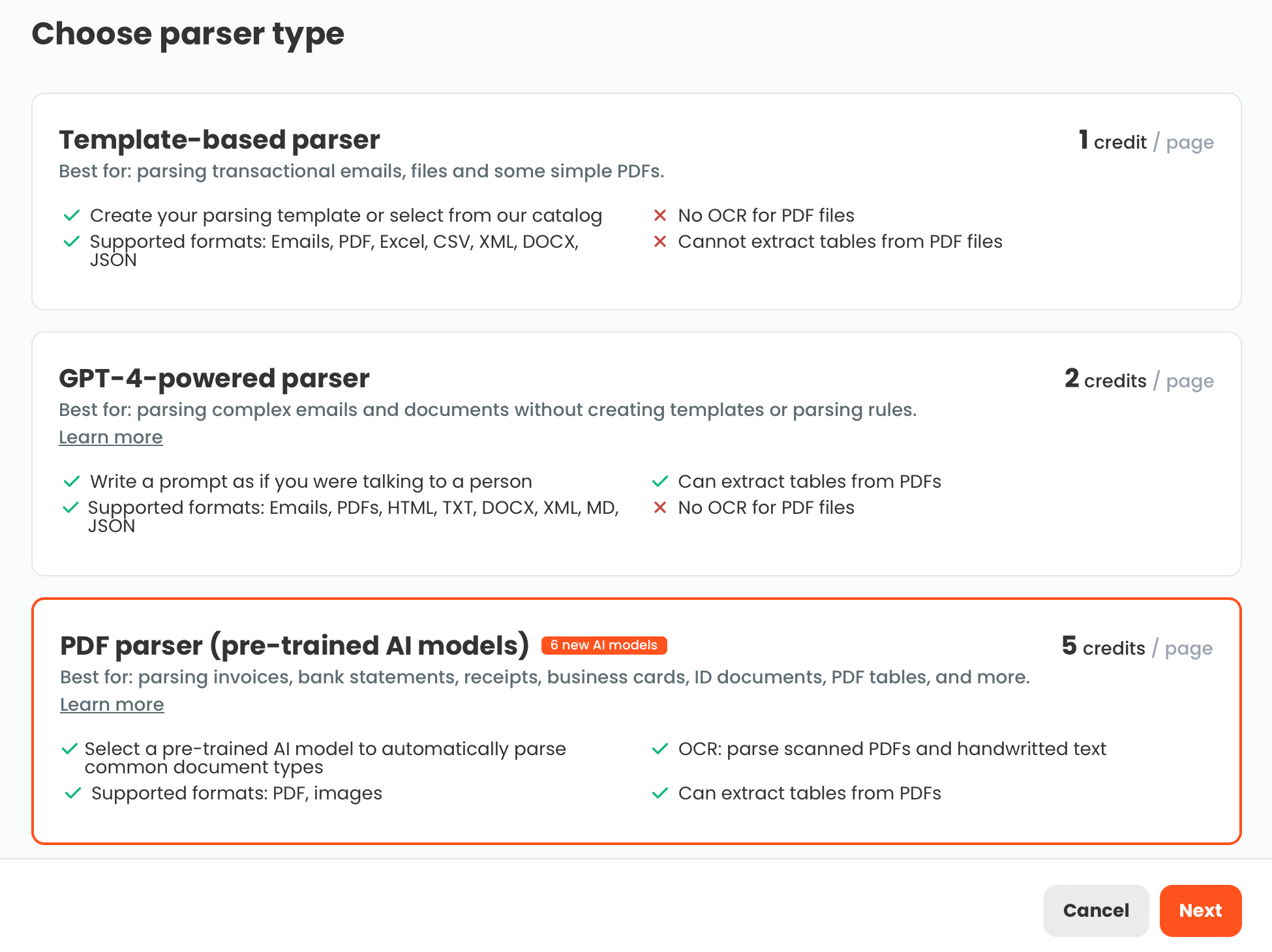
AI-powered PDF parser — for health insurance cards, ID documents, and standard supported types. Parsio's AI-powered PDF parser includes pre-trained models for a specific set of document types. For insurance workflows, the most relevant models are health insurance cards, ID documents (passports, driver's licenses, national ID cards), invoices, receipts, and general documents. These models extract fields with no setup required — you upload the document and the extraction happens automatically. Use this parser when you are processing one of the supported document types and can confirm that a dedicated model exists.
GPT-powered parser — for COIs, claim forms, EOBs, and everything else. For any insurance document that does not have a dedicated AI model, the GPT-powered parser is the right choice. This includes certificates of insurance, explanation-of-benefits statements, claim forms with variable layouts, inspection reports, policy declaration pages, and damage assessments. The GPT parser is highly flexible — it understands context rather than relying on field positions. Importantly, Parsio can automatically generate the extraction prompt from a sample document you upload, so you do not need to write the prompt manually.
Template-based parser — for machine-generated notifications with stable formats. If your team receives policy-related notifications from a specific system (such as a broker portal or a policy management platform) where the email format is always identical, a template-based parser provides very accurate, low-cost extraction. This approach requires maintenance if the source format changes, but it is the right tool for high-volume, stable-format transactional emails.
OCR converter — for text extraction only. The OCR converter converts scanned documents into editable text but does not extract structured fields. It is useful when the goal is to create a searchable PDF or to feed text into another system, but it is not a replacement for field-level structured extraction.
Setting Up an Insurance Document Automation Workflow with Parsio
The core Parsio workflow for insurance document processing follows five steps. Most teams are processing live documents within a couple of hours of setup.
Step 1: Create a Parsio inbox. An inbox is where your documents arrive. You can create one inbox per document type (recommended for insurance, since each type needs its own parser configuration) or use a single inbox if you plan to route all document types through the GPT parser. Email inboxes accept forwarded emails and attachments. You can also upload PDFs directly, or connect via Zapier, Make, or the Parsio API if you want to route documents from an existing system.
Step 2: Configure the parser for your document type. For health insurance cards, ID documents, and other AI-supported types, select the AI-powered PDF parser and choose the matching model from the list. For COIs, claim forms, and EOBs, select the GPT-powered parser. Upload a representative sample document — Parsio reads it and auto-generates an extraction prompt with the fields it detects. Review the suggested fields, adjust if needed, and save the configuration.
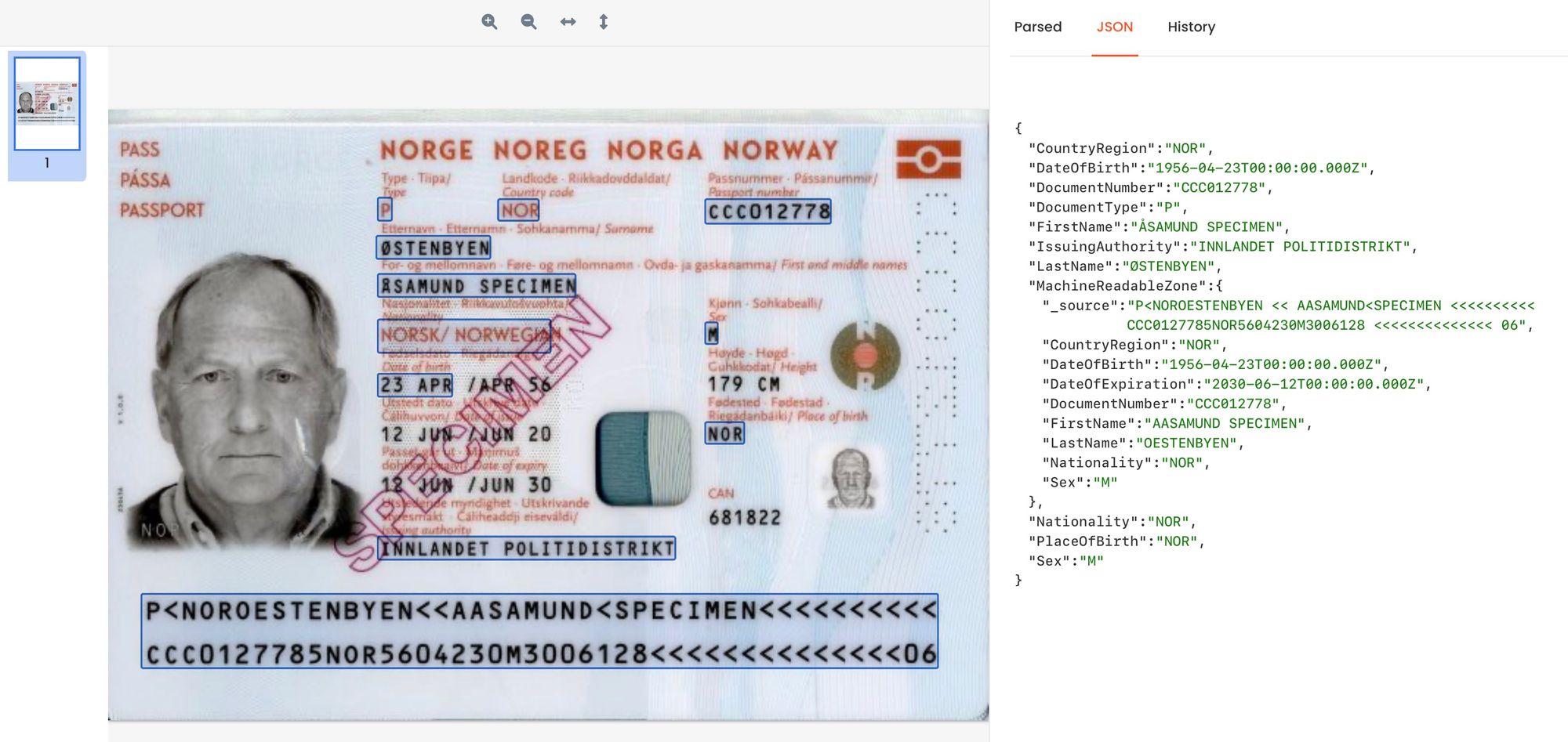
Step 3: Test with real documents. Upload three to five real documents from your existing backlog. Review the extracted fields against the originals. For the AI-powered parser, extraction should be accurate immediately. For the GPT-powered parser, you may want to refine the extraction prompt if any fields are being missed or mis-labeled. Parsio shows the extracted result alongside the source document, making this review straightforward.
Step 4: Set up your intake channel. For ongoing automation, configure how new documents reach Parsio. The most common setup for insurance ops is email forwarding — staff or systems forward documents to the inbox email address, and Parsio processes them automatically. Alternatively, set up a Zapier or Make trigger that watches a shared folder or a claims intake form and routes new attachments into Parsio.
Step 5: Configure data export. Once the parser is working, configure where extracted data should go. Common export targets for insurance teams include a Google Sheets tracker for COI verification, a webhook to a claims management system, a Zapier automation that creates a record in Airtable or HubSpot, or a CSV export for batch processing.
Routing Extracted Insurance Data to Your Downstream Systems
The value of automated extraction is fully realized when the structured data flows immediately into the tools your team already uses. Parsio supports several export patterns that are particularly useful in insurance operations:
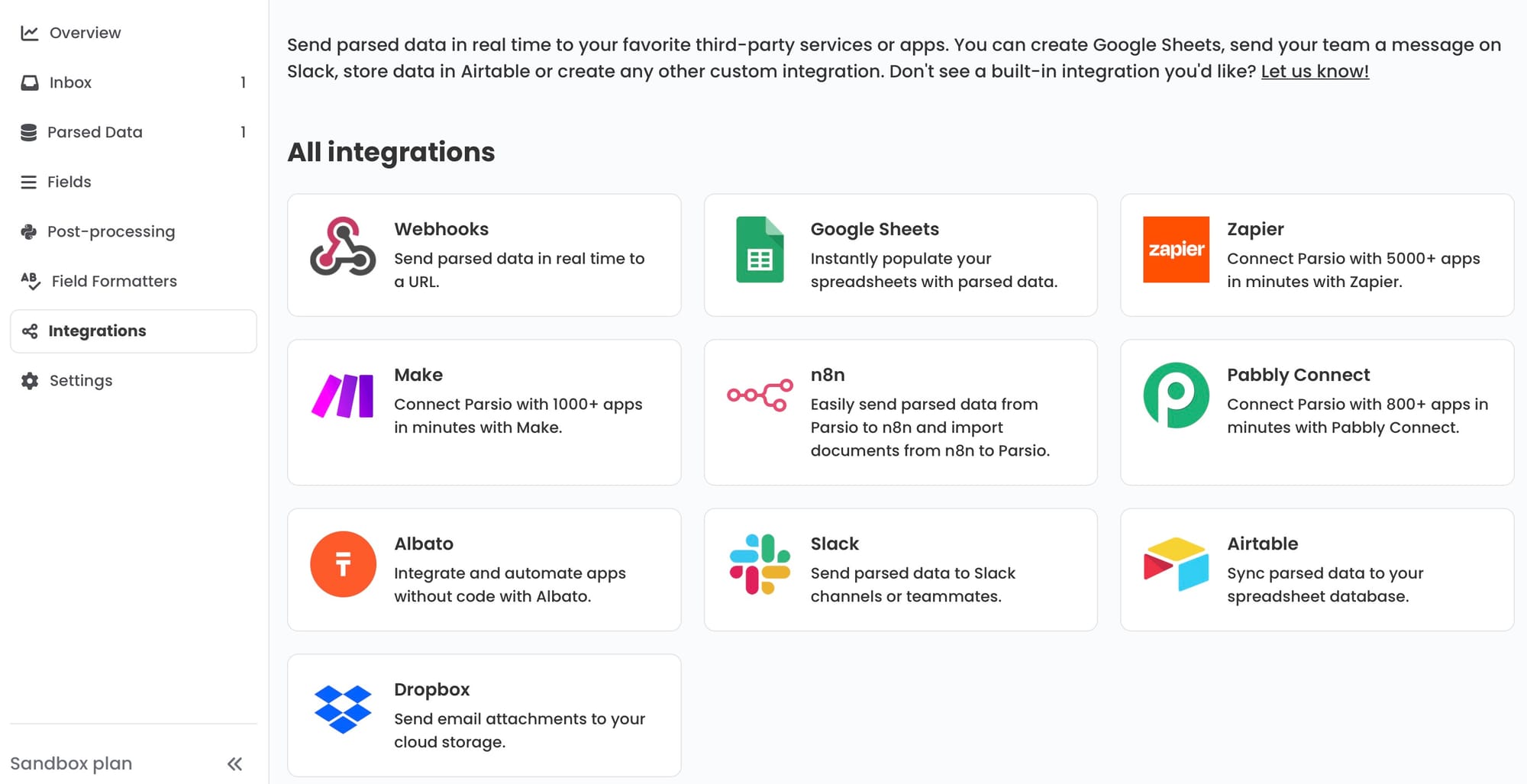
Google Sheets — for COI tracking and expiry monitoring. A common use case for insurance ops teams is maintaining a COI log that tracks policy numbers, coverage types, effective dates, and expiration dates for each vendor or commercial policyholder. Parsio's built-in Google Sheets integration writes extracted fields from each parsed COI directly into a spreadsheet row. Combined with a conditional formatting rule or a Google Sheets script, this creates a real-time expiry alert system with no additional software.
Webhooks — for claims management system integration. If your claims management platform accepts inbound webhooks or has an API, Parsio can post structured JSON data to that endpoint immediately after each document is parsed. This creates a near-real-time handoff from document receipt to case creation, without manual data entry.
Zapier or Make — for routing to any business app. For teams using case management tools, CRMs, or project trackers that do not have a direct Parsio integration, Zapier and Make provide the bridge. A typical pattern: Parsio parses a claim form, triggers a Zapier Zap, which creates a new record in the claims tracker, attaches the parsed fields, and notifies the assigned adjuster via email or Slack. For more detail on building these workflows, see how to automate document parsing in Zapier, Make, and n8n.
CSV or Excel export — for batch and audit workflows. When the goal is to process a backlog of documents or to prepare a file for import into a compliance or audit system, Parsio's CSV export provides a clean structured output. You can export all parsed documents from a given inbox in one step.
Common Mistakes to Avoid When Automating Insurance Document Processing
Using a single parser for all document types. Applying the GPT-powered parser to health insurance cards or ID documents will produce usable results, but you will get better accuracy and no setup time by using the dedicated AI parser models for supported document types. Check the supported model list first before defaulting to GPT for everything.
Recommending the AI parser for unsupported document types. The AI-powered PDF parser only works well for document types that have dedicated pre-trained models. For COIs, EOBs, claim forms, and other variable-format insurance documents that are not in the supported list, use the GPT-powered parser. Applying the wrong parser to an unsupported type will produce incomplete or inaccurate extractions.
Building one inbox for all document types. It is tempting to use a single inbox and a single parser for all incoming documents, but this usually produces lower accuracy than creating separate inboxes per document type. A dedicated COI inbox with a COI-specific GPT prompt will outperform a generic inbox that tries to handle all document types through one configuration.
Skipping the test review step. The auto-generated extraction prompt from a sample document is a strong starting point, but reviewing extractions against three to five real documents before going live will catch edge cases — unusual date formats, multi-page claim forms, or COIs with non-standard field labels — before they affect your production data.
Overlooking document quality. Blurry scans, low-resolution images, and handwritten notes will reduce extraction accuracy regardless of the parser type. For documents that arrive as physical papers, investing in a good quality scanner (300 DPI minimum) pays returns across the entire automation pipeline.
Frequently Asked Questions
Can Parsio extract data from scanned insurance documents and images?
Yes. Parsio's AI-powered PDF parser includes OCR capability that handles scanned documents and images. For document types with dedicated pre-trained models — such as health insurance cards and ID documents — the AI parser reads scanned inputs and extracts structured fields automatically. For other insurance document types processed through the GPT-powered parser, Parsio first converts the scanned content to text and then applies the extraction prompt. The quality of the extraction depends on scan quality: documents scanned at 300 DPI or higher with good contrast produce the most reliable results. Handwritten content can be challenging for automated extraction; typed or printed documents work best.
How does Parsio handle certificates of insurance from different carriers?
Certificates of insurance (COIs) are one of the strongest use cases for Parsio's GPT-powered parser. Because COI layouts vary significantly between carriers — even within the standard ACORD 25 format — a template-based approach would require a separate template for every issuer. The GPT parser handles layout variation automatically by understanding field context rather than field position. You configure it once using a representative COI sample, and Parsio can auto-generate the extraction prompt from that document. In practice, a single GPT-powered inbox handles COIs from many different carriers without requiring reconfiguration. Parsio offers a full walkthrough in the COI extraction guide.
What fields can Parsio extract from health insurance cards?
Parsio's AI-powered PDF parser has a dedicated pre-trained model for health insurance cards. This model extracts the standard fields found on most cards: member name, member ID, group number, plan name, insurer name, effective date, copay amounts (if printed), and network or plan type. Because the model is pre-trained on a large dataset of real health insurance cards, extraction works without any configuration — you create a new inbox, select the AI PDF parser, choose the health insurance card model, and upload or forward the card. The extracted fields appear in a structured JSON output that can then be exported to a spreadsheet or downstream system. See the detailed walkthrough at how to extract data from health insurance cards automatically.
Can Parsio extract line items from medical invoices and hospital bills?
Yes. Medical invoices and hospital bills follow a similar structure to standard invoices — a header with provider and patient details, and a table of service lines with procedure codes, dates, and amounts. Parsio's AI-powered PDF parser includes an invoices model that handles this structure and extracts both the header fields and the line-item table. For hospital bills that follow non-standard layouts or include ICD and CPT codes in unusual positions, the GPT-powered parser can be configured with a custom extraction prompt to capture those specific fields. The result in both cases is structured data with a row per service line that can be exported directly to your AP system or reconciliation spreadsheet.
How long does it take to set up a new document type in Parsio?
For document types with a dedicated AI model — health insurance cards, ID documents, invoices, receipts — setup takes under five minutes. You create an inbox, select the AI PDF parser, choose the matching model, and Parsio begins extracting immediately. There is no template to build and no prompt to write. For document types that use the GPT-powered parser — COIs, claim forms, EOBs, inspection reports — setup takes ten to thirty minutes, including the time to review and refine the auto-generated extraction prompt. Parsio generates the prompt automatically from a sample document you upload, so the main task is reviewing the suggested fields against a few real examples and adjusting any field names or descriptions that need clarification. Most insurance teams are processing live documents within the same working session they start setup.
Does Parsio work with insurance documents that arrive as email attachments?
Yes. Parsio's inbox-based model is built for email-based document intake. Each inbox has its own forwarding email address. Team members or automated systems forward emails with insurance document attachments to that address, and Parsio extracts the documents from the attachments and processes them automatically. This works for PDFs, images, and scanned files attached to inbound emails. The email forwarding approach requires no integration work — it is available immediately on any email client. For more sophisticated intake workflows, you can also trigger Parsio via Zapier, Make, or the API, which allows documents to be routed from shared inboxes, web forms, or document management systems.