How to Extract Data from Certificates of Insurance Automatically
Automate COI data extraction with an AI PDF parser. Pull insured names, coverage types, limits, and expiration dates from certificates of insurance automatically.

TL;DR
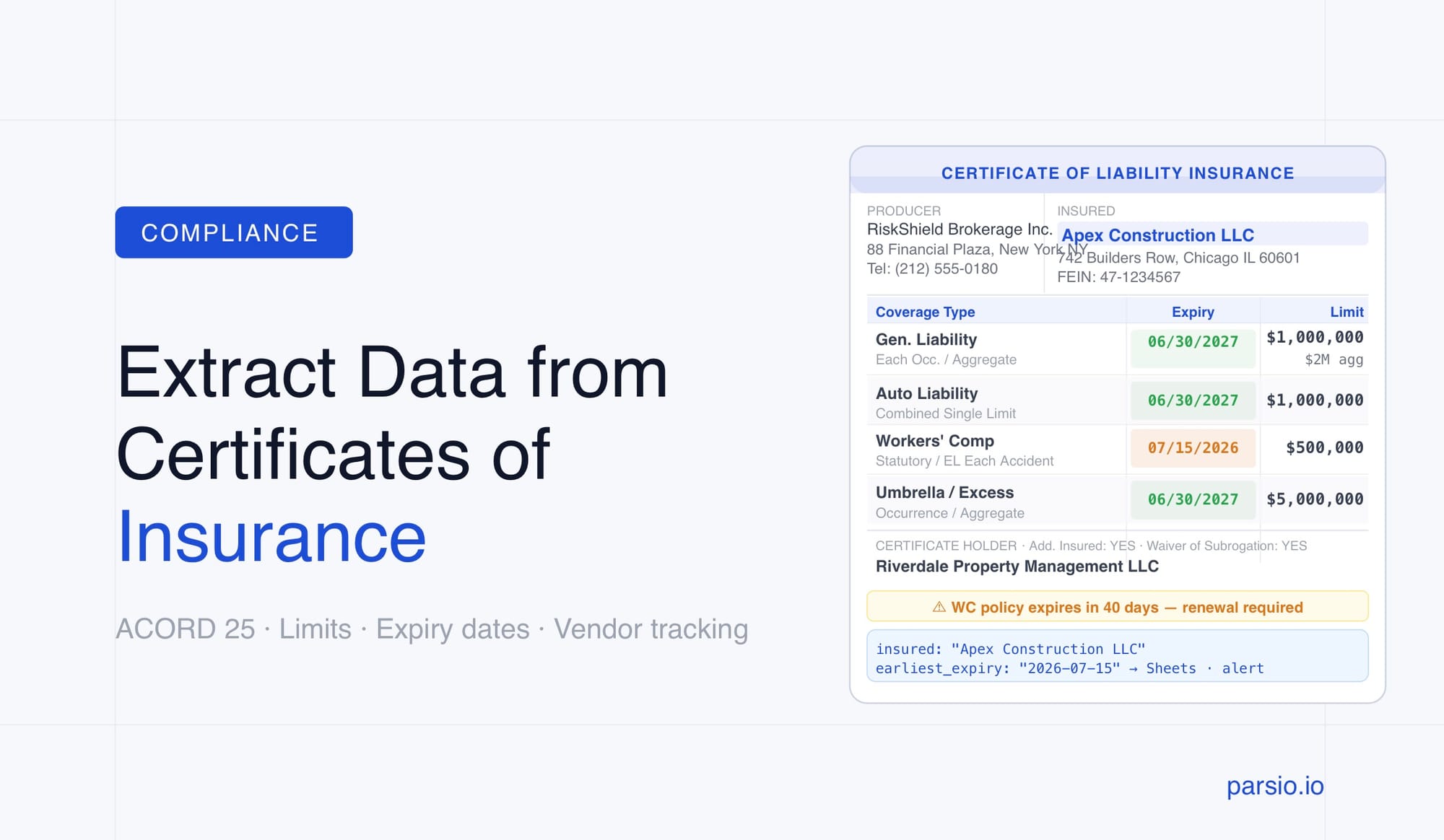
- A Certificate of Insurance (COI) is a structured PDF document with consistent fields — insured name, insurer, policy numbers, coverage types, limits, and expiration dates.
- Manual COI review is error-prone and slow, especially when managing dozens or hundreds of vendor certificates.
- Parsio's GPT-powered parser extracts key COI fields automatically with no template setup — Parsio can auto-generate the extraction prompt from a sample COI you upload.
- Extracted data can be sent to Google Sheets, Airtable, or a webhook to power compliance tracking and expiration alerts.
- For non-standard or scanned COIs, Parsio's GPT-powered parser handles variable layouts without breaking your workflow.
You can extract data from certificates of insurance automatically using Parsio’s GPT-powered parser — upload the COI, define the fields you need (or let Parsio auto-generate the prompt from a sample), and structured fields like the insured name, policy numbers, coverage types, coverage limits, and expiration dates are pulled out within seconds. No manual data entry, no spreadsheet copying.
For operations, procurement, and compliance teams that receive COIs from vendors, contractors, or tenants, this changes the workload dramatically. Instead of opening each PDF, reading the ACORD 25 form, and transferring numbers into a tracker, the extraction happens automatically. The output lands wherever you need it: a Google Sheet, an Airtable base, or a webhook that triggers an alert when a policy is about to expire.
This guide covers which fields to extract, which parser type works best for COI documents, how to set up automated extraction with Parsio, and how to route the results into the tools your team already uses.
What Is a Certificate of Insurance (and Why Extracting It Manually Is Slow)
A Certificate of Insurance is a document issued by an insurance broker or carrier that proves a business or individual holds specific insurance coverage. It is not a policy itself — it is a summary document designed to be shared with clients, landlords, general contractors, or anyone else who needs proof of coverage before a project, lease, or contract begins.
In the United States, the ACORD 25 form is the dominant standard. Most liability certificates follow the same layout: producer information at the top, insured name and address on the left, insurers and policy details in the middle, coverage limits in a structured table, certificate holder at the bottom, and an authorized representative signature. That consistent structure is exactly what makes automated extraction practical.
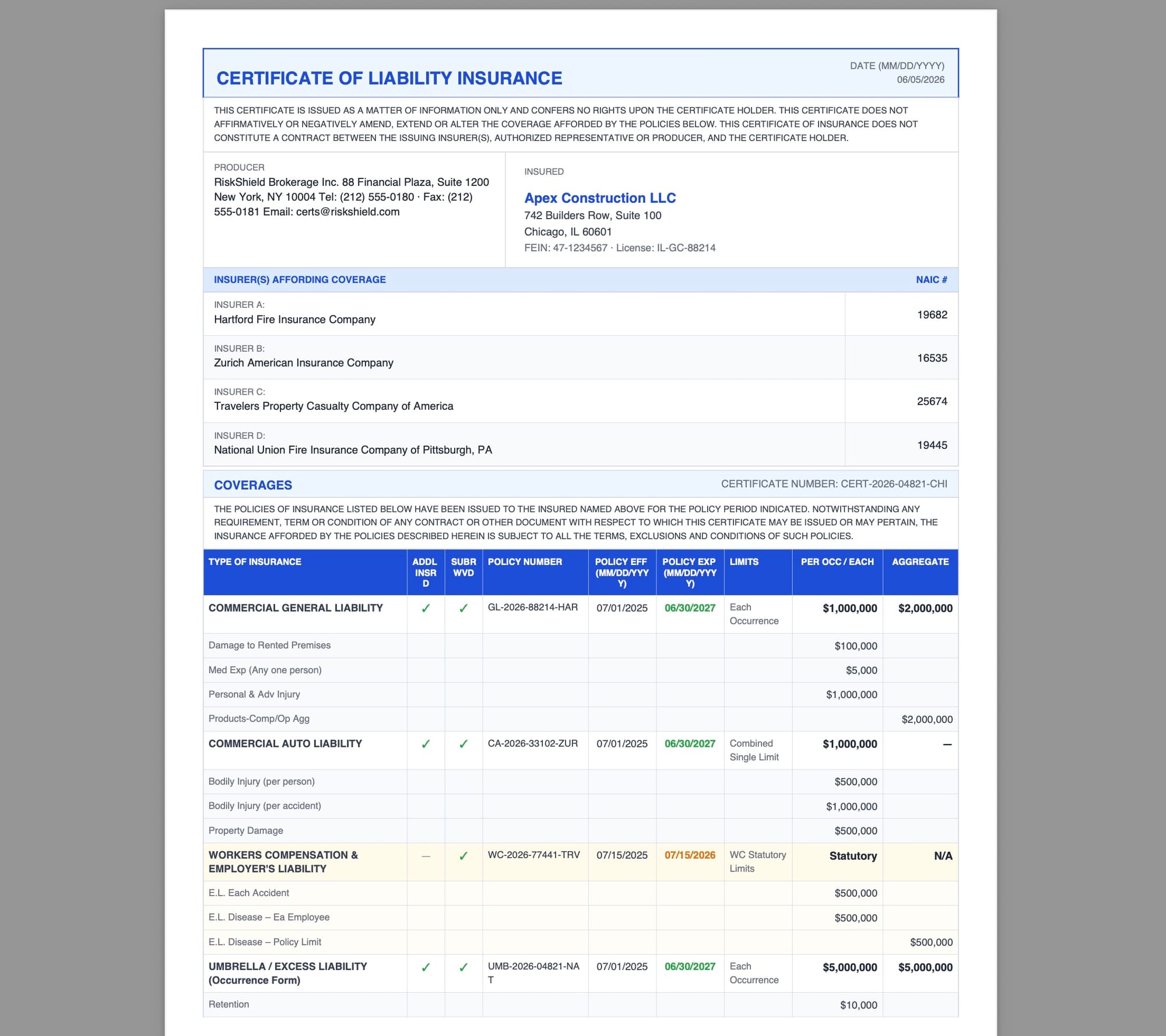
The problem is volume. A general contractor managing twenty active subcontractors needs to track twenty COIs, each with multiple coverage types and different expiration dates. A commercial property manager with fifty tenants runs into the same issue. A logistics company vetting carrier partners may process hundreds of certificates per year. Reviewing each one manually — opening the PDF, reading the coverage table, finding the expiration date, entering it into a spreadsheet — is repetitive work that scales badly and introduces errors.
Expiration tracking is the most common failure point. A lapsed policy that was manually tracked incorrectly can expose a business to significant liability. Automated extraction solves this by pulling expiration dates reliably every time a new certificate comes in, making it possible to build an alert system on top of the extracted data.
Key Fields to Extract from a Certificate of Insurance
The ACORD 25 form contains a predictable set of fields. Here are the ones worth extracting for compliance tracking and vendor management workflows:
Insured Information
- Named Insured — the business or individual the policy covers
- Insured address — useful for vendor record matching
- Producer / agent name — the broker issuing the certificate
Coverage Details (per policy type)
The ACORD 25 form lists multiple coverage types in a structured table. Typical entries include:
- Commercial General Liability — per occurrence limit, general aggregate limit, products/completed operations aggregate, personal and advertising injury limit
- Commercial Auto Liability — combined single limit or split limits
- Workers' Compensation — statutory limits and employer's liability limits
- Umbrella / Excess Liability — occurrence and aggregate limits
- Professional Liability / E&O — per claim and aggregate limits when applicable
Policy Identifiers and Dates
- Policy number — one per coverage type
- Policy effective date — when coverage starts
- Policy expiration date — the field most critical for tracking
Certificate Holder and Endorsements
- Certificate holder — the party receiving the certificate (your company or project)
- Additional insured status — whether the certificate holder is named as an additional insured
- Waiver of subrogation — whether the insurer waives the right to recover damages from the certificate holder
- Description of operations — project-specific notes or contractual requirements listed by the broker
Not every workflow needs every field. A typical compliance tracker needs the insured name, each coverage type, its limits, and the expiration dates. A vendor onboarding workflow may also need the policy numbers and the additional insured confirmation.
Which Parser Type Works Best for COI Documents
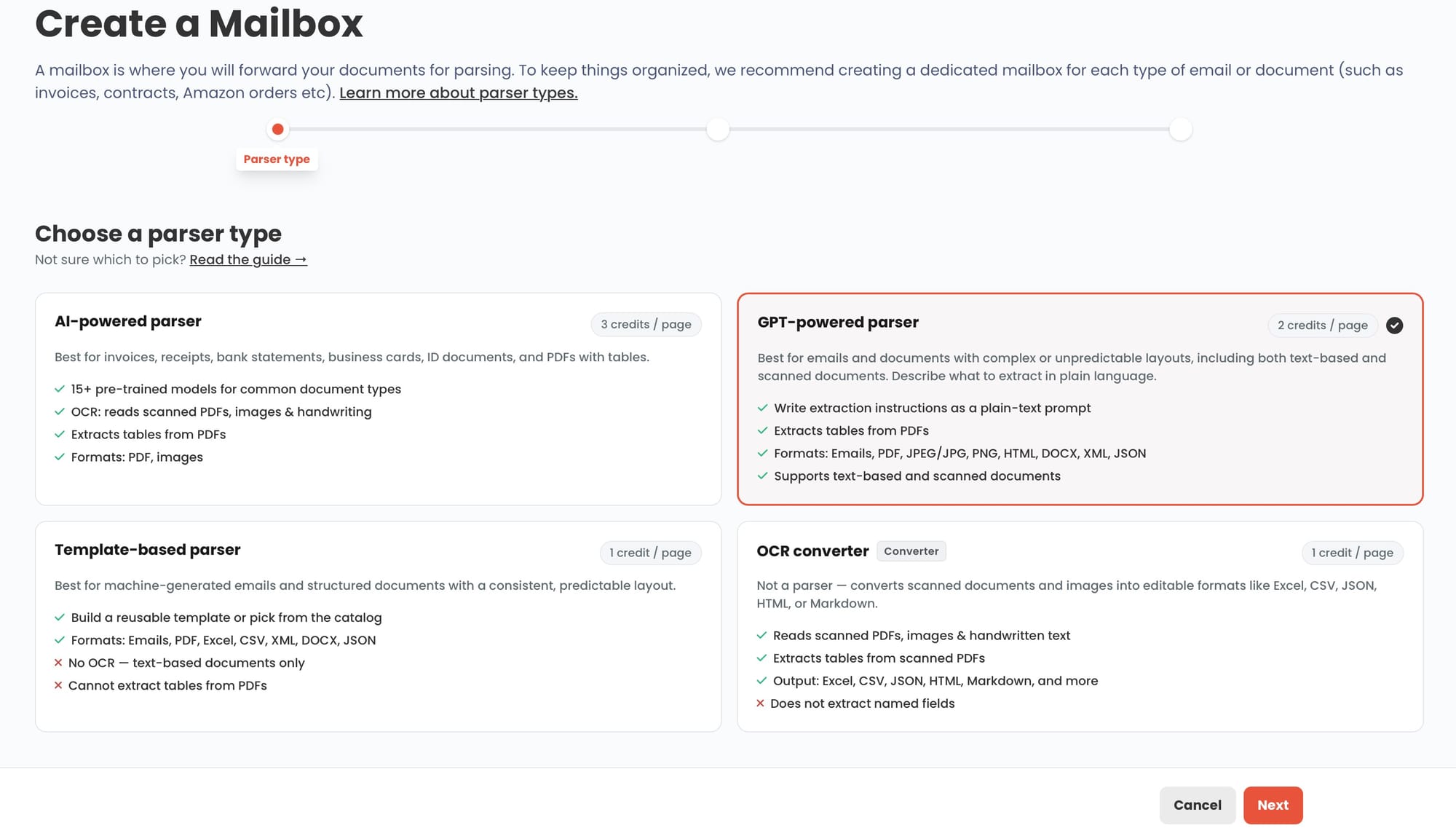
Parsio uses four distinct parser types, and the right choice for COI extraction depends on how the documents arrive and how consistent their layout is.
GPT-powered parser — best for all COI formats, including standard ACORD 25 and non-standard certificates. The ACORD 25 form is machine-generated and follows a fixed layout. Certificates of insurance do not have a dedicated pre-trained AI model in Parsio. The GPT-powered parser handles ACORD 25 and non-standard COI formats without template setup. Parsio can auto-generate the extraction prompt from a sample — you upload the document, Parsio suggests the prompt, and you can refine before running at scale. Upload the COI, Parsio identifies the fields, and structured data comes out immediately. This is the right starting point for most COI workflows.
GPT-powered parser — best for non-standard or foreign certificates. Some insurers issue proprietary certificate formats that deviate from the ACORD standard. International carriers may use completely different layouts. The GPT parser can handle these cases through natural-language prompting rather than fixed templates — you describe what you want to extract and it adapts to the document's actual structure.
Template-based parser — best for COIs arriving as email attachments from a single insurer. If you have a recurring relationship with a specific insurance provider who always sends the same certificate format via email, a template parser can be trained on that exact layout for consistent, high-accuracy extraction across many documents.
OCR converter — not the right tool here. The OCR converter in Parsio is designed for document-to-text conversion, not field extraction. It produces editable text output, but it does not organize the result into structured fields like policy numbers, limits, and dates. Use one of the parser types above, not the OCR converter, for COI data extraction.
For most COI workflows, use the GPT-powered parser. It handles standard ACORD 25 forms and non-standard or foreign certificate formats without template setup. The template-based parser is only worth considering when you receive certificates from a single insurer in a completely stable, never-changing format.
How to Extract Data from Certificates of Insurance with Parsio
Here is how to set up a COI extraction workflow in Parsio from start to finish:
Step 1: Create an inbox
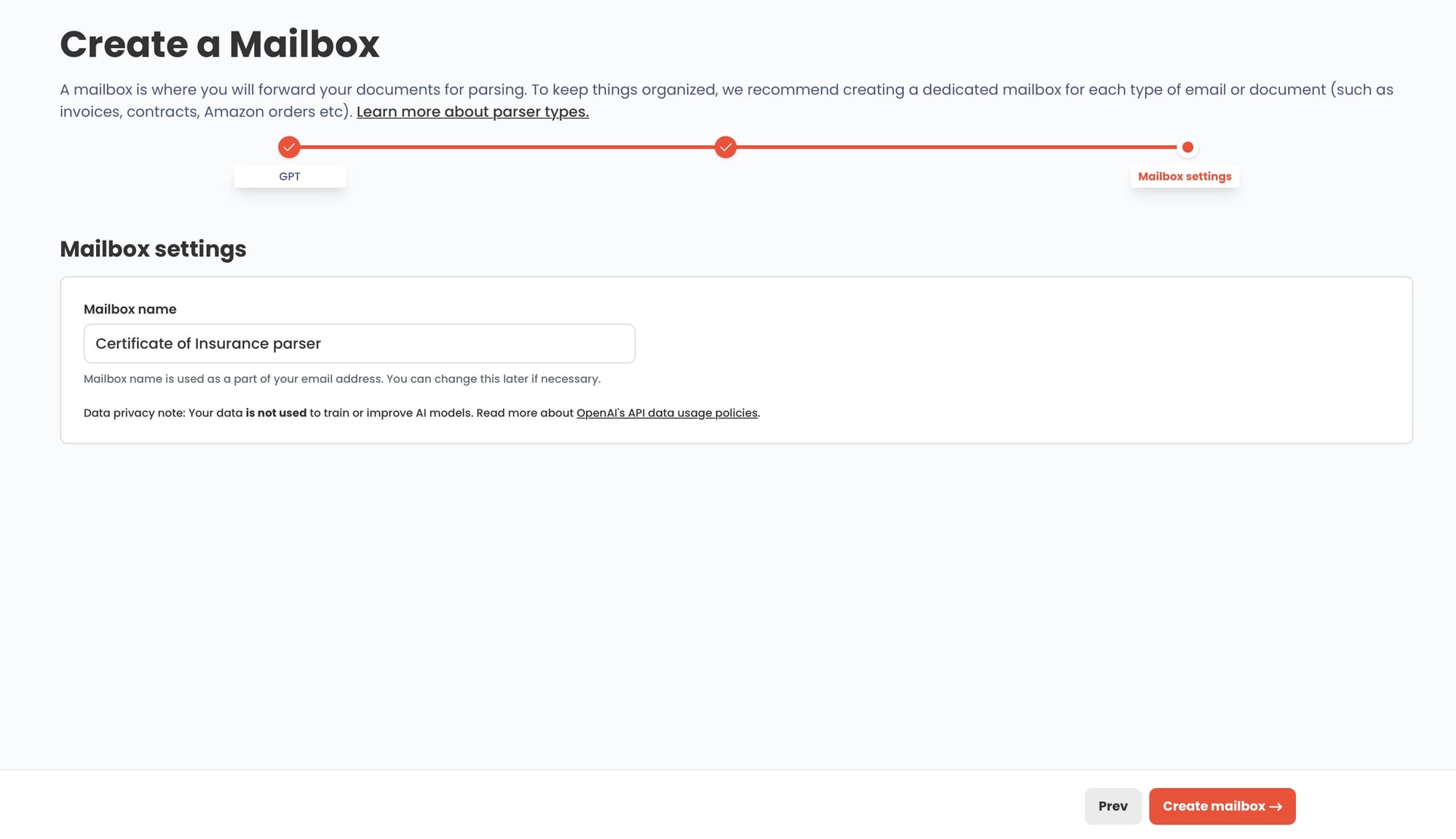
In Parsio, go to your dashboard and create a new inbox. Give it a name that reflects the workflow — "Vendor COIs" or "Subcontractor Certificates" works well. Every inbox gets a dedicated email address. You can forward or send COI documents to that address, or upload them directly.
Step 2: Choose the GPT-powered parser
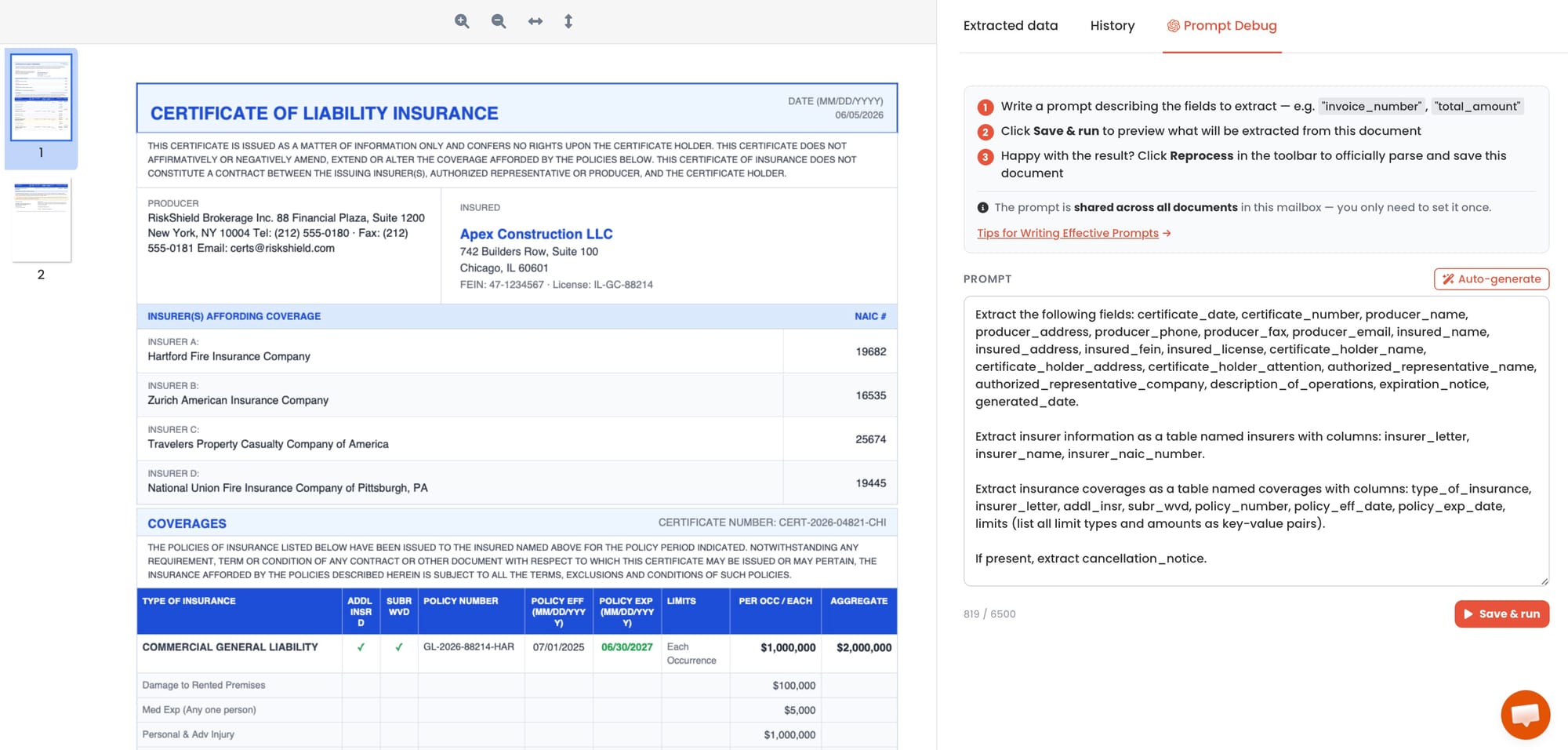
When setting up the inbox, select the GPT-powered parser. Upload a sample COI and let Parsio auto-generate the extraction prompt — it will suggest fields based on the document. Review and adjust the prompt if needed, then save. This works for standard ACORD 25 forms and non-standard formats without any additional configuration.
Step 3: Upload or forward a certificate
Upload a sample COI PDF directly to the inbox, or forward an email with a COI attachment to the inbox email address. Parsio processes the document automatically. Within a few seconds, the extracted fields appear in the document view.
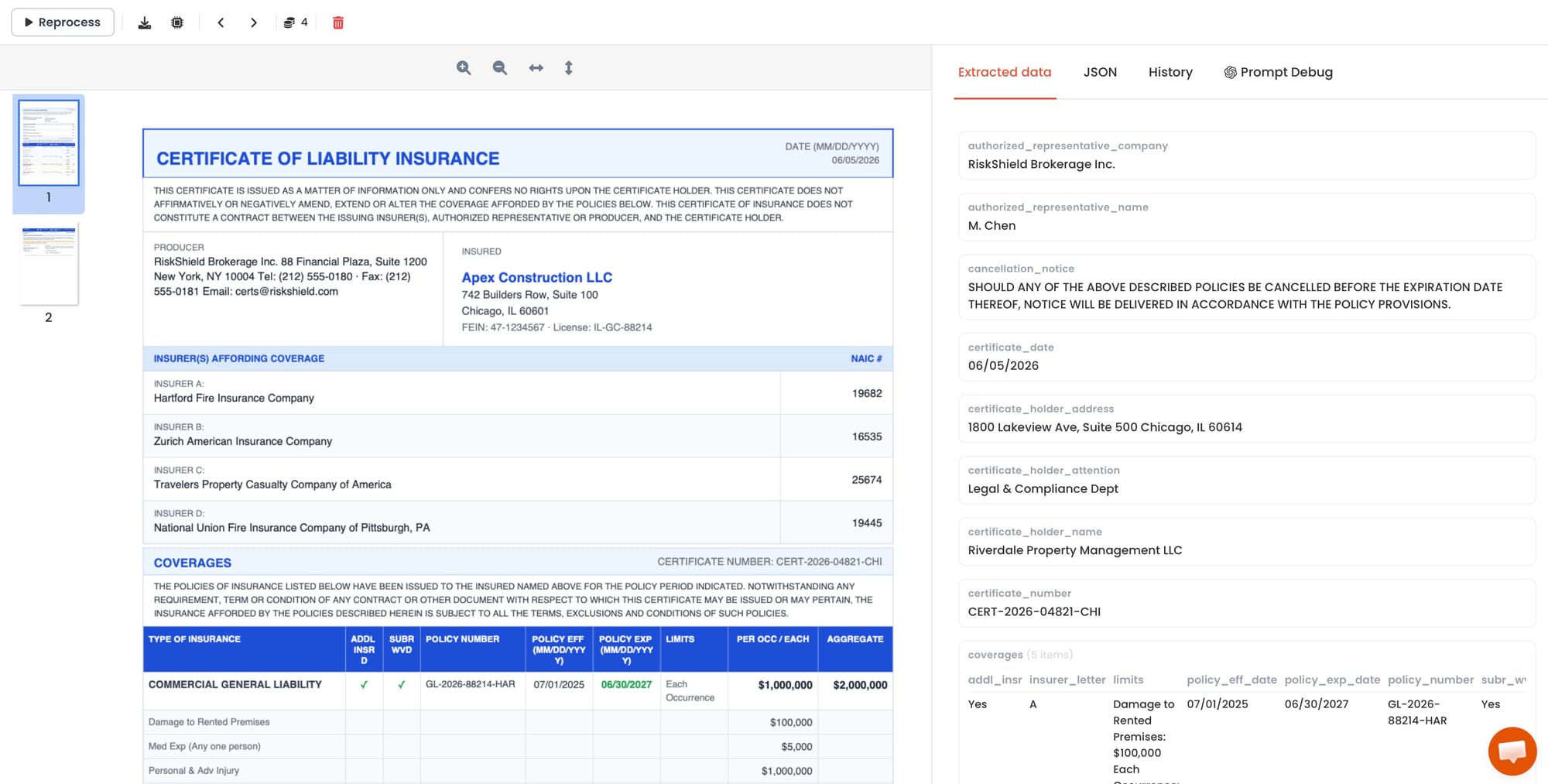
Step 4: Review the extracted fields
Open the parsed document to verify that the key fields were extracted correctly: insured name, insurer names, policy numbers, coverage types, limits, and expiration dates. For standard ACORD 25 forms, accuracy is high because the form layout is consistent across issuers.
If any fields are missing or misidentified — which can happen with older scanned certificates or unusual layouts — switch the inbox to the GPT-powered parser and define a simple extraction prompt describing the fields you need.
Step 5: Set up an export or automation
Once extraction is working correctly, connect the parsed output to your downstream system. Options include Google Sheets (built-in integration), webhooks, Zapier, Make, or n8n. The most common COI tracking setup sends each extracted certificate to a Google Sheet row with columns for the vendor name, coverage type, limit, and expiration date.
Where to Send Your Extracted COI Data
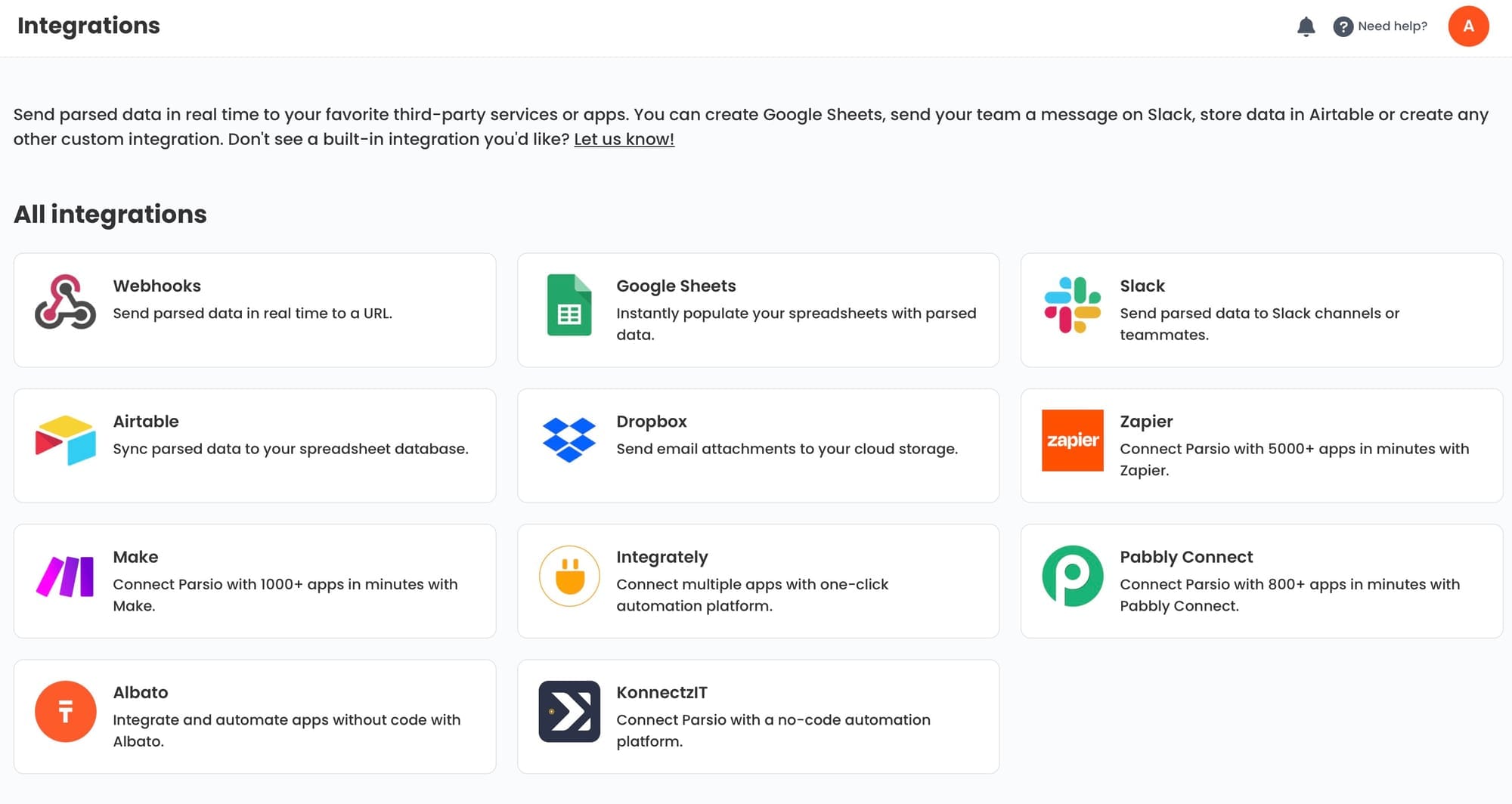
Extraction is only the first step. The value comes from what happens to the data afterward. Here are the most useful destinations for COI extraction output:
Google Sheets — compliance tracker
The simplest and most common setup. Each parsed COI creates a new row in a shared spreadsheet with columns for vendor name, coverage type, limit, policy number, and expiration date. Teams can then filter by expiration date to identify certificates that need to be renewed. Parsio connects to Google Sheets directly without requiring a separate automation tool.
Airtable — vendor management database
Airtable's relational structure works well for COI tracking when you want to link certificate records to a vendor table, add calendar views for expiration dates, or assign follow-up tasks when a certificate lapses. The Parsio webhook or Zapier integration can create or update Airtable records automatically whenever a new certificate is parsed.
Webhook — expiration alerts and custom systems
If your team uses a CRM, a vendor portal, or a custom internal system, webhooks let you send parsed COI data directly to any endpoint. You can also use a webhook to trigger an alert — for example, sending a Slack message or creating a task in a project management tool — when a parsed certificate shows an expiration date within thirty days.
Zapier or Make — multi-step automation
For workflows that need more than one step after extraction — such as sending a confirmation email to the vendor, updating a CRM record, and logging the result to a spreadsheet simultaneously — Zapier and Make provide a no-code orchestration layer on top of Parsio's parsed output. See our guide on automating document parsing with Zapier, Make, and n8n for practical workflow examples.
How to Handle Non-Standard and Scanned COI Documents
Most COI extraction challenges fall into three categories, each with a clear resolution:
Non-standard certificate formats
Some industries or countries use certificate formats that do not follow the ACORD 25 layout. Non-US carriers often issue certificates in entirely different formats. Adjust the GPT extraction prompt — for example, "Extract the insured name, insurer name, each coverage type with its per-occurrence limit and aggregate limit, the policy number, and the policy expiration date." The GPT parser adapts to the document's actual structure rather than expecting a specific form layout.
Scanned or low-quality PDFs
Certificates that have been printed and re-scanned lose the machine-readable text layer. Parsio handles these through OCR as part of the GPT-powered parser workflow — the document is optically recognized before field extraction happens, so you do not need to take any additional steps. Quality still matters: a very low-resolution scan or a photograph taken at an angle may reduce accuracy. If that happens, requesting a digital copy from the vendor or certificate holder is the most reliable fix.
Certificates with handwritten additions
Some COIs include handwritten notes in the Description of Operations field or handwritten additions to coverage limits. The GPT-powered parser can read printed form fields reliably. Handwriting introduces more variability. For certificates where handwritten content is consistently important — such as project-specific endorsements — the GPT parser with a targeted extraction prompt gives better results than the standard AI model.
For a broader look at how different parsing methods compare for structured versus semi-structured PDF documents, see our guide on how to extract data from PDF forms automatically.
Practical Use Cases for Automated COI Extraction
COI data extraction is most valuable in workflows where certificate volume is high, where compliance requirements are strict, or where the cost of a missed expiration is significant. Here are four concrete scenarios:
General contractor subcontractor management
A construction GC typically requires every subcontractor to provide a COI before work begins and to maintain coverage throughout the project. With dozens of active subcontractors and multiple coverage types per certificate, manual tracking is impractical. Automated extraction lets the GC build a live spreadsheet of all active certificates, sorted by expiration date, without anyone manually entering data from each PDF.
Commercial real estate tenant compliance
Property managers require tenants to carry General Liability insurance — and often name the landlord as an additional insured. Tracking dozens of tenant certificates, each renewed annually, is a common operational burden. Automated extraction creates a record for each certificate as it arrives, and the expiration date field feeds a renewal reminder workflow.
Vendor and supplier onboarding
Procurement teams that onboard new vendors often require proof of insurance as part of the intake process. Extracting the COI data automatically — rather than storing the PDF and hoping someone reviews it — creates a structured record that can be matched against the company's minimum coverage requirements. Vendors who do not meet the threshold can be flagged before onboarding completes.
Event and venue management
Event venues, conference organizers, and exhibitor-heavy shows often require exhibitors, vendors, and performers to submit COIs. Processing dozens of certificates before a large event is exactly the kind of high-volume, low-complexity extraction task that benefits most from automation. Each certificate gets parsed on arrival, and the results feed a single compliance dashboard the operations team monitors.
FAQ
What is a Certificate of Insurance used for?
A Certificate of Insurance is a summary document issued by an insurance broker or carrier that proves a business or individual holds specific types of coverage. It is not the insurance policy itself — it is proof that the policy exists. COIs are required in many business relationships: a general contractor asks subcontractors for COIs before they begin work, a landlord requires a tenant's COI before the lease begins, a client requires a consultant's COI before engaging them on a project. The document lets the receiving party verify that the covered party carries adequate insurance without needing to review the full policy. In practice, most COIs follow the ACORD 25 standard form for liability coverage, which makes the layout consistent enough to extract data from automatically.
What fields does a Certificate of Insurance typically contain?
A standard ACORD 25 Certificate of Insurance contains the named insured's name and address, the producer or insurance agent's information, a list of insuring companies, and a structured table of coverage types with associated policy numbers, effective dates, expiration dates, and coverage limits. Coverage types commonly listed include Commercial General Liability (with per-occurrence and aggregate limits), Commercial Auto Liability, Workers' Compensation and Employer's Liability, Umbrella or Excess Liability, and sometimes Professional Liability or Errors and Omissions coverage. At the bottom, the form shows the certificate holder — the company or individual requesting proof of coverage — along with any endorsements such as additional insured status or waiver of subrogation. The Description of Operations field often contains project-specific notes or contractual requirements that the broker has added.
Can AI extract data from ACORD 25 forms reliably?
Yes, ACORD 25 forms are well-suited for AI extraction because the layout is highly standardized. Unlike invoices or contracts, which vary significantly between issuers, the ACORD 25 form is defined by a standards body and used across the US insurance industry with minimal variation. This consistency means the GPT-powered parser can locate and extract the key fields — insurer name, coverage type, limits, policy number, expiration date — with high accuracy on standard digitally-generated certificates. Accuracy is lower for scanned copies with degraded image quality, certificates with significant handwritten additions, or non-ACORD formats used by international insurers. For those cases, a GPT-powered parser with a descriptive extraction prompt handles the variability more gracefully.
How do I track COI expiration dates automatically?
The most practical approach is to extract the expiration date field from each certificate as it arrives and send it to a tracking system — Google Sheets, Airtable, or a CRM. From there, you can set up a date-based alert: a Zapier or Make automation that checks the expiration date column each day and sends a notification if any certificate expires within a set number of days. In Airtable, you can create a calendar view filtered to certificates expiring within thirty or sixty days, giving the team a live dashboard without any manual updates. The key is that the expiration date only ends up in the tracking system once and automatically — the alternative, which is manually entering it each time a new certificate arrives, is where teams make errors and let policies lapse unnoticed.
Is certificate of insurance parsing accurate when certificates come from different insurers?
Accuracy on standard ACORD 25 certificates is high across different issuers because the form layout is standardized, not the insurer. Even though the issuing insurance companies are different, the form structure is the same — coverage table, policy numbers, limits, and dates appear in consistent positions. Variation increases when certificates deviate from the ACORD format, when documents are scanned rather than digitally generated, or when the Description of Operations section contains complex multi-line endorsements. For the vast majority of standard US liability certificates, AI extraction works reliably regardless of which insurer or brokerage generated the document. Edge cases involving non-standard formats, foreign certificates, or heavily annotated PDFs are best handled with a GPT-powered parser that describes what to extract rather than relying on layout matching.
Do I need to set up a template for each different insurance company?
No — and this is one of the key advantages of GPT-powered extraction for COI workflows. Template-based parsers require a separate template for each distinct document layout, which quickly becomes impractical when you receive certificates from dozens of different insurance companies. Parsio's GPT-powered parser does not require per-insurer templates. A single inbox with one auto-generated prompt handles certificates from any insurer. Parsio can auto-generate the prompt from a sample document, so you do not need to write it manually. This makes it practical to run all COI processing through a single workflow regardless of how many different insurance providers your vendors use.
How is COI extraction different from invoice parsing?
The underlying extraction process is similar — both involve pulling structured data from a PDF — but the field types and downstream use cases are different. Invoice parsing focuses on financial fields like line items, totals, tax amounts, and vendor payment information. COI extraction focuses on compliance fields: coverage types, limits, policy numbers, and expiration dates. The stakes are also different: a missed invoice can delay payment, but a missed COI expiration can expose a business to liability if an incident occurs while a vendor's coverage has lapsed. COI extraction workflows typically feed into compliance tracking systems and trigger alerts rather than flowing into accounting or AP software. For more context on AI-powered document extraction across different document types, see our guide on document data extraction using AI.
Extract COI Data Automatically with Parsio
Parsio's GPT-powered parser pulls insured names, coverage types, limits, policy numbers, and expiration dates from certificates of insurance without manual templates or setup. Connect the output to Google Sheets, Airtable, or a webhook to build a live compliance tracker for your vendor or contractor certificates.
Try Parsio for free See how it works →