How to Automate Real Estate Document Processing for Property Managers
Property managers can automate lease agreement extraction, tenant application processing, and contract review with Parsio's AI document parser. No code required.

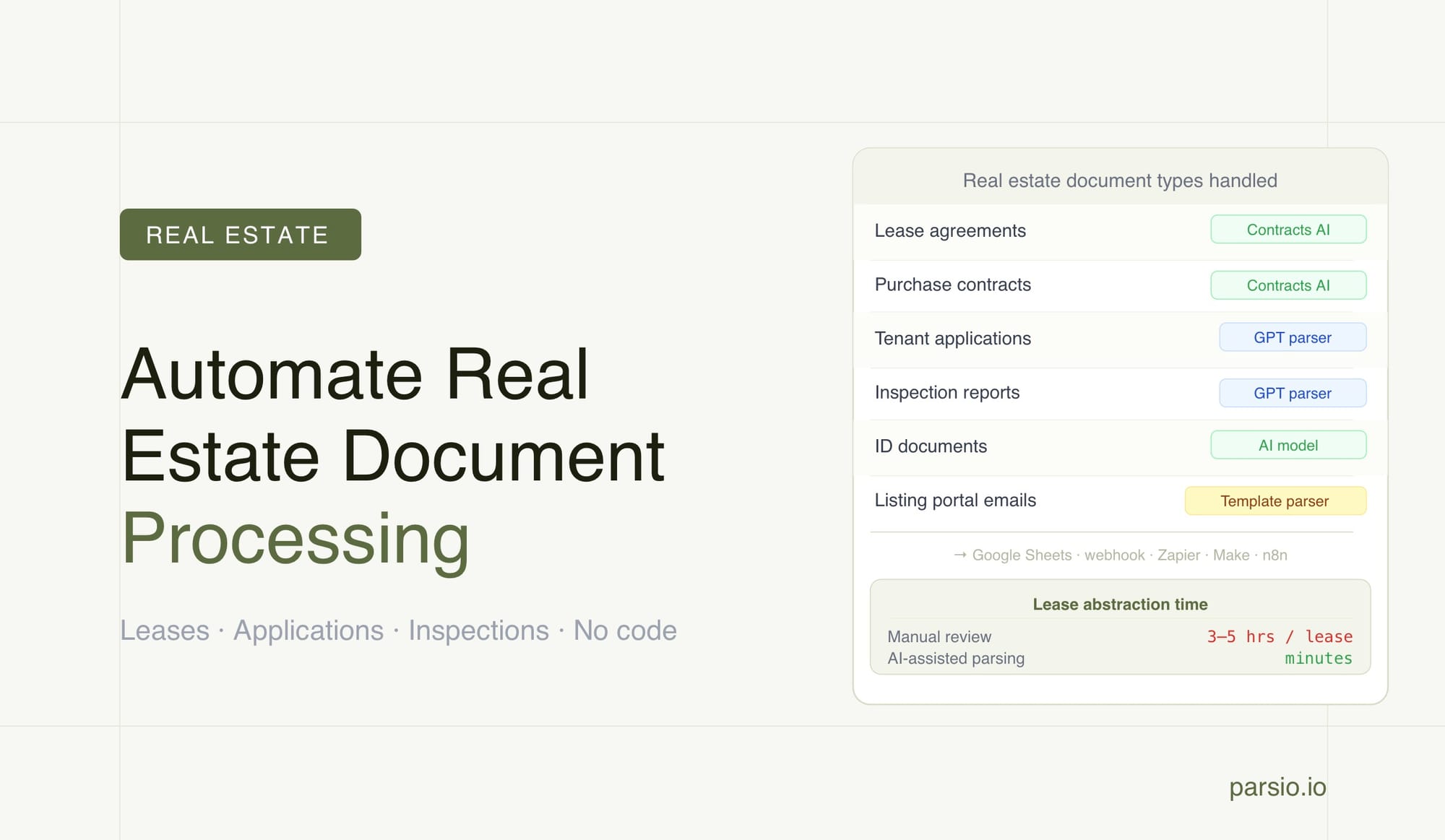
Property managers can automate real estate document processing — including lease agreements, tenant applications, purchase contracts, and inspection reports — by routing each document type to the right parsing model and sending the output directly to their property management tools. The result is structured, searchable data without manual data entry, typically in minutes rather than hours.
Real estate operations generate more documents per transaction than almost any other business type. A single lease signing involves the agreement itself, identity verification documents, bank statements, and often an inspection report. Multiply that across a growing portfolio and the paperwork becomes a full-time job. Manual extraction from these documents is slow, error-prone, and rarely keeps pace with portfolio growth — especially when every landlord, inspection company, and tenant uses a different document format.
This guide covers how property managers and real estate operations teams can use Parsio to extract structured data from the most common real estate document types and route that data into spreadsheets, property management platforms, or automation workflows without writing code.
TL;DR
- Real estate teams process lease agreements, purchase contracts, tenant applications, and inspection reports — most arriving as PDFs or email attachments
- Parsio's AI-powered PDF parser includes a dedicated Contracts model for lease agreements and purchase contracts — no template setup required
- Tenant applications and inspection reports with variable layouts work best with Parsio's GPT-powered parser, which auto-generates the extraction prompt from a sample document
- Emails from listing portals (Zillow, Realtor.com, Apartments.com) with fixed formats are a natural fit for Parsio's template-based parser
- Extracted data routes to Google Sheets, webhooks, Zapier, Make, or n8n — connecting directly to property management software
- Manual lease abstraction takes 3–5 hours per document; AI-assisted parsing brings that to minutes
The Real Estate Document Backlog That Slows Operations
A property management team handles documents at every stage of the tenant lifecycle. Before a lease is signed, there are applications, identity documents, pay stubs, and bank statements to review. At signing, the lease agreement itself — often 20 to 50 pages for commercial properties — needs to be read, summarized, and filed. During the tenancy, inspection reports, maintenance receipts, and insurance certificates arrive. At renewal or sale, purchase contracts and addendums add to the pile.
Manual lease abstraction — reading a lease and pulling out key terms into a spreadsheet — takes between three and five hours per document when done by hand. For a portfolio manager overseeing 50 properties with annual renewals, that is up to 250 hours per year on a single task. Add tenant applications and inspection reports, and the document processing load is significant enough to occupy one or two full-time staff.
The challenge is not just time. Every lease uses different formatting. One landlord puts the security deposit clause on page 4, another buries it in an addendum. Commercial leases include CAM (common area maintenance) charges, tenant improvement allowances, and escalation schedules that rarely appear in the same location across documents. Manual extraction across variable layouts introduces errors, inconsistencies, and missed renewal dates — any of which can have real financial consequences.
According to industry data, over 66% of commercial real estate firms have shifted toward automation solutions for document processing and lease tracking. The primary driver is accuracy at scale: AI-assisted extraction is faster, more consistent, and catches critical dates that manual reviewers miss under time pressure.
What Data Property Managers Need to Extract from Each Document Type
Before setting up a parsing workflow, it helps to define which fields your team actually needs from each document category. The exact list varies by operation, but most property management teams are working toward the same structured output.
From lease agreements: tenant name, landlord name, property address, lease start date, lease end date, monthly rent, security deposit amount, renewal option terms, rent escalation schedule, permitted use, and maintenance responsibilities. Commercial leases often add CAM charge details, tenant improvement allowance, and notice requirements.
From tenant applications: full legal name, date of birth, current address, employment status, monthly income, employer name and contact, previous landlord references, and consent acknowledgments for credit and background checks.
From purchase contracts: buyer and seller names, property address, offer price, earnest money deposit, closing date, contingency conditions (financing, inspection, appraisal), possession date, and agent details.
From property inspection reports: property address, inspection date, inspector name and company, condition ratings by system (roof, HVAC, plumbing, electrical, foundation), flagged deficiencies, and recommended actions.
Having this field list defined before setup makes it easier to configure each Parsio inbox for the right output — and ensures the downstream spreadsheet or property management system receives data in a consistent format regardless of which document variant arrived.
Choosing the Right Parser for Each Real Estate Document
Parsio offers four parser types. The right choice depends on how structured and consistent the document layout is. Real estate document types map to different parsers, and using the wrong one is the most common source of extraction errors.
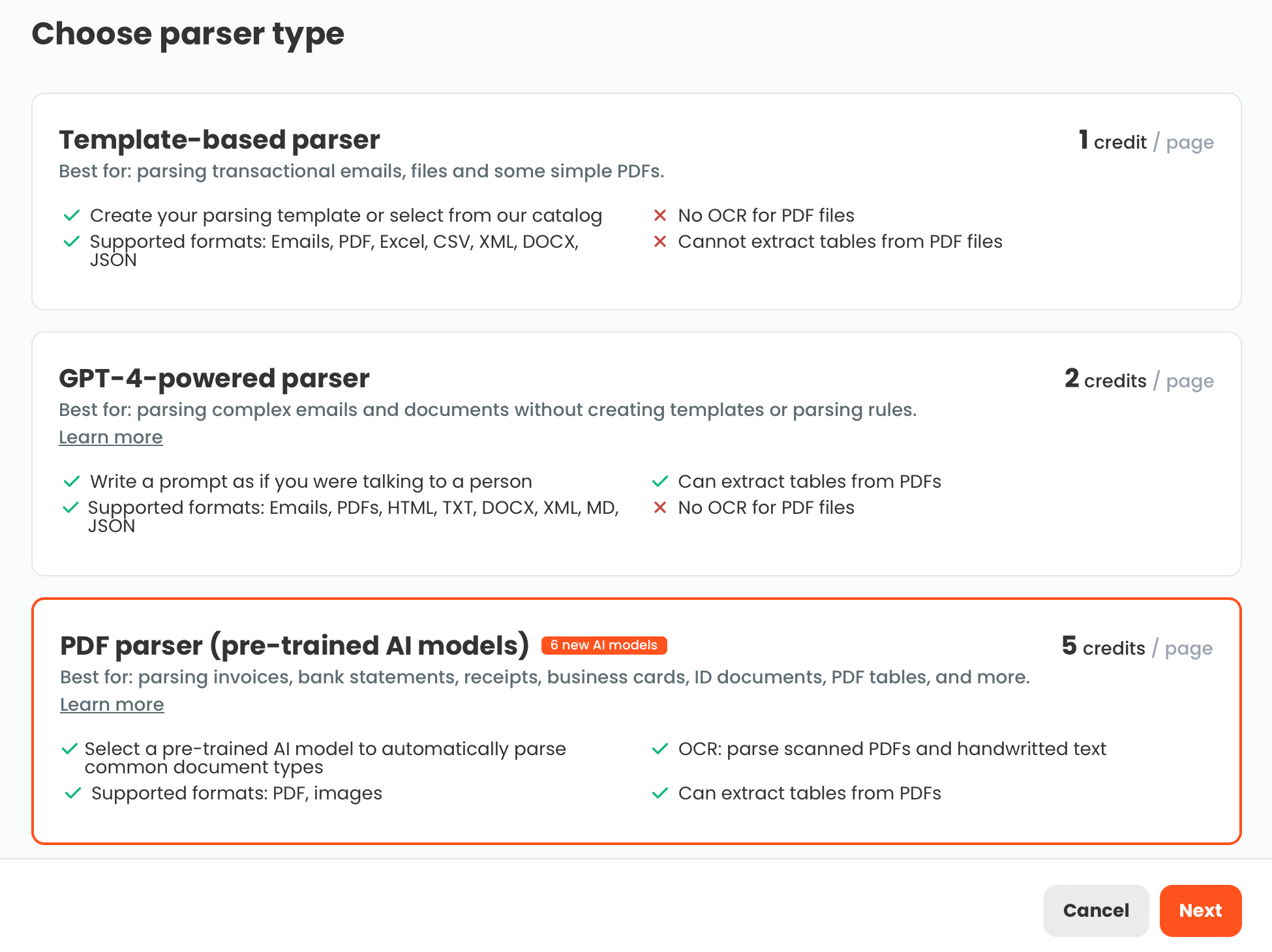
Lease agreements and purchase contracts → AI-powered PDF parser (Contracts model). Parsio includes a dedicated pre-trained model for contracts. No template setup is required — the model already understands the structure of a legal agreement and extracts key fields automatically from the document. For standard residential and commercial lease agreements and purchase contracts, this is the fastest route to structured data with no configuration overhead.
Tenant applications and inspection reports → GPT-powered parser. Application forms vary significantly from one property manager to the next. Some are PDF fillable forms, others are printed documents returned as scanned images. Inspection reports come from different companies with completely different layouts. The GPT-powered parser handles this variability without requiring a template per layout. Parsio can auto-generate the extraction prompt from a sample document you upload — you do not need to write the prompt manually.
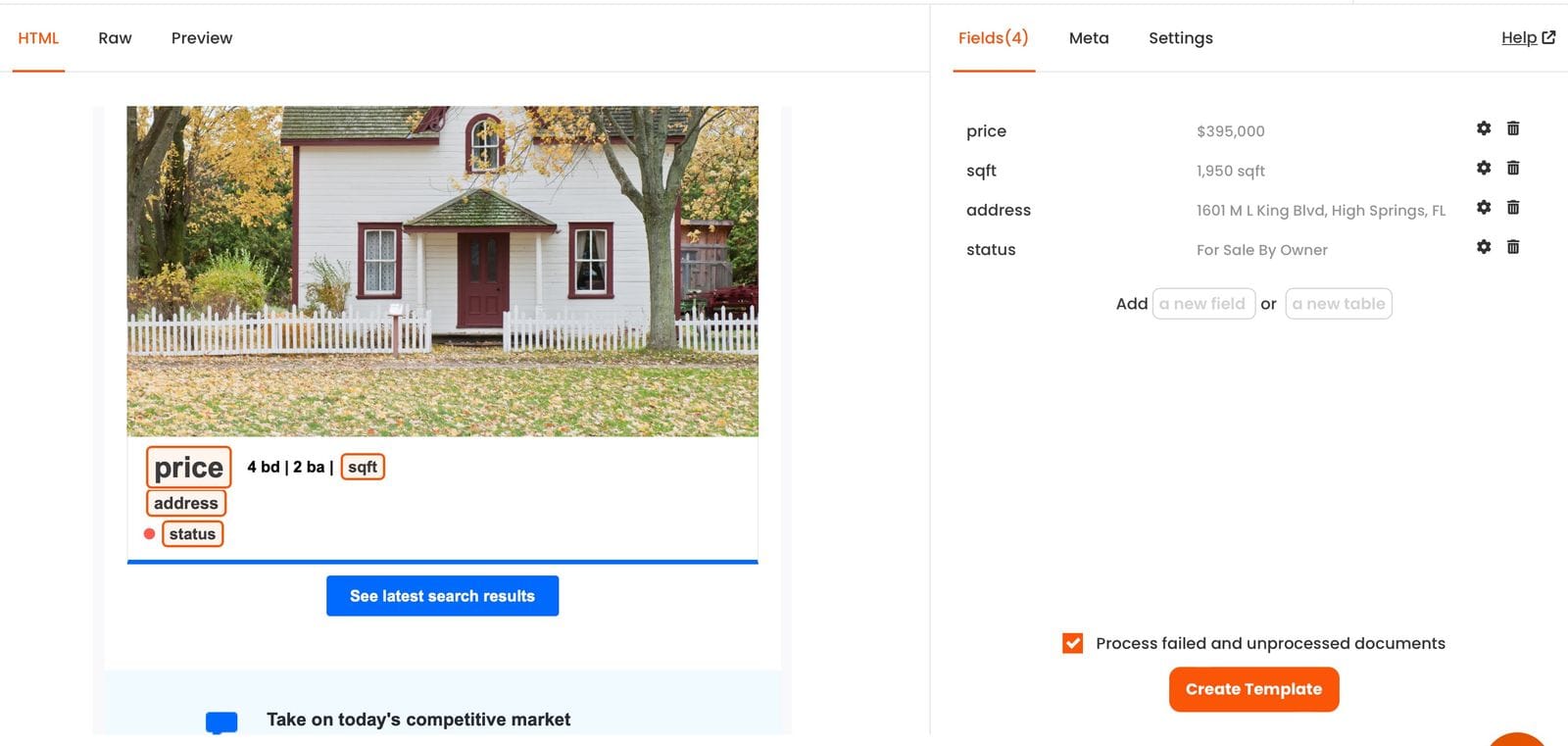
Listing portal emails (Zillow, Realtor.com, Apartments.com) → Template-based parser. Lead notification emails from major listing portals arrive in the same format from the same sender every time. Once a template is built for that specific email format, every subsequent notification extracts automatically with very high accuracy and minimal per-document processing cost. This is the most efficient parser for high-volume, fixed-format email sources. For more on setting up email-based lead capture, see the guide to email parsing for real estate teams.
OCR converter — not a structured data extractor, but useful when a document is too low-quality for direct parsing. If a scanned lease is unclear, running it through the OCR converter first produces editable text that can then be reviewed or processed through the GPT parser.
How to Extract Data from Lease Agreements with Parsio
Lease agreements are the highest-value document extraction target for most property management teams. Getting lease data into a structured format quickly — especially key dates and financial terms — is the difference between proactive portfolio management and missed renewal windows.
To get started, create a new inbox in Parsio and select the AI-powered PDF parser. When prompted to choose a document model, select Contracts. Parsio then accepts lease PDFs through this inbox via email attachment, manual upload, or API. For teams where leases are generated by property management software and saved to Google Drive or Dropbox, Zapier or Make can watch those folders and send new files to the Parsio inbox automatically.
The Contracts model extracts the key fields from each lease — parties, address, dates, financial terms, renewal options — and makes them available as structured data. The extracted output can be reviewed in the Parsio interface before export, or sent automatically to downstream tools when the parser is reliable enough to skip manual review.
The most useful destination for lease data is usually a Google Sheets lease tracker: one row per property, with columns for tenant name, lease start, lease end, monthly rent, security deposit, and renewal option. This sheet becomes a live portfolio database that any team member can filter by expiry date, sort by rent, or export for reporting — without opening a single PDF.
For commercial leases with unusual structures — non-standard addendums, heavily negotiated clauses, or very long agreements — the GPT-powered parser can supplement the Contracts model. The GPT parser handles document complexity that falls outside what the pre-trained model captures consistently. That said, for documents exceeding 10 pages, focus the extraction on the specific fields your team needs rather than attempting full-document parsing. For a broader view of contract extraction across other document types, see the guide to automating legal document processing.
Processing Tenant Applications and Screening Forms
Tenant application forms are almost always unique to each landlord or property management company. One firm uses a PDF fillable form, another uses a printed Word document returned as a scanned image. A third uses a third-party screening service with its own output format. This variety makes template-based parsing impractical — a new template would be required every time the application format changes.
The GPT-powered parser solves this. You upload a sample application, Parsio generates an extraction prompt automatically, and then every subsequent application of the same general type — even with minor format differences — extracts using that prompt. You do not need to create a field-by-field template or adjust the configuration when minor layout changes occur.
The extracted application data can feed a Google Sheet where all submissions are collected in rows, making it easy for a leasing agent to compare candidates across income, employment history, and reference count without opening individual PDFs. For higher-volume operations, webhook output can deliver the structured data directly to a CRM or tenant screening platform the moment processing completes.
If your application process begins with an email from the applicant (forwarding their documents as attachments), Parsio handles both the email content and the PDF attachment in the same inbox. Email metadata — sender address, subject line, received timestamp — can be captured alongside the parsed application fields, giving you a complete record with no manual logging.
For identity document verification that accompanies applications — passports, driver's licenses, national ID cards — Parsio's AI-powered PDF parser includes a dedicated ID Documents model. This extracts name, document number, date of birth, nationality, and expiry date from common identity formats automatically. See the guide to extracting data from PDF forms for a detailed look at form-style document workflows.
Handling Purchase Contracts and Property Inspection Reports
Purchase contracts and inspection reports represent two ends of the real estate document spectrum: one is highly structured and legally standardized, the other is variable and narrative-heavy. Parsio handles both, but through different parser types.
Purchase contracts follow a reasonably consistent structure across jurisdictions and are a strong fit for the Contracts model. Key terms — buyer and seller names, property address, offer price, deposit amount, contingencies, closing date — appear in predictable sections of most standard purchase and sale agreements. Parsio extracts these fields automatically and can deliver the structured data to a deal tracker in Google Sheets or a CRM via webhook the moment the document is processed. For real estate agencies managing multiple active transactions, this automation replaces the manual step of reading each contract and updating a deal board by hand.
Property inspection reports are the opposite: semi-structured, narrative in sections, and highly variable between inspection companies. The section covering roof condition appears in a different location and under a different heading depending on which inspection firm produced the report. The GPT-powered parser handles this well when the extraction goal is focused — condition ratings for major systems, flagged deficiencies, inspector details, and property address — rather than a full transcript of the document. Parsio generates the extraction prompt automatically from a sample report, and the prompt can be refined based on what your team needs to capture most reliably.
For teams that receive inspection reports from the same two or three inspection companies repeatedly, creating one GPT inbox per company produces more consistent results. Each inbox has a prompt tuned to that company's report format, and incoming reports are forwarded to the matching inbox based on the sender email address.
Setting Up the Workflow in Parsio
The most practical starting point is one inbox per document type. Lease agreements go to the Contracts inbox, tenant applications go to a GPT Application inbox, inspection reports go to a GPT Inspection inbox, and listing portal emails go to a Template inbox per portal. This keeps the extraction logic clean and makes it easy to tune each inbox independently without one document type affecting another.
Documents enter each inbox in several ways:
- Email forwarding: forward each document type to its inbox email address. Parsio extracts from the attached PDF automatically. This is the simplest ingestion path — a leasing agent forwards a received lease to the lease inbox and extraction starts immediately.
- Manual upload: drag and drop files directly in the Parsio interface. Useful for backfilling historical documents or occasional document types that don't warrant a full automation setup.
- Zapier or Make: watch a Google Drive folder, Dropbox folder, or email label and send new files to the right Parsio inbox automatically. This works well when leases are generated by property management software and saved to a shared drive.
- Parsio API: for high-volume operations or direct software integrations, the API allows document submission programmatically from any application or workflow engine.
Once documents are processed, the Parsio review interface shows the extracted fields alongside the original document. For document types where the parser is reliable, automatic export can skip the review step entirely. For high-stakes documents like commercial leases, a brief verification pass before export is recommended for critical fields.
Where the Extracted Real Estate Data Goes
Extraction produces structured data — but that data is only useful when it reaches the right destination. Parsio connects to the tools real estate teams already use, without requiring custom code or API development.
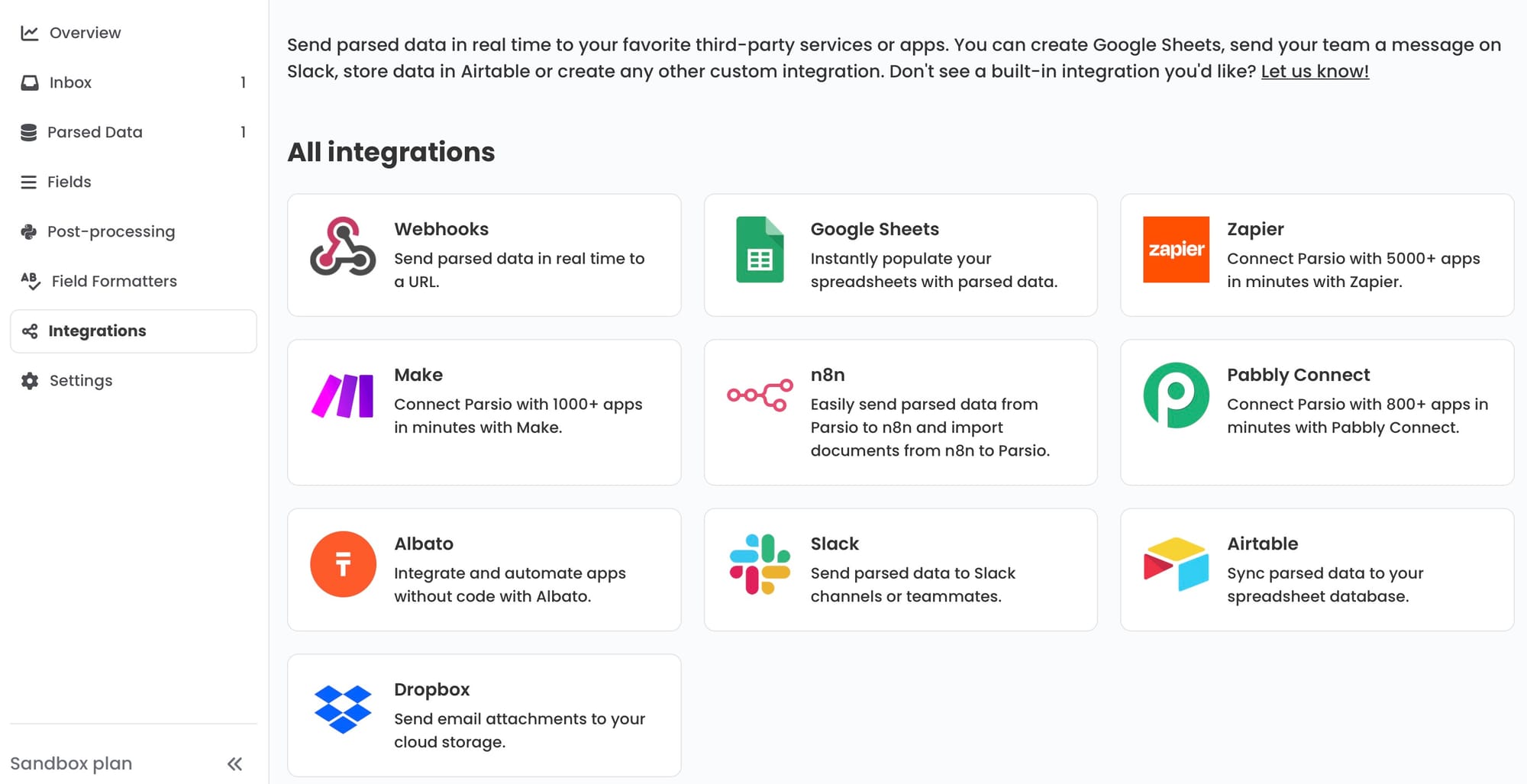
Google Sheets is the most common starting point for property management teams. Parsio's built-in Sheets integration sends each processed document as a new row in a target spreadsheet. A lease tracker sheet with one row per property — sortable by expiry date, filterable by rent band, and shareable across the team — becomes a live portfolio database maintained by document parsing rather than manual entry.
Webhooks deliver structured data as JSON to any endpoint, including property management platforms (AppFolio, Buildium, Yardi, RentManager), CRM systems, or maintenance tracking tools that accept inbound data. A webhook from a processed lease application can create a new applicant record in your leasing CRM automatically, with all extracted fields pre-populated.
Zapier and Make connect Parsio to platforms that support these automation ecosystems. A Parsio trigger in Zapier can create a new contact in a CRM, add a row to an Airtable base, send a Slack notification to the leasing team when an application is ready for review, or update a deal stage in a pipeline tool. Make offers more granular control for conditional routing — for example, sending residential lease data to one destination and commercial lease data to a different property management system based on an extracted field value.
n8n is available for teams building self-hosted automation infrastructure. Parsio connects to n8n, allowing document parsing pipelines that run on internal servers rather than third-party cloud services — relevant for property management groups with specific data residency requirements.
Frequently Asked Questions
Can Parsio extract data from scanned or handwritten lease agreements?
Yes. Parsio's AI-powered PDF parser handles scanned documents and images alongside digital PDFs. OCR processing is built into the extraction workflow, so scanned lease agreements — including those produced from physical paper originals — go through optical character recognition automatically before field extraction begins. Standard lease forms with typed content and handwritten signatures extract well in most cases, because the typed content carries the key terms that matter. Handwritten annotations or fully handwritten agreements are more challenging: accuracy depends on handwriting clarity and the legibility of the scan. Where a scanned document produces unreliable results through the main parser, the OCR converter in Parsio can be used as a preprocessing step to convert the scan to editable text, which can then be reviewed or passed to the GPT parser for targeted extraction of specific fields.
What happens when lease agreements from different landlords use different layouts?
Format variability across landlords and legal firms is the normal case for property managers who handle leases from multiple property owners — each using their own preferred template or attorney-drafted agreement. Parsio's Contracts model is pre-trained to handle this variability without requiring a separate configuration per landlord. The model identifies key terms and clauses by semantic meaning rather than by fixed page position. This means a lease that puts the security deposit clause on page 4 and another that buries it in an addendum on page 18 both produce the same structured output field. Where the standard model is inconsistent for a particularly unusual layout, the GPT-powered parser can be used instead, with Parsio auto-generating an extraction prompt from a sample of that specific format. The practical result is that your team never needs to rebuild a template configuration when you onboard a new property owner with a different lease style.
How does Parsio handle very long commercial lease agreements that run 50 or more pages?
Commercial leases can run extremely long, with key financial terms buried across multiple sections, exhibits, and addendums. Parsio's Contracts model processes multi-page PDFs and extracts the defined fields wherever they appear in the document. For very long agreements, the most reliable approach is to focus the extraction on the specific fields your team actually needs — rent, escalation, options, deposit, CAM charges — rather than attempting a full-document parse of every clause. If critical terms are isolated in a separate exhibit (common for commercial rent schedules and CAM charge calculations), processing that exhibit as a separate document often produces better results than extracting from the entire agreement at once. For documents exceeding 10 pages where the extraction goal is complex, the GPT-powered parser is a better choice than the pre-trained model, and focusing the extraction prompt on a defined field list keeps results consistent. Note that very long documents, particularly those above 10 pages, require more focused extraction prompts to maintain reliability.
Can extracted lease and application data update property management software automatically?
Yes, through webhooks or automation platforms like Zapier and Make. When Parsio finishes processing a document, it can send the extracted data as a JSON payload to a webhook endpoint that your property management platform exposes. If your platform supports inbound webhooks (many modern platforms including AppFolio, Buildium, and RentManager provide these), the integration is straightforward: a processed lease creates or updates a property record in the platform with all extracted fields pre-filled. For platforms that do not have direct webhook support but are available in Zapier or Make, those automation tools can relay the data from Parsio to the destination application. More complex routing — for example, sending residential lease data to one system while routing commercial lease data to a different platform — is handled cleanly in Make using conditional logic based on an extracted field value such as lease type or square footage.
How do you handle tenant applications that arrive in different formats from different applicants?
The GPT-powered parser is designed precisely for this scenario. Unlike the template-based parser — which requires a specific template per document format — the GPT parser extracts data from documents based on meaning rather than layout. When you set up a GPT Application inbox in Parsio, you upload a sample application form. Parsio auto-generates an extraction prompt from that sample, identifying the fields to extract. When subsequent applications arrive — even those with different field arrangements, fonts, or pagination — the same prompt extracts the target fields without requiring a new configuration. Where an applicant submits a completely different application type (for example, one from a relocation agency with a different structure), updating the prompt to accommodate the new format or creating a second inbox for that specific source handles the variation cleanly. The ability for Parsio to auto-generate the initial prompt means there is no manual prompt-writing step even when onboarding a new application format.
Is the extracted data from lease agreements accurate enough to use without manual review?
For well-formatted digital lease agreements processed through Parsio's Contracts model, field-level accuracy on standard fields — tenant name, property address, lease dates, monthly rent, security deposit — is typically very high. Most property management teams find that routine fields on digital leases can be accepted without per-document verification once the parser has been validated on a representative sample of their specific lease formats. However, a verification pass is strongly recommended for high-stakes financial terms before those values feed into financial calculations or legal records. Key fields to double-check include rent escalation schedules (which often contain complex percentage or CPI-linked formulas), option exercise deadlines, and termination clause specifics. The practical workflow for most teams is automatic extraction with automatic export for the bulk of the data, combined with a lightweight exception review queue for documents where the confidence score falls below a threshold or where critical financial terms require sign-off before the data is used in downstream systems.
Stop copying lease data by hand
Parsio's AI-powered parser extracts structured data from lease agreements, tenant applications, purchase contracts, and inspection reports — and sends the results directly to your property management tools or spreadsheets.