How to Automate Three-Way Invoice Matching with Document Parsing
Three-way matching compares the purchase order, goods receipt, and supplier invoice before approving payment. Here is how to automate the data extraction step and speed up your AP approval cycle.

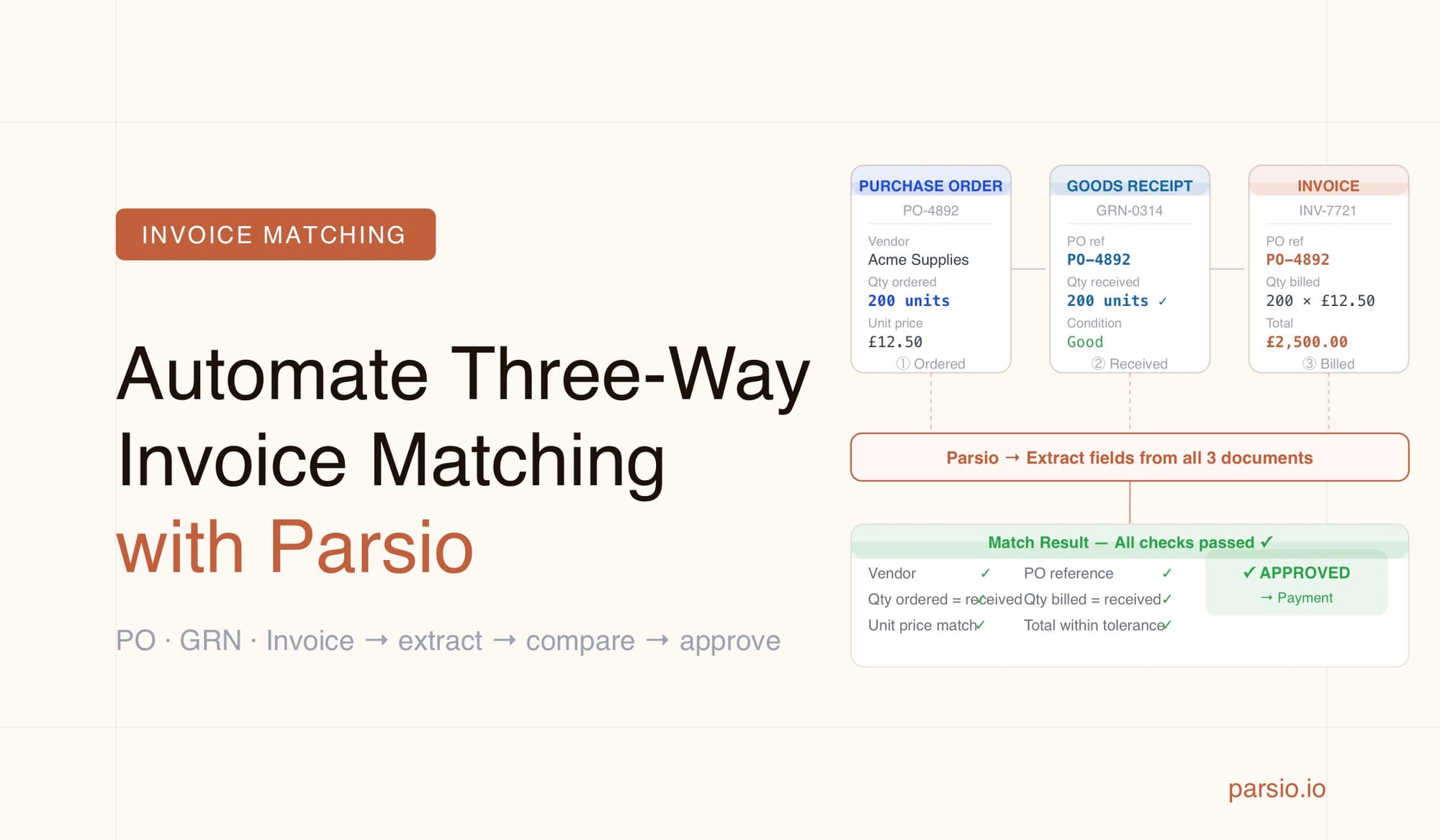
Three-way invoice matching automates the accounts payable approval process by comparing three documents — the purchase order, the goods receipt note, and the supplier invoice — to verify that what was ordered, what arrived, and what is being billed all agree before a payment is approved. The bottleneck in this process is almost always data extraction: manually pulling numbers out of PDFs and emails so they can be compared. Parsio handles that extraction step automatically, converting each document type into structured data that a spreadsheet, ERP, or automation platform can then match without any manual keying.
This guide explains the three-way matching workflow, what data to extract from each document type, and how to configure Parsio to handle all three extraction jobs reliably.
What Is Three-Way Invoice Matching
Three-way matching is the core internal control used by accounts payable teams to verify supplier invoices before approving them for payment. It compares three independent documents:
- Purchase order (PO): what your organisation agreed to buy, at what price, from which supplier
- Goods receipt note (GRN) or delivery confirmation: what was actually received and accepted at your premises
- Supplier invoice: what the supplier is billing for
A match means all three documents agree on quantity, price, and supplier identity within an acceptable tolerance. A mismatch — the invoice quantity is higher than the GRN, or the invoice price differs from the PO — triggers an exception that requires review before payment is released.
Three-way matching is standard practice in manufacturing, retail, distribution, and any organisation with meaningful procurement volume. Research from IOFM benchmarking data shows that manual invoice processing costs between $12 and $30 per invoice, while organisations with automated matching bring that cost below $4. The process also catches duplicate invoices, billing errors, and quantity discrepancies that would otherwise result in overpayments.
The challenge is that all three documents typically arrive as PDFs or email attachments in formats that differ by supplier and by internal system. Getting data out of them — accurately, at scale — is where the manual work accumulates.
Why Document Extraction Is the Matching Bottleneck
Most AP teams already understand the logic of three-way matching. The difficulty is not the comparison itself — it is getting consistent, structured data out of three different document types, each arriving from a different source in a different format.
Purchase orders come from your own procurement system or from a buyer ERP as a PDF. Goods receipt notes are issued internally when a delivery is confirmed — sometimes as a PDF from a warehouse system, sometimes as an email notification from a logistics platform. Supplier invoices arrive from dozens or hundreds of different vendors, each using their own template. No two of these document types look the same, and no single parsing approach works across all of them without configuration.
Teams that try to automate matching without solving the extraction step typically hit one of three problems:
- Manual re-keying: AP staff type PO numbers, quantities, and amounts from PDFs into a spreadsheet before any comparison can happen — introducing data entry errors at the start of the process
- Brittle template parsers: rule-based extraction tools work when document layouts stay fixed but break whenever a supplier changes their invoice template or a new vendor is onboarded
- Partial automation: the matching logic is automated but data still enters through a manual upload step, creating a throughput bottleneck at the point of ingestion
Parsio addresses this by providing different parser types for different document characteristics: a template-based parser for documents with stable, predictable layouts; an AI-powered PDF parser for standard business documents like invoices; and a GPT-powered parser for layouts that vary or that do not conform to a standard format.
What Data to Extract from Each Document
Successful three-way matching requires a consistent set of fields from each of the three documents. The fields that need to match across all three are the linking keys: PO number, vendor identity, line-item quantities, and unit prices. Everything else is context.
Purchase order fields
- PO number (the primary matching key across all three documents)
- PO date and required delivery date
- Supplier name and supplier code
- Line items: item description, item code or SKU, quantity ordered, unit price, line total
- Total order value and currency
- Payment terms
Goods receipt note fields
- PO number (for linking back to the original order)
- GRN number or delivery reference
- Receipt date
- Supplier name and delivery address
- Line items: item code, description, quantity received
- Receiving department or warehouse location
Supplier invoice fields
- Invoice number
- PO number (when referenced on the invoice — this is the key matching link)
- Invoice date and payment due date
- Supplier name and VAT or tax number
- Line items: description, quantity billed, unit price, line total
- Subtotal, tax amount, and total due
- Payment instructions: bank details or payment reference
For the three-way match to work reliably, your extraction schema must capture the PO number from all three documents using consistent formatting. Suppliers sometimes reference the PO number differently — "PO#", "Order Ref", "Your Ref" — so the extraction prompt or template should account for all common variations you see from your suppliers.
How to Set Up Extraction for Each Document Type in Parsio
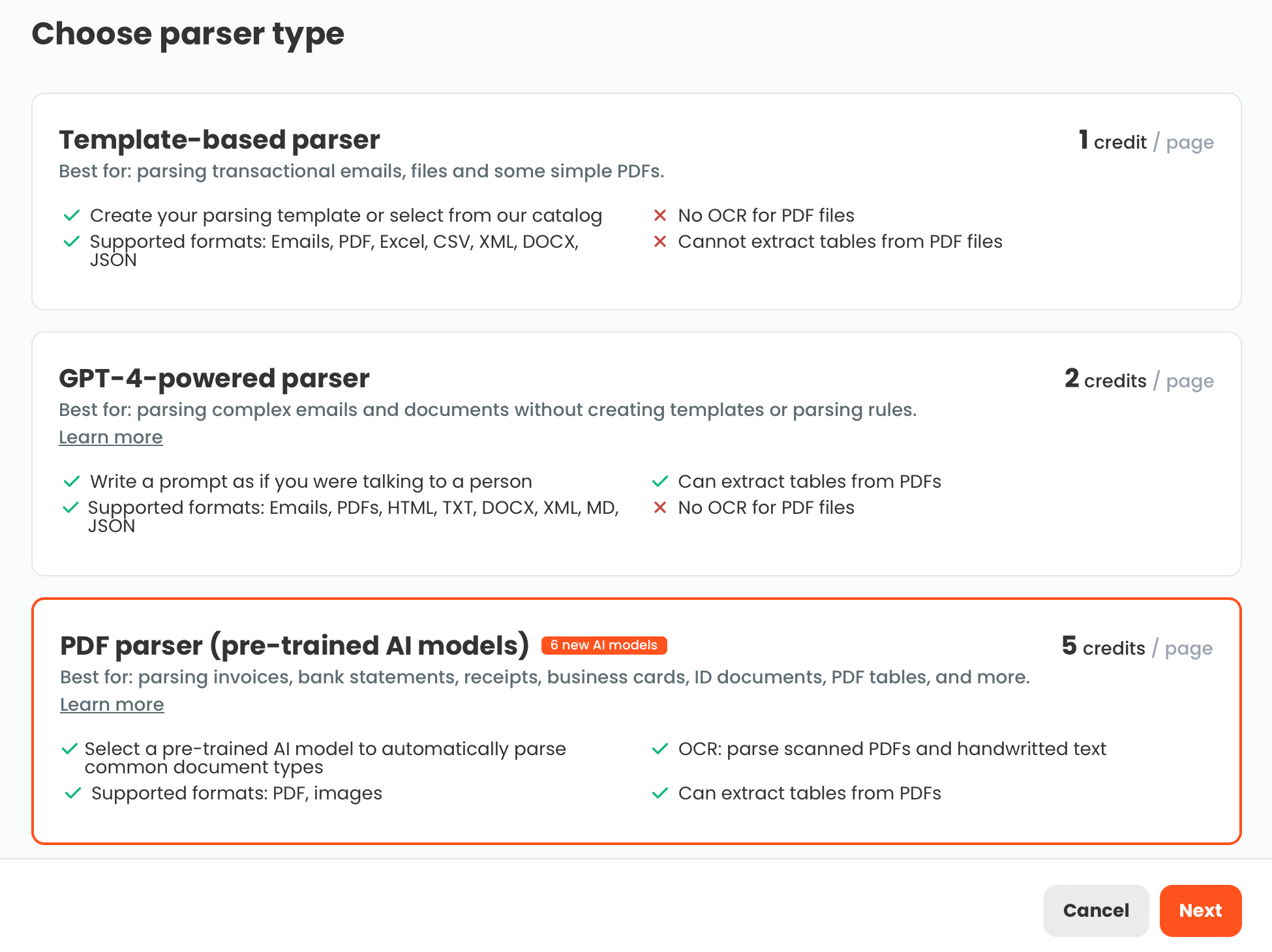
Each document type in a three-way match benefits from a different Parsio parser. Set up three separate inboxes — one per document type — so each can be configured independently.
Purchase orders
Purchase orders issued by your own procurement system have a predictable, machine-generated layout. Use the template-based parser if your POs always look the same. If you also process inbound POs from customers who each use their own layout, use the GPT-powered parser for those — define the fields you need in plain language and the parser locates them regardless of layout. Configure line items as a repeating field group so each product line becomes a separate record in the output rather than a single merged text string.
Goods receipt notes
GRNs typically come from a single internal warehouse or ERP system, making them the most consistent document in the three-way match set. The template-based parser works reliably here. Focus the extraction schema on the PO number (for matching), quantities received, and receipt date. Set up a forwarding rule that routes GRN emails or notifications from your warehouse system to the dedicated Parsio inbox automatically.
Supplier invoices
Supplier invoices are the most variable of the three document types. Use Parsio's AI-powered PDF parser for standard invoice formats — it handles invoices from most suppliers without any template setup and requires no manual field mapping. For vendors with unusual invoice layouts, or for invoices that arrive as email content rather than PDF attachments, the GPT-powered parser provides the flexibility to handle any format.
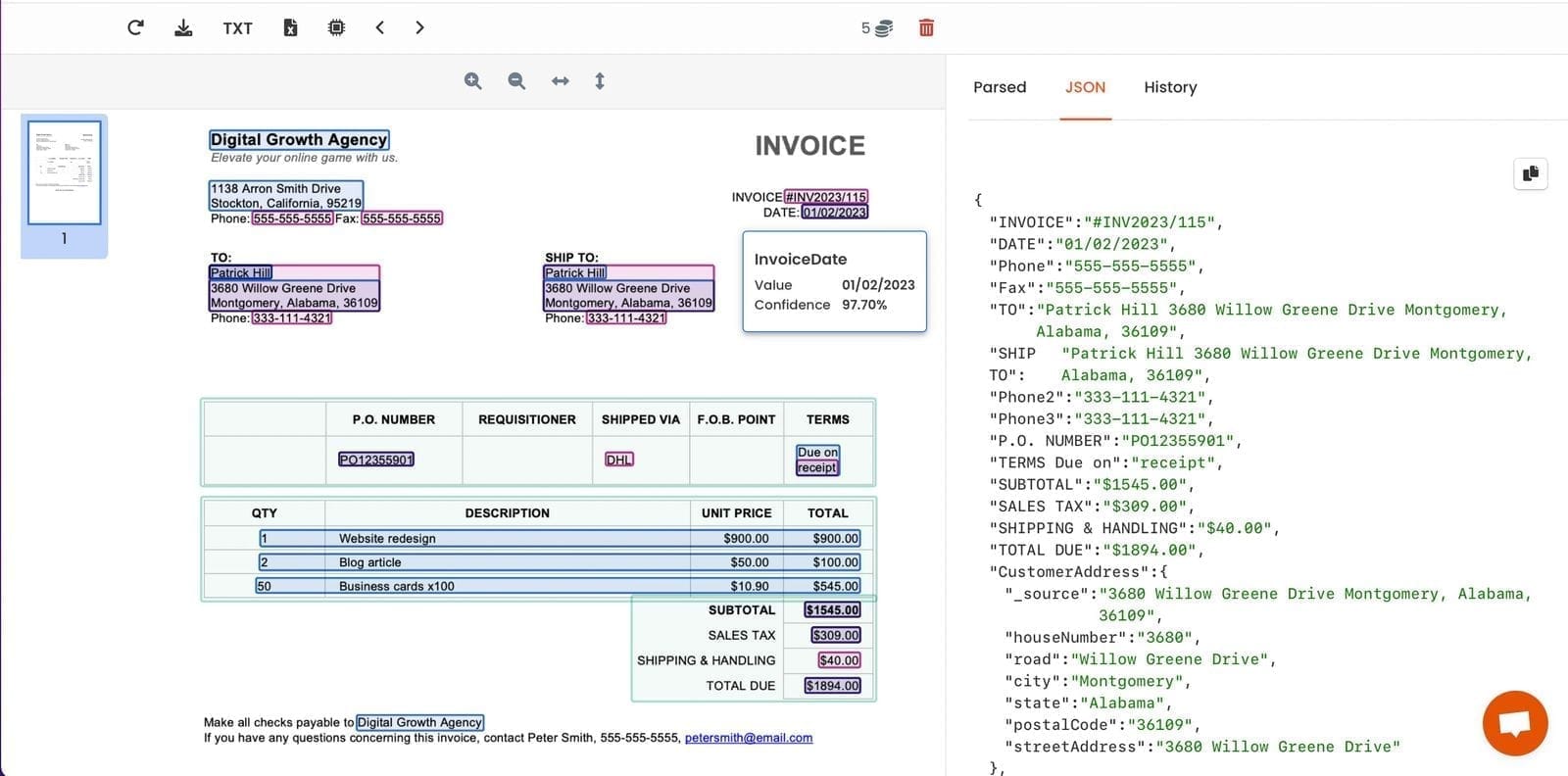
For each inbox, confirm that the PO number field is being extracted consistently and in a comparable format. This is the linking key that makes matching possible. Test against invoices from your five highest-volume suppliers before relying on it at scale.
Connecting the Three Documents for Matching
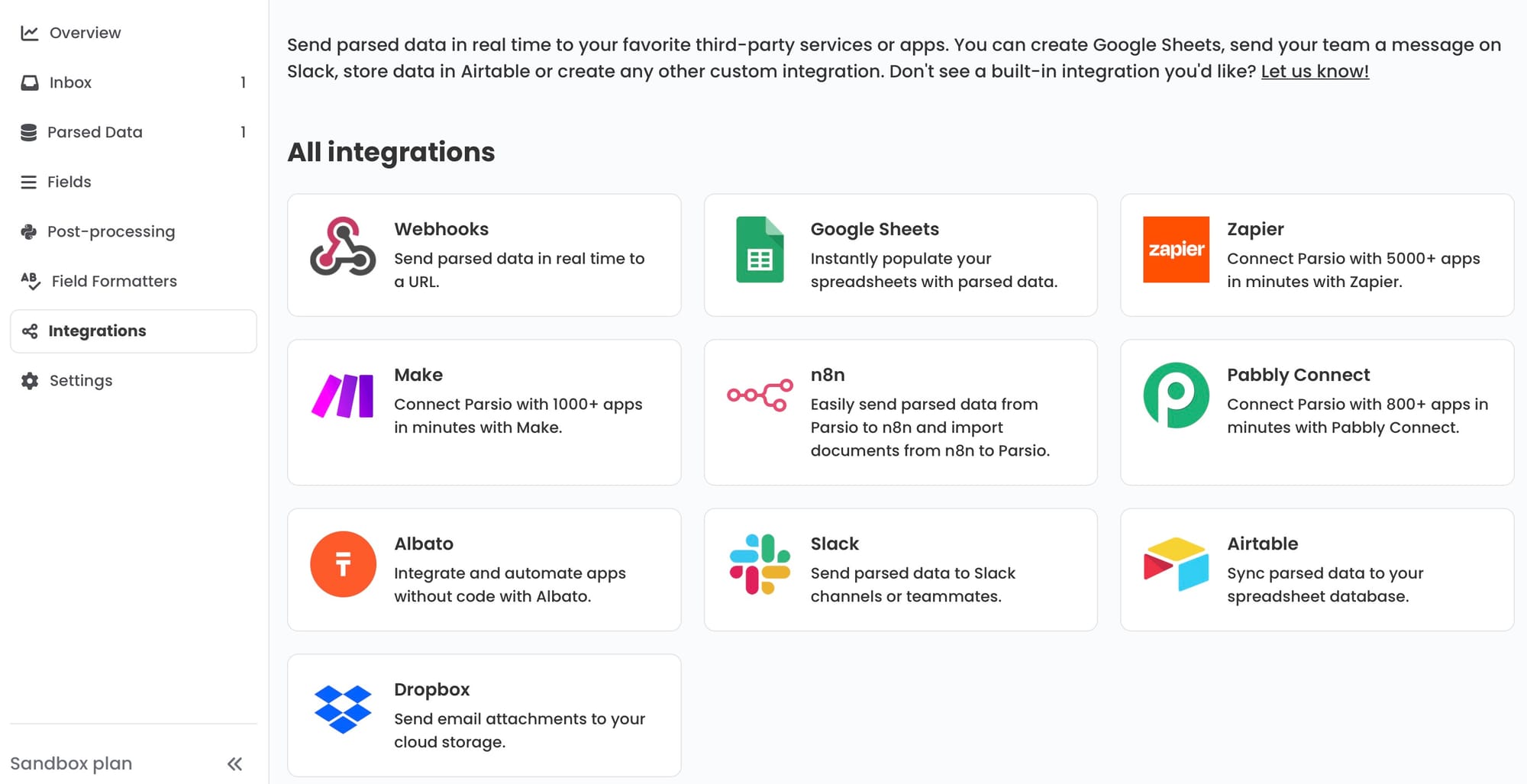
Parsio handles the extraction step. The matching comparison itself happens in whatever tool your team uses to run AP workflows — a spreadsheet, an automation platform, or your ERP.
Matching in Google Sheets
For small and mid-sized teams, Google Sheets is the most accessible matching layer. Configure Parsio to append extracted rows to three separate sheets — one for POs, one for GRNs, one for invoices. Add a fourth summary sheet that uses VLOOKUP or QUERY formulas to join the three tables on PO number and flag rows where quantities or prices fall outside your tolerance threshold. This requires no coding and can be operational within a few hours.
Matching via Make or Zapier
For more automated exception handling, build matching logic on top of Parsio's output using Make or Zapier. When Parsio parses a new invoice, trigger an automation that looks up the PO record and GRN record for the same PO number, compares line-item quantities and prices, and sends a Slack message or creates a task in your project tool if a discrepancy is found. Matched invoices route to an approval queue automatically; only exceptions require a human reviewer.
Matching in an ERP
If your organisation uses NetSuite, SAP, Xero, or another ERP, configure Parsio to send extracted invoice data via webhook to the ERP API. Most ERP systems have built-in three-way matching once the data is inside the system — the bottleneck is getting invoice data in without manual entry. Parsio solves that by converting PDF invoices into structured JSON that the ERP can ingest directly through its API, removing the manual upload step entirely.
Common Failure Modes in Automated Three-Way Matching
PO number format inconsistency. Suppliers reference PO numbers in different ways — some write "PO-12345", others write "PO 12345" or just "12345". If the PO number in the extracted invoice does not match the format in the PO record, the join fails silently. Standardise PO number format in a post-processing step — for example, strip non-numeric characters before comparing — so that all three sources produce the same key value.
Partial deliveries. A supplier ships 80 units against a PO for 100 and invoices for 80. The GRN records 80 received. If your matching logic expects quantities to exactly equal the PO total, this flags as an exception when it is actually correct. Set tolerance rules that allow partial delivery matching: the invoice quantity must equal the GRN quantity and must not exceed the PO quantity.
Line-item description mismatches. Descriptions rarely match word for word across documents. The PO might say "widget model A — blue" while the invoice says "Blue Widget, Model A". Matching on item codes or SKUs is more reliable than matching on descriptions. Make sure your extraction schema captures a consistent item code field in all three documents that refers to the same catalogue number.
Invoices without a PO reference. Some suppliers, particularly smaller vendors, send invoices without referencing the PO number. These cannot be automatically matched. Route no-PO invoices to a separate review queue at ingestion rather than letting them fail partway through the matching workflow.
Multiple invoices against one PO. A PO for an ongoing service or phased delivery may generate several invoices over time. Your matching logic must support one-to-many relationships — tracking the cumulative invoiced amount against the PO total, not expecting a single invoice to equal the entire PO value.
For the full invoice extraction workflow, see How to Extract Data from Invoices Automatically. For PO extraction specifics, see Automating Purchase Orders Data Extraction. For end-of-month supplier reconciliation, see How to Automate Supplier Statement Reconciliation.
FAQ
What is three-way matching in accounts payable?
Three-way matching is an accounts payable control that verifies a supplier invoice against two other documents — the original purchase order and the goods receipt note — before approving the invoice for payment. The match confirms that your organisation agreed to buy the goods (PO), that the goods arrived and were accepted (GRN), and that the invoice reflects what was ordered and received. If any of the three documents disagree on quantity, price, or supplier identity, the invoice is held for review rather than paid automatically. This control prevents overpayments, catches duplicate invoices, and reduces the risk of paying for goods that never arrived or were returned. Companies that run manual matching spend between $12 and $30 per invoice on average and take five to ten business days to complete a payment cycle. Automating the data extraction step — using tools like Parsio to convert each document type into structured data — cuts processing time to under 24 hours and reduces per-invoice cost substantially. Three-way matching is typically required by internal compliance policies in organisations above a certain procurement spend threshold, and it is a standard expectation in external audits of accounts payable processes.
Can Parsio extract data from all three document types in the matching workflow?
Yes. Parsio handles all three documents in the matching workflow, each with the parser type best suited to its format. Purchase orders, whether generated by your own procurement system or received from buyers in different layouts, are extracted using the template-based or GPT-powered parser depending on how consistent the layout is. Goods receipt notes, which usually come from a single internal warehouse or ERP system, work well with the template-based parser since their format is predictable. Supplier invoices — the most variable of the three — are handled by Parsio's AI-powered PDF parser for standard invoice layouts, or the GPT-powered parser for vendors with unusual formats or for invoices that arrive as email content rather than PDF attachments. You create three separate inboxes in Parsio, one per document type, and configure each with the appropriate parser and extraction schema. Extracted data from all three flows into your matching layer — whether a Google Sheet, a Make or Zapier automation, or an ERP — via the Parsio integration that fits your workflow.
How do I handle invoices that do not include a PO number?
Invoices without a PO reference are the most common exception in three-way matching workflows. They typically come from small or occasional suppliers who do not use a PO-based process, or from service vendors whose invoices cover ongoing retainer arrangements rather than specific purchase orders. The best approach is to route no-PO invoices to a separate review queue at the point of ingestion rather than letting them fail partway through the matching process. In Parsio, you can add a conditional step in your automation: if the extracted invoice contains no PO number, tag it with a label such as "no-PO" and send it to a dedicated inbox or Slack channel. Your AP team handles these as a separate category — either coding them directly to the correct account or contacting the supplier to request the PO reference before approving payment. This keeps your automated matching queue clean and ensures no-PO invoices are not dropped or delayed without visibility.
What tolerance thresholds should I set for three-way matching?
Tolerance thresholds define how much variance between documents is acceptable before flagging an exception. The right thresholds depend on your business and the types of goods or services you procure. A common starting configuration is to allow quantity variances of up to two percent — to account for measurement rounding in bulk or weight-based goods — and price variances of up to one percent or a fixed maximum such as £10 or $20 per line, to cover minor supplier-side rounding differences. Freight, duty, and handling charges frequently appear on invoices but not on purchase orders, so add a list of approved additional charge types that can appear on invoices above the PO total without triggering an exception. Start with conservative thresholds and loosen them over time if the volume of minor exceptions becomes unmanageable. Your matching system should log all variances — even those within tolerance — so your finance team can review them during period-end reconciliation and identify whether any supplier is consistently billing at the top of the tolerance band, which may indicate a pricing dispute that needs attention.
How does three-way matching differ from two-way matching?
Two-way matching compares only the purchase order and the supplier invoice, without involving a goods receipt note. It is faster to configure because it requires extracting data from only two document types, but it provides a weaker control — you can approve an invoice that matches the PO even if the goods never arrived or arrived damaged and were returned. Two-way matching is appropriate for service invoices where there is no physical delivery to record, or for low-value purchases where the cost of full three-way matching exceeds the risk of overpayment. Three-way matching adds the goods receipt note as a third confirmation layer, ensuring payment is only approved once delivery is confirmed by a warehouse or operations team member. For organisations with significant procurement of physical goods, three-way matching is the stronger control and is typically required by external auditors and internal compliance policies above certain spend thresholds. A fully automated extraction workflow — using Parsio to pull structured data from each of the three document types — makes three-way matching practical even at high invoice volumes without adding headcount to the AP function.
What is the best way to standardise PO numbers across three different documents?
PO number formatting is one of the most common failure points in automated three-way matching. Suppliers may write your PO number as "PO-12345", "PO 12345", "12345", or even "Ref: 12345" — and if your internal system stores it as "PO-12345" while the invoice extraction returns "12345", the join fails. The most reliable fix is to apply a normalisation step immediately after extraction: strip all non-numeric characters from the PO number field before it enters your matching table. This converts all variants to the same numeric string for comparison. If your PO numbers include meaningful alpha prefixes that distinguish document types or divisions, preserve those while stripping spaces, hyphens, and labels like "PO" or "Ref". Document the normalisation rule clearly in your process, because it needs to apply consistently to all three sources — PO records, GRN records, and invoice records — for the join to work. Adding a test for PO number normalisation to your Parsio inbox setup validation will catch most format issues before they reach production matching volume.
Extract structured data from invoices, purchase orders, and delivery documents automatically